Your team, your agents and apps read one or more workspace queries. Your team also builds workspaces.
Press enter or space to select a node. Press delete to remove it and escape to cancel.
Press enter or space to select an edge. You can then press delete to remove it or escape to cancel.
Source layer. One database dataset per warehouse table. kater sync writes these files for you.
Shared layer. Kater datasets and semantic models. The data team defines dimensions, measures and joins here. Explore reads this layer.
Workspace layer. A workspace root reads one shared model. Queries in the workspace read the root, and charts read their query.
Consumers. Your team, your agents and apps read one or more workspace queries. Your team also builds the workspaces.
Sandbox. Scratch files in your own brainstorm folder, for quick SQL. Nothing reads them.
Models are SQL, not YAML
Every model is a .sql file in your warehouse’s own SQL, with a few Kater calls. There is no YAML file of metrics to keep in step with it. The compiler reads the SQL and makes a definition card for each field. You, your agents and every editor read the same card.
A measure is one line
The Orders dataset of Kater’s sample shop declares Revenue:
Kater makes this card from those two lines. It is the card of the Definitions tab, of a hover in the SQL editor, and of VS Code. Open a row under Use to see the query it writes, then select Preview data.
Revenue
orders.sum__amount
Description
Order amount before discounts.
Inputs
Group or filter by
Required
one Currency per result row: group by it or filter it to one value
Not allowed
none
Computes
Expression
SUM(amount)
From
orders › amount
Always filtered
none
Step by step
1
Sum of amount
Format/Display
•2 decimal places
•Currency symbol from each row's Currency, such as $ for USD
Use
EvaluateEVAL(orders.sum__amount)
Pass throughorders.sum__amount, or *
Build on top
Running totalCUSTOM_CALCULATION('running_sum__sum__amount', KATER__WINDOW_AGGREGATION(EVAL(orders.sum__amount), 'sum', 'running') OVER (PARTITION BY orders.currency ORDER BY orders.order_date ASC))
7-day averageCUSTOM_CALCULATION('trailing_7_avg__sum__amount', KATER__WINDOW_AGGREGATION(EVAL(orders.sum__amount), 'avg', 'trailing', 7) OVER (PARTITION BY orders.currency ORDER BY orders.order_date ASC))
Change from previous dayCUSTOM_CALCULATION('delta__sum__amount', KATER__DELTA(EVAL(orders.sum__amount)) OVER (PARTITION BY orders.currency ORDER BY orders.order_date ASC))
Percent change from previous dayCUSTOM_CALCULATION('percent_delta__sum__amount', KATER__PERCENT_DELTA(EVAL(orders.sum__amount)) OVER (PARTITION BY orders.currency ORDER BY orders.order_date ASC))
RankCUSTOM_CALCULATION('rank__sum__amount', KATER__RANK(EVAL(orders.sum__amount), 'desc') OVER (PARTITION BY orders.currency))
Share of totalCUSTOM_CALCULATION('share_of_total__sum__amount', KATER__SHARE_OF_TOTAL(EVAL(orders.sum__amount)) OVER (PARTITION BY orders.currency))
Total across all datesMEASURE('across_order_date__sum__amount', KATER__IGNORE_GROUPING_BY(orders.sum__amount, orders.order_date))
Reading the definition
Computes.KATER__SUM(orders.amount) is the expression. A KATER__ function means the same on every warehouse.
Inputs.NOT_ADDITIVE_ACROSS(currency) is a rule: each result row holds one currency, so no total adds euros to dollars.
Description and format.-- @description and @format are comments in the SQL.
Use. The ways a reader can use Revenue: evaluate it, pass it through, or build on top of it with a running total, a rank or a share of total.
A measure built from measures
A query of the Shop workspace divides Revenue by Customers:
Revenue divided by Customers, empty when equal to 0
•Orders › Sum of amount.
•Order amount before discounts.
•Customers › Count distinct customer id.
•Each qualifying value counts once within each group in your report; missing values do not count.
•Shop › Reexports the reusable measure Customers from Customers.
•Include rows where order id is present.
•Order amount before discounts.
•Shop › Reexports the reusable measure Customers from Shop.
•Include rows where all of the following apply:
- region is one of the values of the Region parameter when the Region filter is enabled
- order date is between the start of the Order Date parameter and the end of the Order Date parameter (inclusive) when the Order date filter is enabled
- amount is at least the Minimum amount parameter when the Minimum amount filter is enabled.
•Order amount before discounts.
•Region: default Not set.
•Order Date: default Not set.
•Minimum amount: default 0.
•Calculate once per shop.region_group, shop.country, shop.currency, shop."loyalty tier".
•Include rows where all of the following apply:
- country is the Country parameter when the Country filter is enabled
- channel contains 'paid', ignoring letter case.
•Country: default "US".
Use
EvaluateEVAL(region_mix.revenue_per_customer)
Pass throughregion_mix.revenue_per_customer, or *
Build on top
RankCUSTOM_CALCULATION('rank__revenue_per_customer', KATER__RANK(EVAL(region_mix.revenue_per_customer), 'desc') OVER (PARTITION BY region_mix.currency))
Share of totalCUSTOM_CALCULATION('share_of_total__revenue_per_customer', KATER__SHARE_OF_TOTAL(EVAL(region_mix.revenue_per_customer)) OVER (PARTITION BY region_mix.currency))
Total across all Region GroupMEASURE('across_region_group__revenue_per_customer', KATER__IGNORE_GROUPING_BY(region_mix.revenue_per_customer, region_mix.region_group))
Reading the definition
Required. One currency per result row, from Revenue.
Always filtered. The query’s REQUIRED_FILTER. Its OPTIONAL_FILTER is under Optional filters, for a reader to turn on.
Use. Each reader decides how to use it. A rank or a share of total is one call, and it stays within each currency.
A new metric often starts in one query. When it proves useful, you promote it up a layer, and its meaning stays the same.
Querytoworkspace
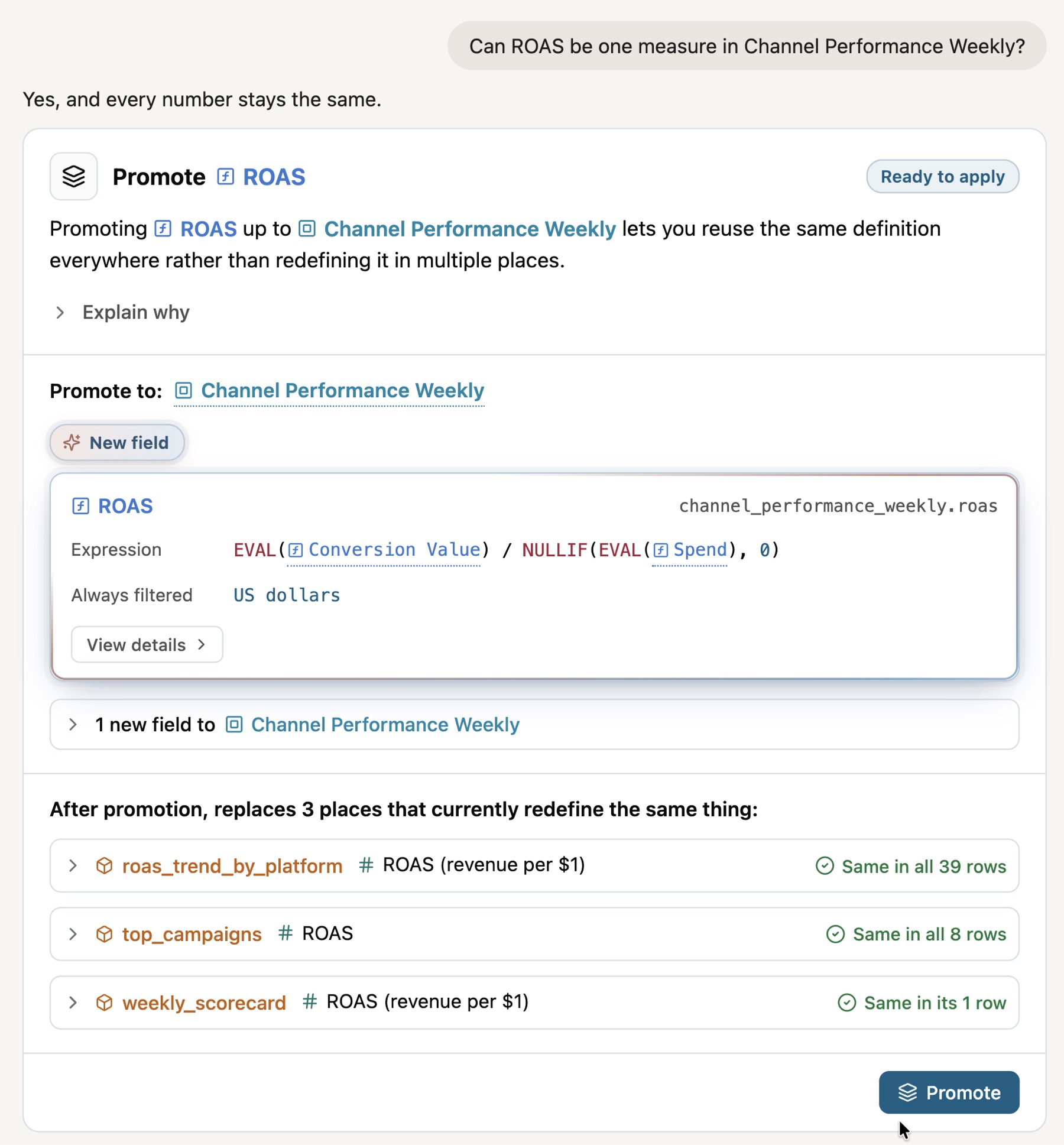
PromoteROASReady to apply
Promoting ROAS up to Channel Performance Weekly lets you reuse the same definition everywhere rather than redefining it in multiple places.
Expression
EVAL(Conversion Value) / NULLIF(EVAL(Spend), 0)
Workspace layertoshared layer
PromoteAvg Order ValueReady to apply
Promoting Avg Order Value up to shop lets you reuse the same definition everywhere rather than redefining it in multiple places.
Expression
EVAL(Revenue) / NULLIF(EVAL(Orders), 0)
In a query. You declare it with MEASURE in one query. Only that query reads it.
To the workspace. You promote it to the workspace root. Every query in the workspace now reads one definition, and queries that computed the same formula point at it.
To the shared layer. You ask the data team to promote it. The data team approves the request, and every workspace on the connection can read it. The field now shows as verified.
Like everything in Kater, there are three ways to promote a field:
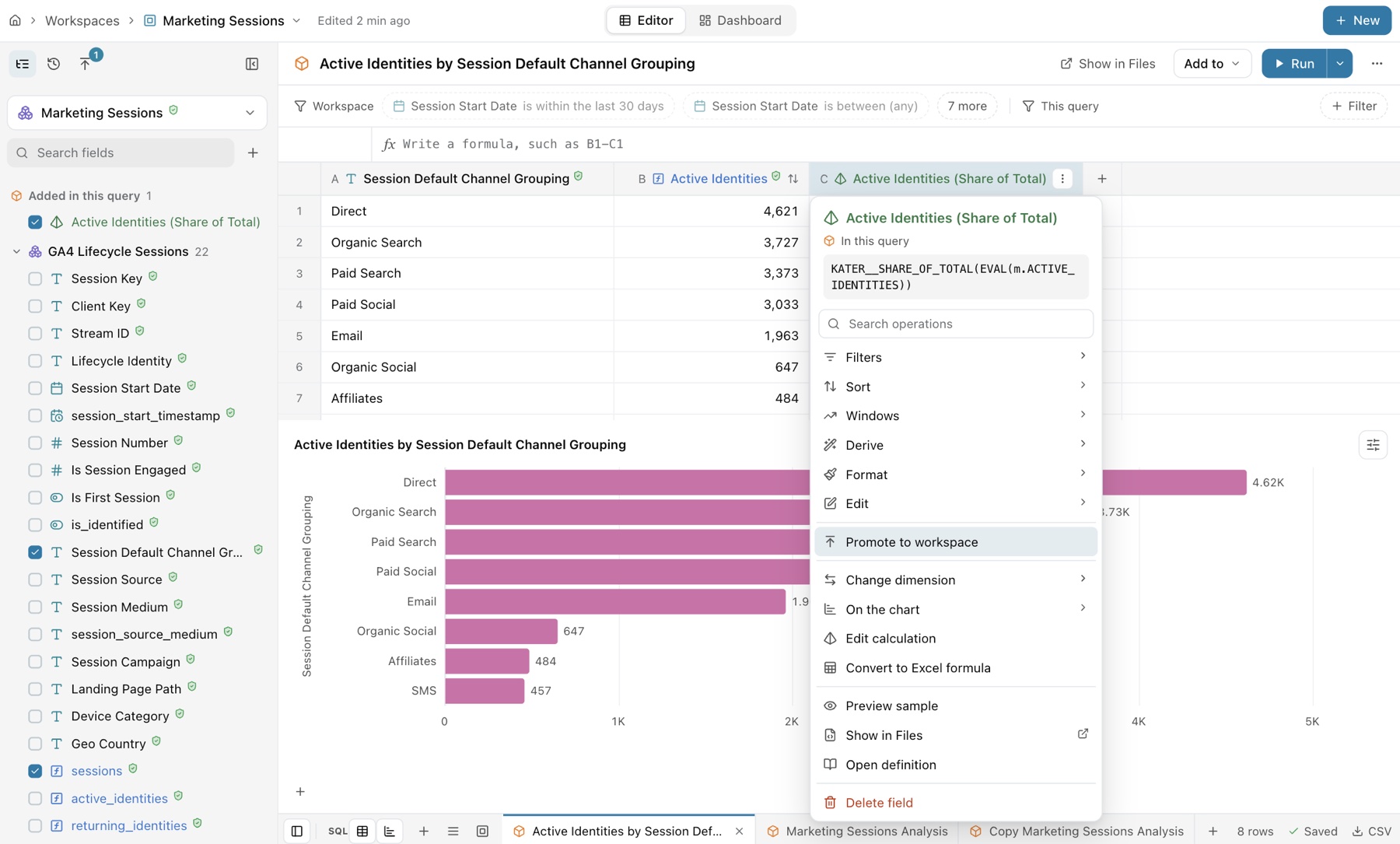
In the workspace editor, open the menu of a field made in the query, on its column or in the field list. Select Promote to workspace. The promotion dialog shows where the field goes and its expression. Select Promote.
A query reads verified fields from the shared model. Promote to workspace moves a field made in the query up a layer.
Ask your agent, such as Claude or ChatGPT, connected to Kater. It drafts the promotion and shows the card: where the field goes, its expression, and each query that defines the same thing, with its rows compared. Select Promote to apply it. See Ask Kater MCP.
The agent drafts the promotion. Promote applies it.
In VS Code, run Kater: Promote a Field from the Command Palette. From a terminal, use kater model promote:
--dry-run shows the change and writes nothing. Run it again without --dry-run to write.
Promotion recommendations for admins and developers
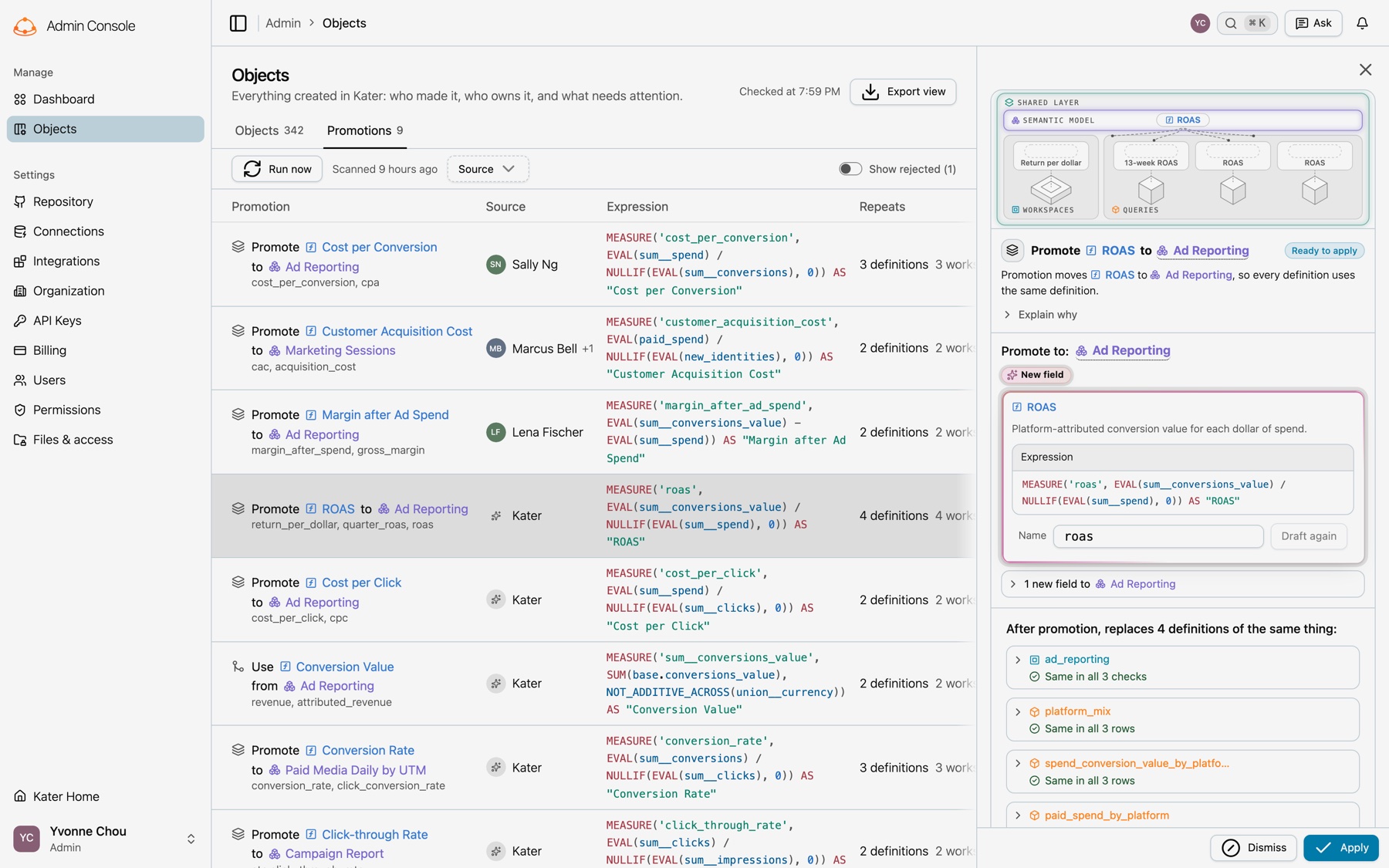
Kater finds the same formula defined in more than one place and recommends a promotion for it. A nightly scan compiles every workspace on the connection and matches formulas by fingerprint, so two fields with different names still match. Open Admin › Objects and select Promotions. Each row shows the field and the model it moves to, who asked for it or that Kater found it, its expression, how many definitions it replaces, and its state. Select a row to see the drafted field and each definition it replaces, with its numbers before and after. Then select Apply or Dismiss. See Promotion requests.
Kater recommends a promotion for each formula defined in more than one place.
What you get
Define a metric once, and every answer, app, dashboard and agent uses that same definition. In Kater you model your warehouse in layers of plain SQL files. The data team writes the shared definitions. Everyone else builds analysis on top of them.
When a marketer asks their agent for spend by platform in the last 3 months, the agent reads the Spend measure your data team defined, with its currency rule and its description. It does not write a SUM of its own.
One definition per metric. A measure such as Spend is written once, in a shared model. Queries, dashboards, apps and agents read it by name.
Numbers that stay right. The compiler refuses a query that adds up revenue across currencies, and a join never counts an order twice inside a measure.
Context for AI. Descriptions, AI context and business questions sit beside each field, so an agent knows what a field means before it uses it.
Plain files. Every model is a .sql file with YAML frontmatter. You can read it, compare it, test it and review it.
What each model can do
These rules are fixed policy in the compiler. Every editor, the CLI and the MCP apply the same rules.
Its workspace root and other queries in the same workspace
Yes
Yes
Yes
No
Chart
Workspace
Its parent query
No
Uses its query’s
No
No
Scratch file
Sandbox
Shared models, workspace roots and queries, and warehouse tables if you can edit the shared layer
Plain joins
Yes
Yes
No
A semantic model is optional. A workspace can read a Kater dataset directly.
Rules that follow from the layers
Shared models take no parameters. Only workspace roots and queries declare parameters and optional filters. A shared model can hold a required filter with fixed values.
Custom calculations live in queries. A rank or a running total over result rows is a query’s custom calculation. In a shared model a window is a dimension, and a workspace root runs no window. See Custom calculations.
Explore runs one way. Explore reads Kater datasets and semantic models. A card leaves Explore as an ordinary query in a workspace, and nothing in a workspace flows back into Explore.
Every model is a Kater SQL file
A model file is YAML frontmatter between --- lines, then one SQL statement. Kater SQL is your warehouse’s own SQL with a few additions: DIMENSION, MEASURE, EVAL, RELATIONSHIP, the filter calls, the KATER__ functions and -- @ comment directives.
The Shared models editor reads and writes this file. A field you tick, a join you add and a label you type are all changes to its SQL, and what you type in the SQL shows in the editor. The full syntax is in the Kater SQL reference.
What a connection holds
Each warehouse connection is a folder in your organisation’s content store. Kater hosts the content store. You work in it through the portal, the CLI, VS Code or your agent.
connections/<connection>/
├── connection.yaml the warehouse and the schemas to sync
├── connection_context.md notes agents read for this connection
├── .kater/dataset-sync/ sync state, kept with the content
Every surface writes the same files through the same operations. Each save is formatted and compiled, and a save that adds a compile error is refused. Scratch files are the one exception: they save as written.
Where
Good for
Shared models in the portal
Semantic models and Kater datasets: sources and joins, fields, labels and descriptions, model details, tests and history. See Semantic models.
Files in the portal
Any file in the content store. A semantic model or Kater dataset opens in the same editor, inside Files. Database datasets keep Files’ own view, and Files › Modeling lists models by layer and runs schema sync.
The workspace editor
Workspace roots and queries: the field picker, field menus, the filter bar and the formula bar. See Queries.
Describe the change. The agent writes through the same operations, and anything outside your brainstorm folder waits for your yes.
Shared models
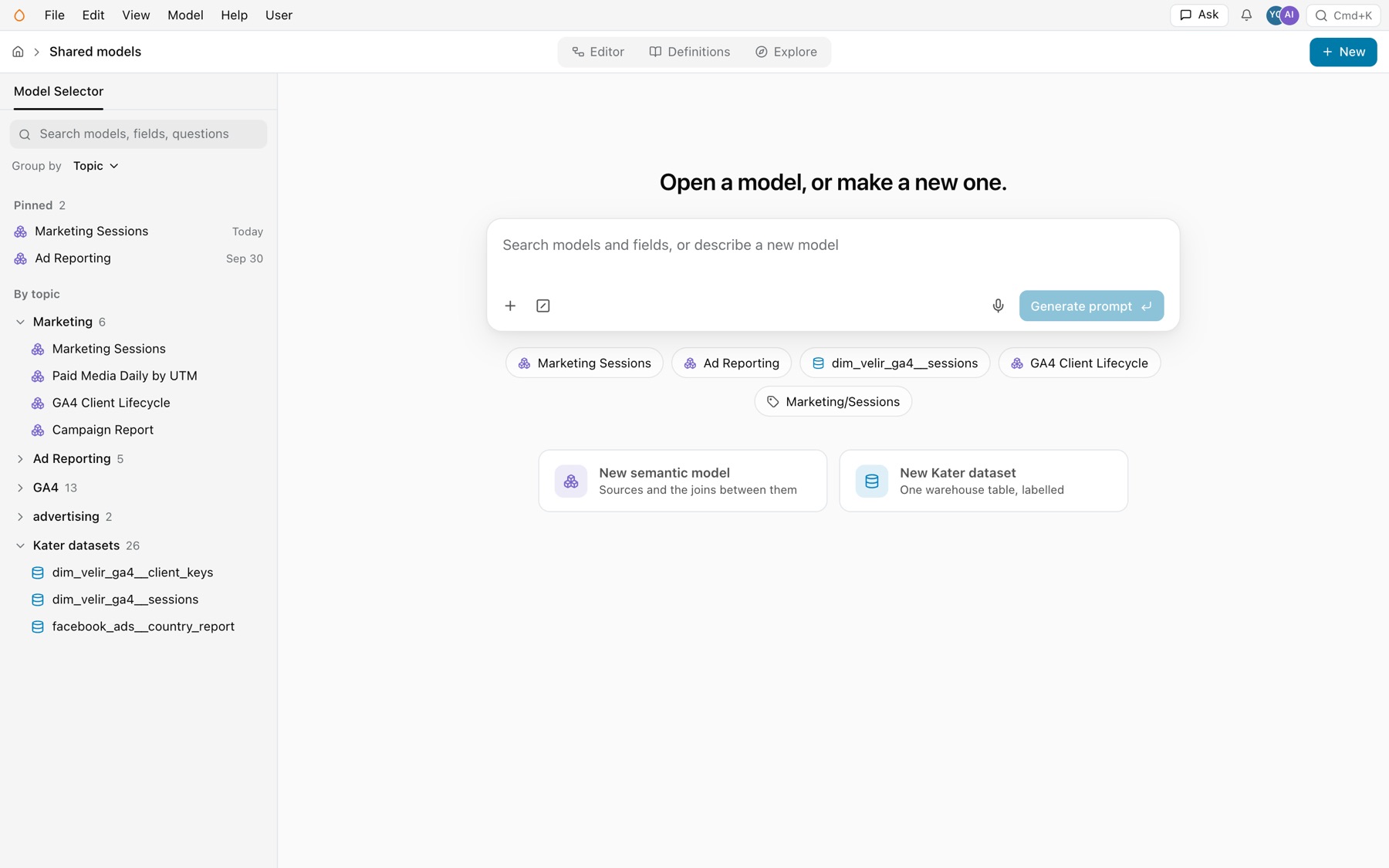
Go to /shared-model in the portal. With no model open, the page says “Open a model, or make a new one.” The Model Selector at the left lists your pinned models, every model by topic, and the Kater datasets. The search box finds models and fields, or takes a description of a new model for your agent. The New semantic model and New Kater dataset cards open the New dialog.
Shared models, with no model open.
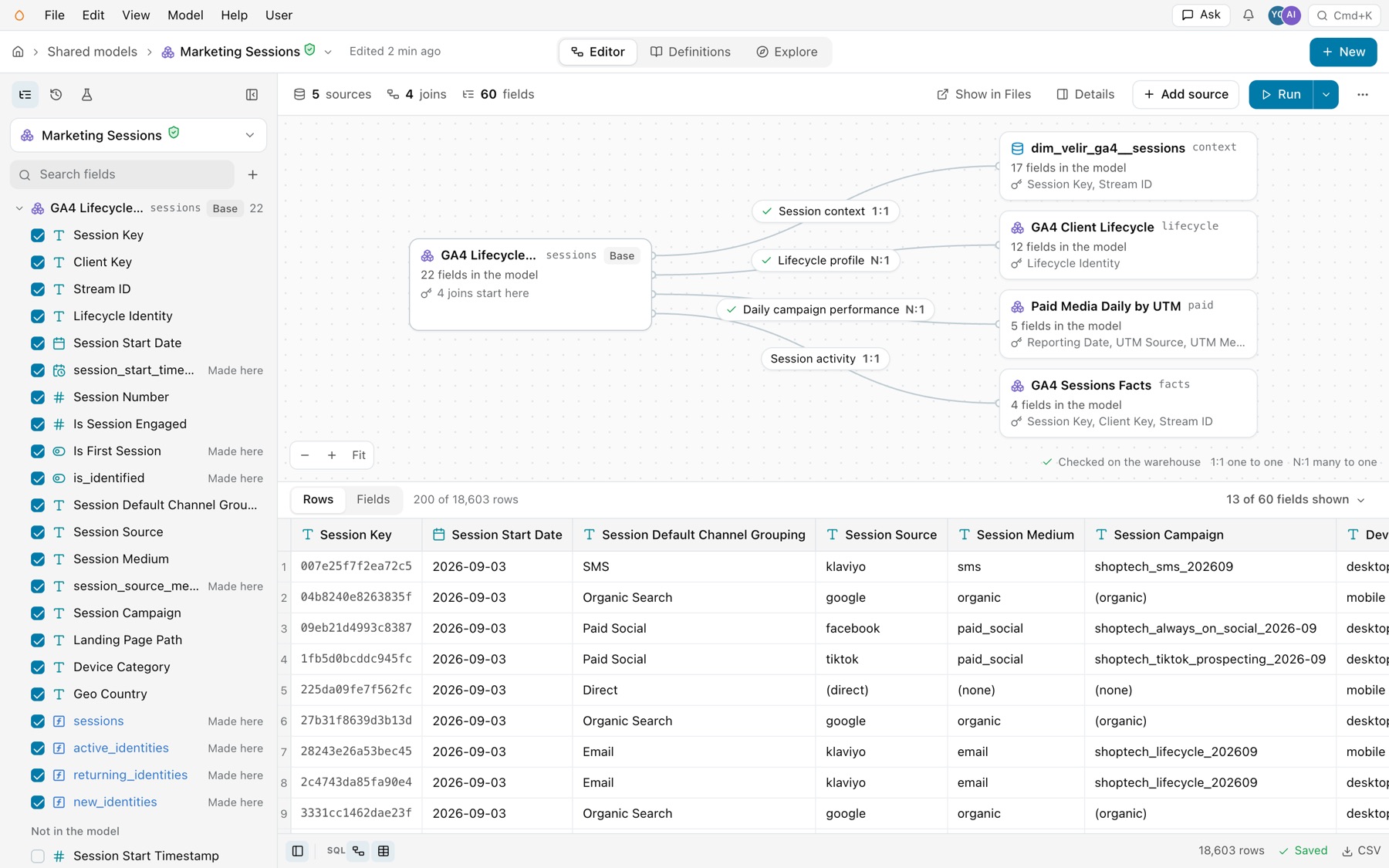
Open a model, and the editor shows it whole: its sources and the joins between them, its fields grouped by source, and its rows. Everything saves itself. There is no Save button, and the footer says Saving, then Saved. A model’s address is /shared-model/<connection>/<model>.
Marketing Sessions in the Shared models editor.
In Files
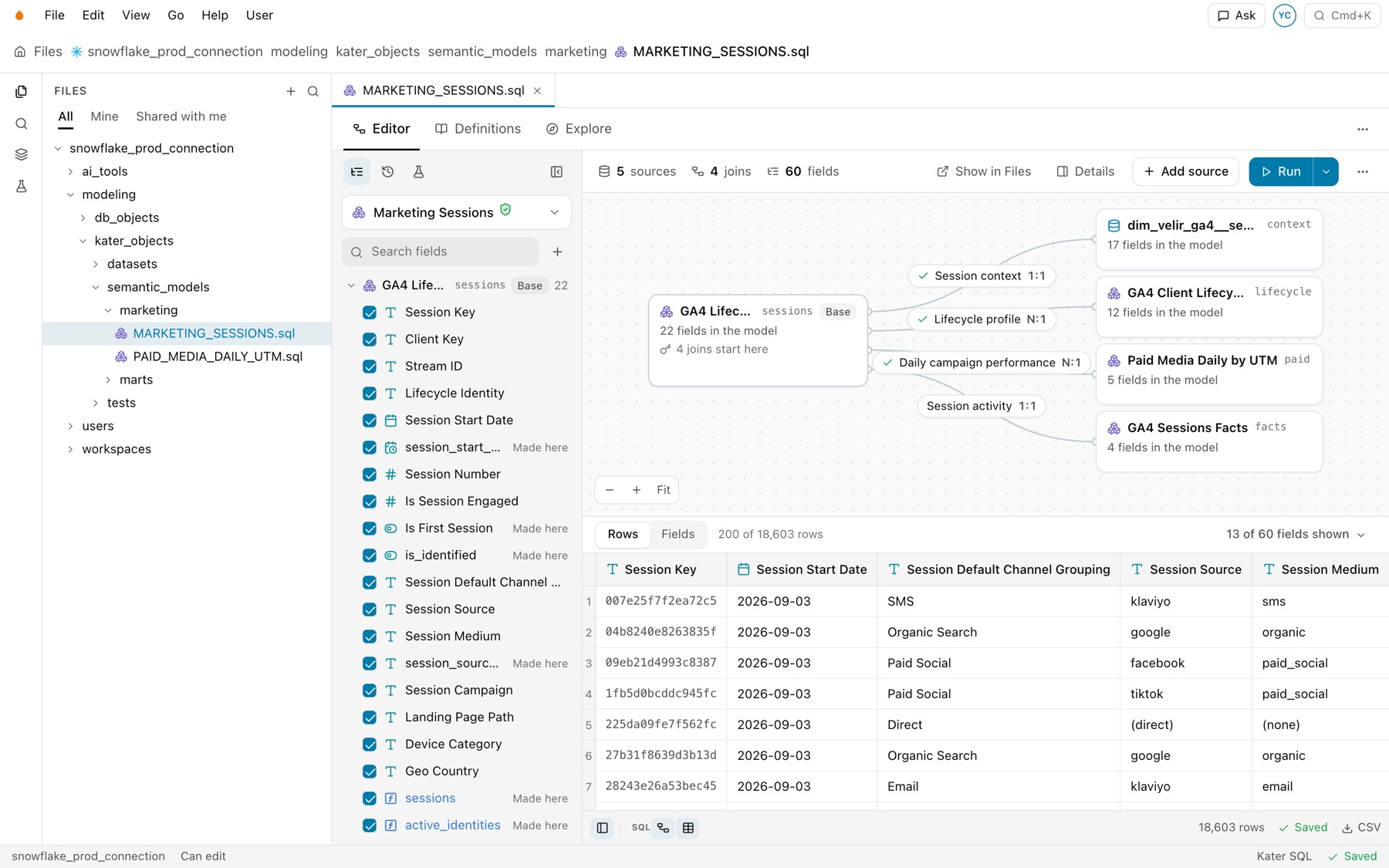
Open a semantic model or Kater dataset file in Files, and the same editor opens in the file’s tab. Files keeps its own menu bar, breadcrumb and explorer. Above the editor, the file’s view bar has Editor, Definitions and Explore, and a menu with the Model items.
A semantic model open in Files.
In VS Code
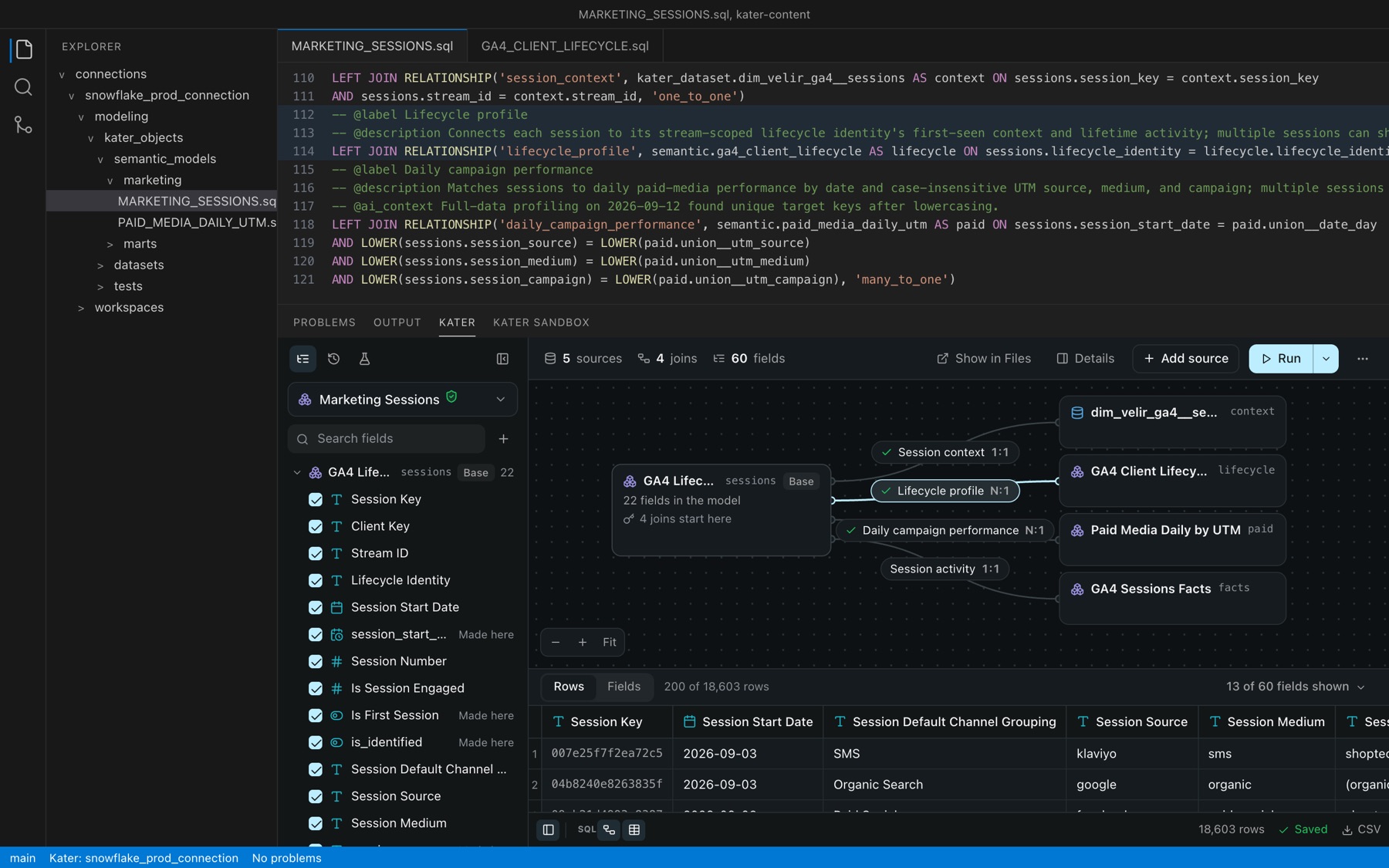
Open a semantic model or Kater dataset file in VS Code, and the KATER panel shows the same editor below the SQL. Select a join in the panel, and its lines light up in the file. The editor’s menu items are Kater commands in the Command Palette, such as Kater: Add Source, Kater: Check Every Join and Kater: Generate Tests. See VS Code extension.