On this page
- Kater SQL is SQL, with a few additions
- Definitions come out of your SQL
- Example: measures at the end of a chain of CTEs
- Recommended promotions
- Ways to write a query
- Pick fields
- Use a field’s menu
- Write an Excel formula
- Write SQL in the editor
- Write SQL in VS Code
- Ask your agent
- Authoring rules
- 1. One step, one query
- 2. Use the KATER__ function when one exists
- 3. Select a field bare
- 4. Leave an output unnamed
- 5. Name a field only when a later query reads it
- 6. One name, one formula
- 7. Filters are calls
- 8. Do not format in SQL
- 9. Compile and run
- More examples
- Queries power apps
- Keys
- Fields made in a query
- Charts read a query
- Run and check
- Warnings and errors
Model Workspaces
Queries
Write a query in Kater SQL by picking fields or writing SQL. Its definitions, recommended promotions and app figures all come from it.
Agents pick fields first. SQL is the fallback.
We tested how agents write queries. Language models write very good SQL. But when an agent writes every answer as new SQL from a question, the answers drift: a metric gets a second formula, a date window is written by hand, a ratio is added up across currencies.
So in Kater, an agent builds a query the way you do in the editor. It picks fields, and it applies operations from each field’s menu, such as a timeframe, a comparison, a window, a filter or Top N. Kater writes the SQL, and every field keeps its definition.
SQL is still a very good fallback. When no operation can make a change, the agent writes Kater SQL. Before it does, it says which operation it tried and why that operation could not make the change. The compiler checks every write against the same rules, whether it came from picks or from SQL.
- It lists what it can pick.
kater query fields WORKSPACElists each field, with the operations its menu offers. - It makes the query from picks.
query.newtakes the fields by name, one operation for each, conditions, order and a limit. - It changes the query with operations.
edit.modelapplies a field’s operation to a saved query. - It writes SQL last. It writes SQL only when no operation fits, and it follows the authoring rules below.
These rules are the query-authoring skill, in each connection’s ai_tools/skills/. Every agent that works through the Kater MCP or the CLI loads it before it writes a query.
Kater SQL is SQL, with a few additions
A query is a SELECT in your warehouse’s own SQL. Joins, CASE, window functions and your warehouse’s functions work as you write them. The compiler refuses a function that your warehouse does not have. Kater SQL adds these:
| Addition | What it does |
|---|---|
MEASURE('name', expr) | Names a measure. A query that reads it computes it again at its own grouping. |
DIMENSION('name', expr) | Names a value to group or filter by. |
CUSTOM_CALCULATION('name', expr) | Names a value computed over this query’s rows, such as a window or a comparison with the month before. |
EVAL(field) | Computes a measure inside an expression, or in HAVING, QUALIFY or ORDER BY. |
KATER__ functions | Date grains, comparisons, ranks and conditions, with one meaning on every warehouse: KATER__MONTH, KATER__PREVIOUS_PERIOD, KATER__IS_IN_TOP. |
OPTIONAL_FILTER, REQUIRED_FILTER | A filter that a reader can turn off or change, or one that always applies. |
RELATIONSHIP(...) | A join with a name and a cardinality, such as 'many_to_one'. |
-- @description, /* @format ... */ | A field’s description and display format, written as comments. |
workspace., query., semantic., kater_dataset. | The address of what you read: the workspace root, another query, or a shared model. |
:name or $name | A parameter’s value. |
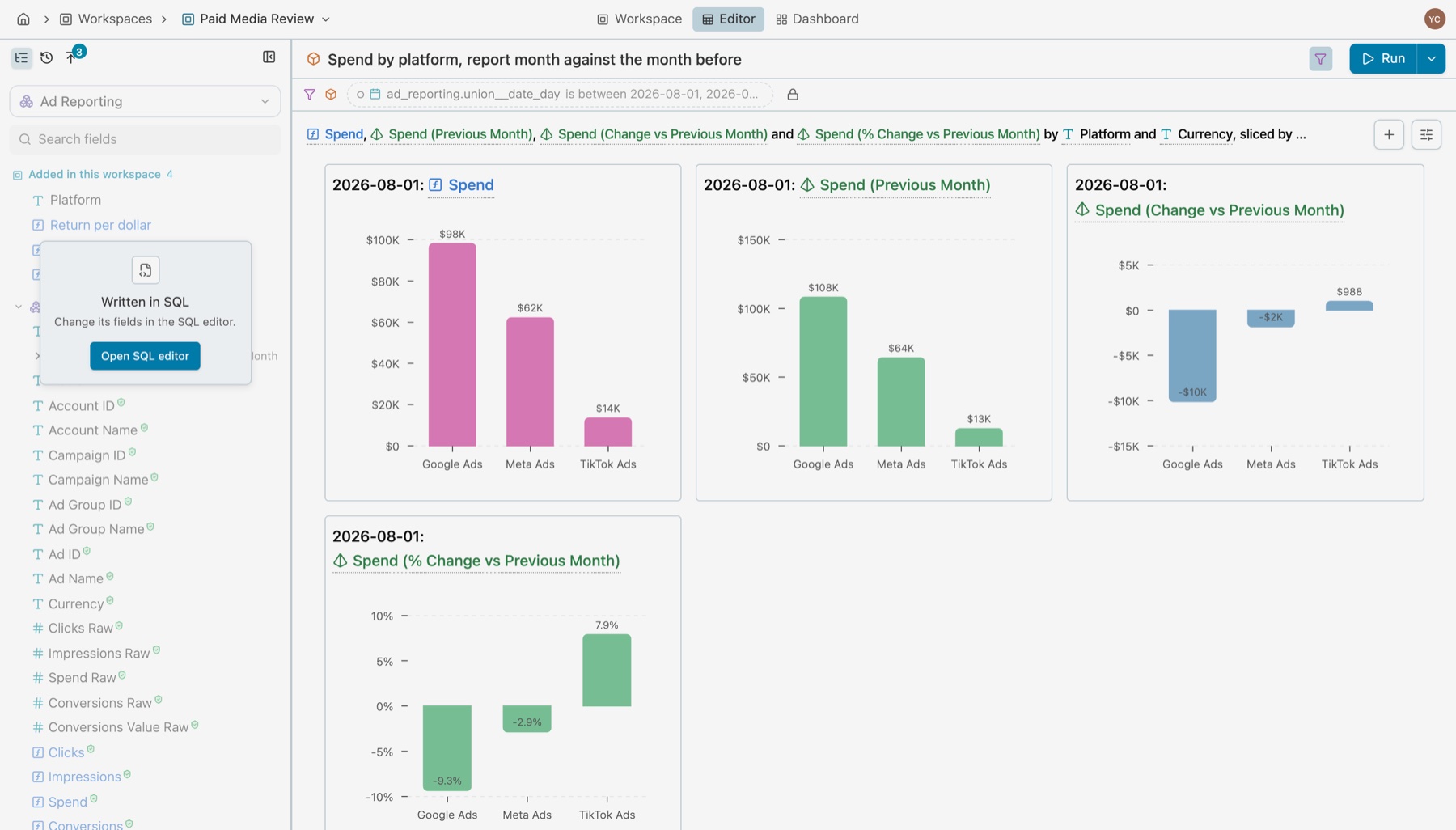
This query, from a real Paid Media Review workspace, compares each ad platform’s spend in a report month with the month before:
---name: platform_month_over_monthmodel_type: querylabel: Spend by platform, report month against the month beforeparameters:- name: is_between__union__date_day default_value: - '2026-08-01' - '2026-08-31' label: Report month kater_data_type: date subtype: range relative: true---SELECT ad_reporting.platform_name, ad_reporting.union__currency, KATER__MONTH(ad_reporting.union__date_day), EVAL(ad_reporting.sum__spend), /* @format currency(union__currency, 0) */ CUSTOM_CALCULATION( 'previous_month__sum__spend', KATER__PREVIOUS_PERIOD(ad_reporting.sum__spend, by => KATER__MONTH(ad_reporting.union__date_day)) ) AS "Spend (Previous Month)", /* @format currency(union__currency, 0) */ CUSTOM_CALCULATION( 'previous_month_percent_change__sum__spend', KATER__PERCENT_CHANGE( EVAL(ad_reporting.sum__spend), KATER__PREVIOUS_PERIOD(ad_reporting.sum__spend, by => KATER__MONTH(ad_reporting.union__date_day)) ) ) AS "Spend (% Change vs Previous Month)" /* @format percent(1) */FROM workspace.ad_reporting AS ad_reportingWHERE OPTIONAL_FILTER( 'is_between__union__date_day', KATER__IS_BETWEEN(ad_reporting.union__date_day, :is_between__union__date_day), label='Report month' )GROUP BY ad_reporting.platform_name, ad_reporting.union__currency, KATER__MONTH(ad_reporting.union__date_day)- The month before.
CUSTOM_CALCULATIONnames a value computed over this query’s rows, andKATER__PREVIOUS_PERIODgets the month before without a self-join. - The report month.
OPTIONAL_FILTERwith:is_between__union__date_daymakes it a parameter. An app or a reader can change it. - The rest is SQL. It also uses
EVALto compute a measure in an expression,workspace.ad_reportingto read the workspace root, and@formatto set how a value shows.
See Kater SQL for every addition.
Definitions come out of your SQL
You do not keep a separate file of metric definitions. The compiler reads your SQL and finds the definitions in it: every MEASURE, DIMENSION and CUSTOM_CALCULATION, and every field a query passes through. It does this for every semantic model, every workspace and every query. Your definitions are a byproduct of the work that you and your agent already do.
So you keep the power of SQL, with no YAML to keep in step with it, and you still get definitions, lineage and promotions after the fact.
Example: measures at the end of a chain of CTEs
The shared GA4 Client Lifecycle model finds each person’s first session in two CTEs. Then its last SELECT declares the lifetime measures:
WITH ranked_sessions AS ( SELECT sessions.lifecycle_identity, sessions.session_start_date AS first_seen_start_date, clients.first_user_source, -- ... ROW_NUMBER() OVER ( PARTITION BY sessions.lifecycle_identity ORDER BY sessions.session_start_timestamp, sessions.client_key, sessions.session_key ) AS first_session_rank FROM semantic.ga4_sessions AS sessions LEFT JOIN kater_dataset.dim_velir_ga4__client_keys AS clients ON sessions.client_key = clients.client_key AND sessions.stream_id = clients.stream_id WHERE NOT sessions.lifecycle_identity IS NULL), identity_context AS ( SELECT lifecycle_identity, first_seen_start_date, first_user_source -- ... FROM ranked_sessions WHERE first_session_rank = 1)SELECT context.lifecycle_identity AS "Lifecycle Identity", DIMENSION('first_seen_start_date', context.first_seen_start_date) AS "First Seen Start Date", context.first_user_source AS "First User Source", -- ... MEASURE('count_sessions', COUNT(DISTINCT sessions.session_key)) AS "Count Sessions", -- @description Lifetime count of sessions that met the GA4 engaged-session definition for the lifecycle identity. MEASURE('count_engaged_sessions', SUM(sessions.is_session_engaged)) AS "Count Engaged Sessions", MEASURE('sum__count_pageviews', SUM(sessions.count_pageviews)) AS "Count Pageviews"FROM identity_context AS contextINNER JOIN semantic.ga4_sessions AS sessions ON context.lifecycle_identity = sessions.lifecycle_identityGROUP BY context.lifecycle_identity, context.first_seen_start_date, context.first_user_sourceThe Marketing Sessions model joins it by a relationship and reads its measure:
SELECT -- ... MEASURE('lifetime_sessions', EVAL(lifecycle.count_sessions)) AS lifetime_sessionsFROM semantic.ga4_sessions AS sessionsLEFT JOIN RELATIONSHIP( 'lifecycle_profile', semantic.ga4_client_lifecycle AS lifecycle ON sessions.lifecycle_identity = lifecycle.lifecycle_identity, 'many_to_one')Nobody wrote a definition for lifetime_sessions. Kater gives it a definition card anyway, made from the SQL above.
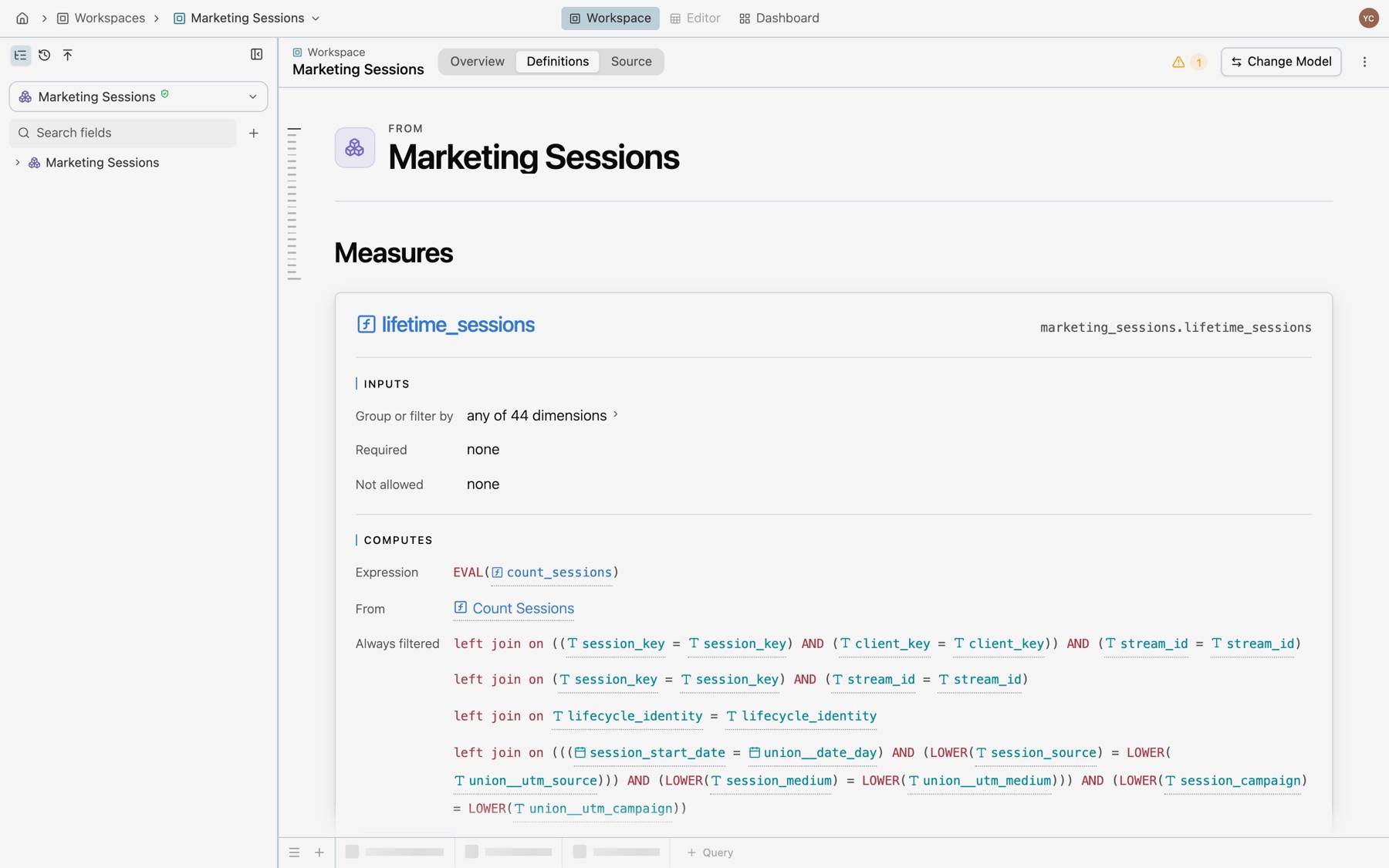
lifetime_sessions, made from its SQL. - Inputs. What you can group or filter it by, what a query must include, and what it cannot use.
- Computes. Its expression, the field it comes from, and the filters that always apply, here the relationship’s join.
- Step by step. The trace through each model, down to the rows it counts.
- Use. How a query reads it: evaluate it, pass it through, or build on top of it with a rank or a share of total.
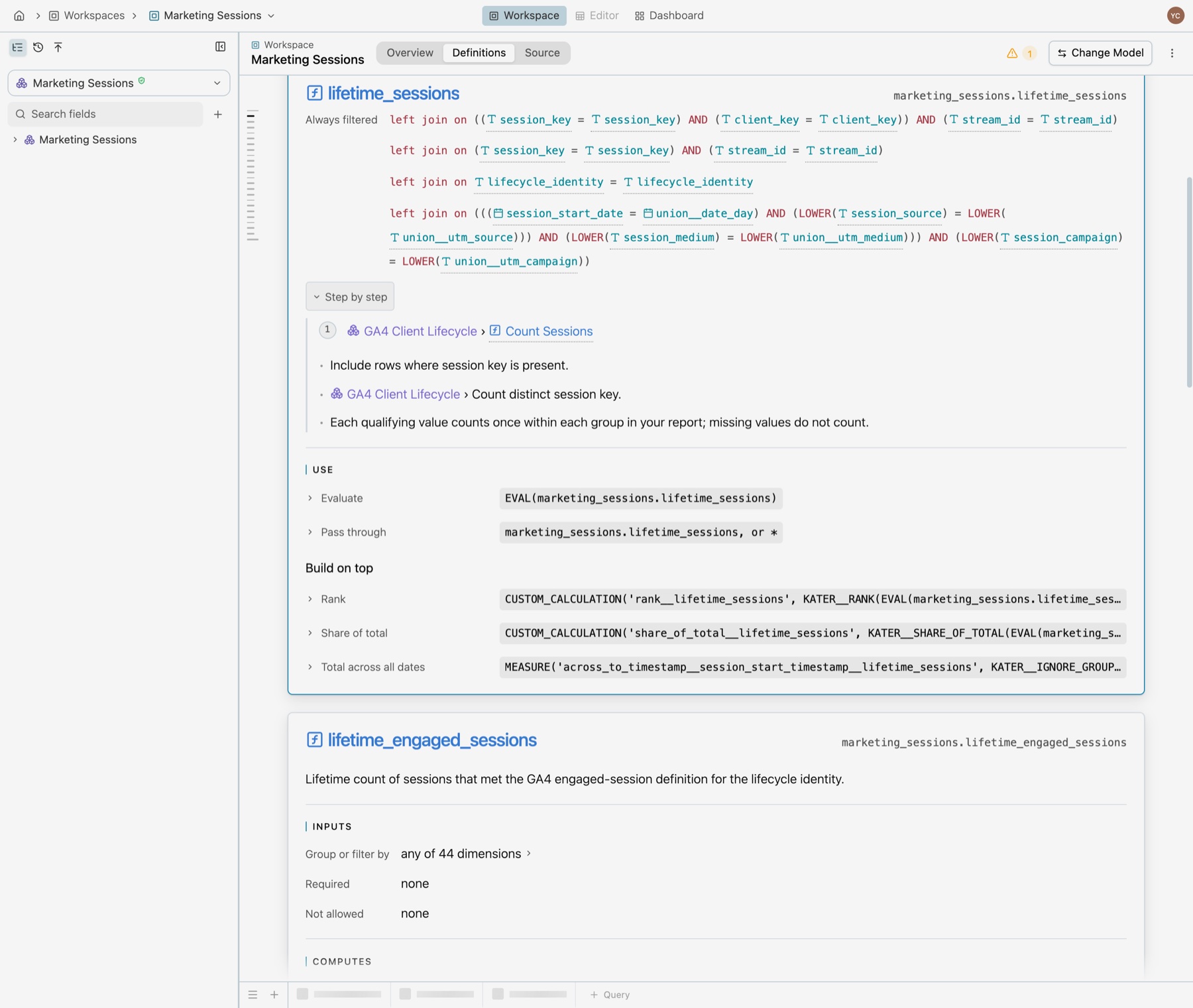
lifetime_sessions into GA4 Client Lifecycle, past its CTEs, to the rows it counts. The same card shows in a workspace’s Definitions tab, when you hover a field in the SQL editor, and in VS Code. Your agent reads the same definition with the Kater MCP’s explain_field tool.
Recommended promotions
Because Kater reads every query, it also sees when the same expression is written more than one time. The Promote tab in the workspace sidebar lists each repeated expression, with its formula and the number of queries that define it.
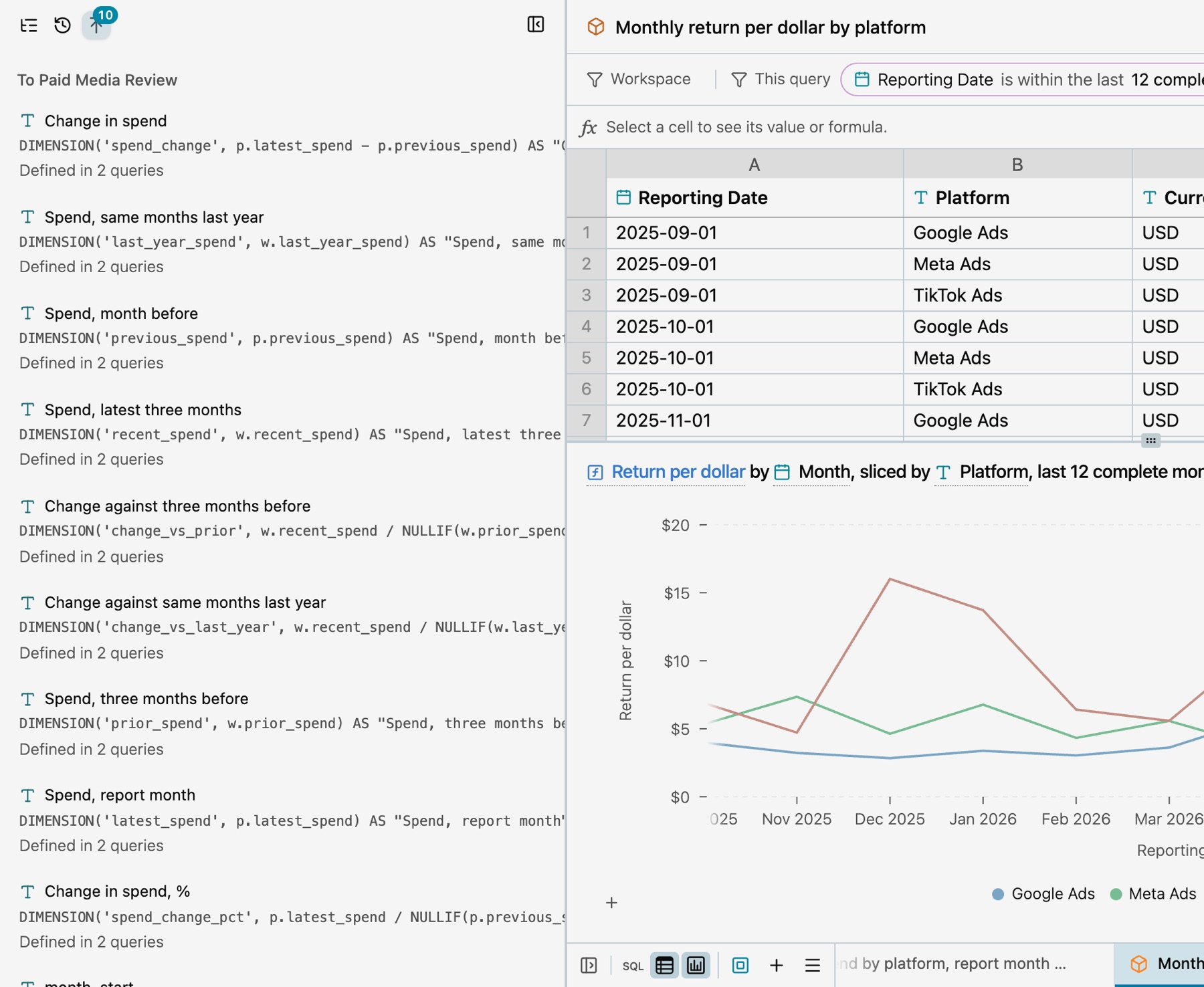
- To the workspace. Select Promote. The expression moves to the workspace root, and each query reads it from there.
- To the shared layer. An expression that more than one workspace writes goes to a shared model. Select Ask, and the data team decides.
See Promotion and verification.
Ways to write a query
Each way writes the same Kater SQL file in the workspace’s query_contracts/ folder. Use the one that fits the change, and change ways at any time.
Pick fields
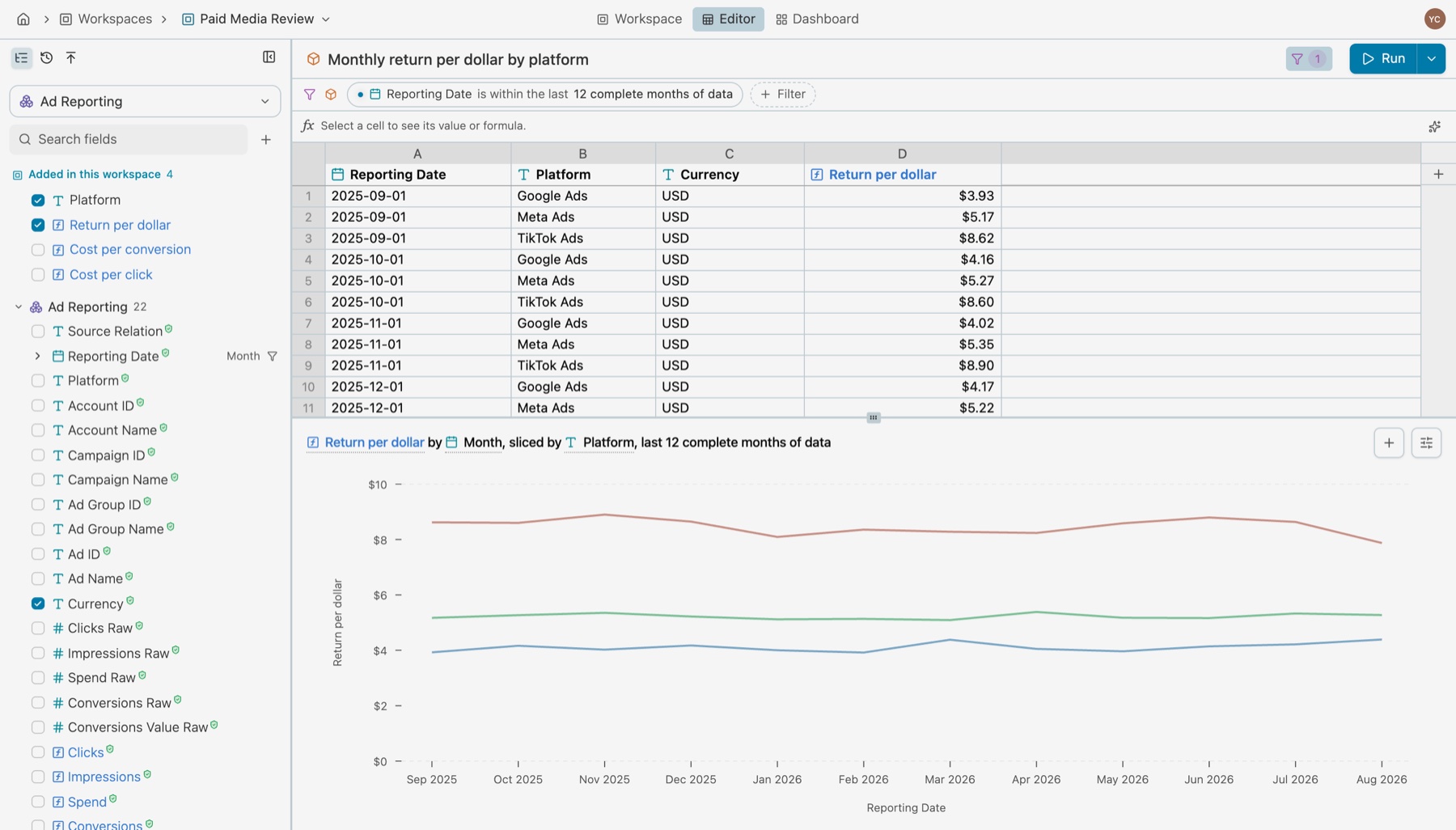
Open a workspace in the editor. Select a field in the field list to add its column, and select it again to remove it. The query groups by the other fields, and a measure brings in the fields its currency rule needs. + Filter in the filter bar adds a filter, top rows or a row limit.
Use a field’s menu
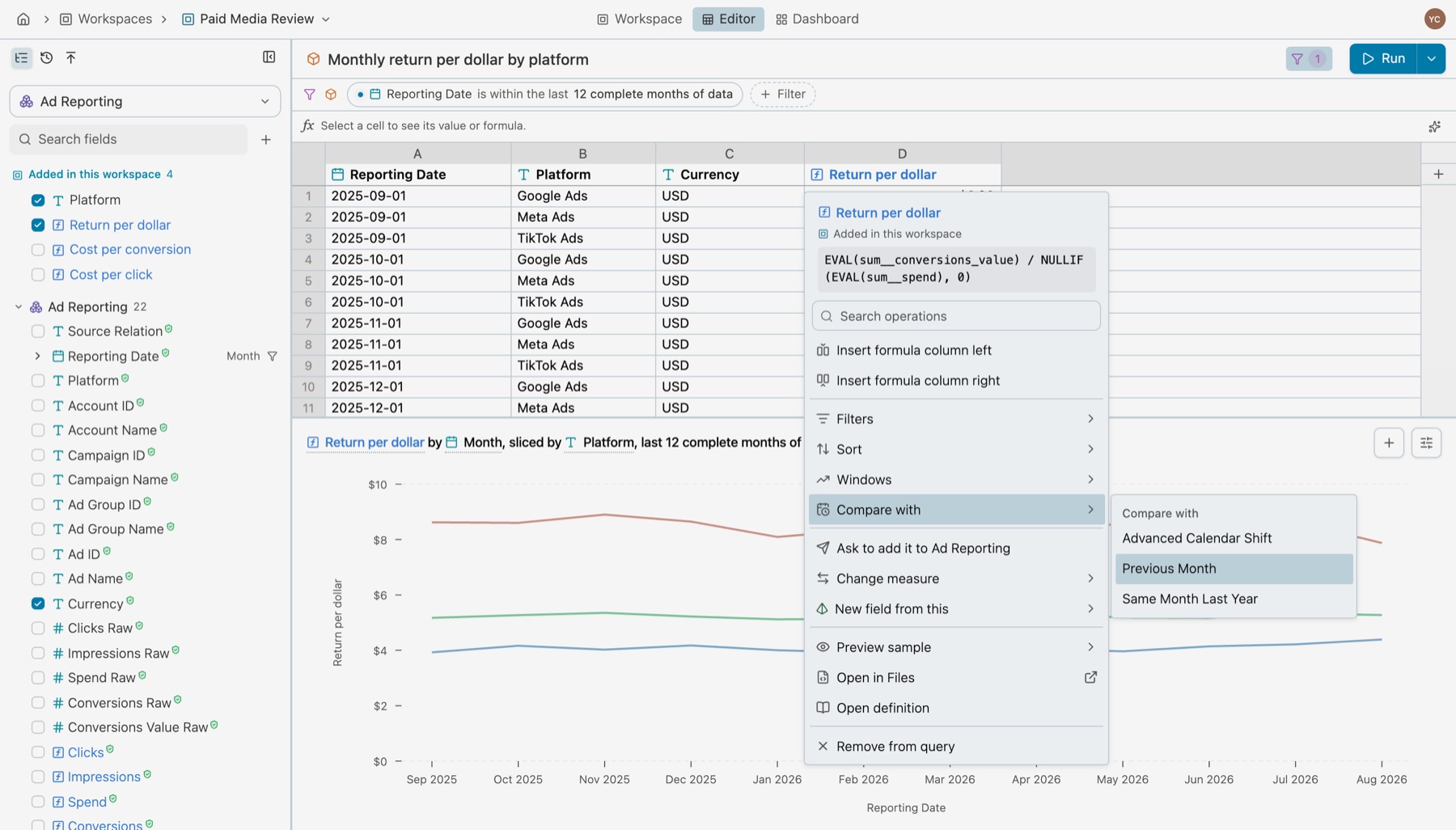
A field’s menu lists what you can do with it: Sort, Windows, Compare with, Calculate at, filters, timeframes and formats. Each item writes the KATER__ call for you. Compare with › Previous Month writes the KATER__PREVIOUS_PERIOD calculation in the example above. Agents use the same menus through kater query fields.
See Fields.
Write an Excel formula
Type = in the formula bar, or in a new column, and write a formula over the columns, such as =D1/AVERAGE(D:D). The column shows its values as you type. Kater keeps the formula as a formula and stores its cell references as column names:
CUSTOM_CALCULATION( 'calculation_1', EXCEL('=[@return_per_dollar]/AVERAGE([return_per_dollar])')) AS "Calculation 1"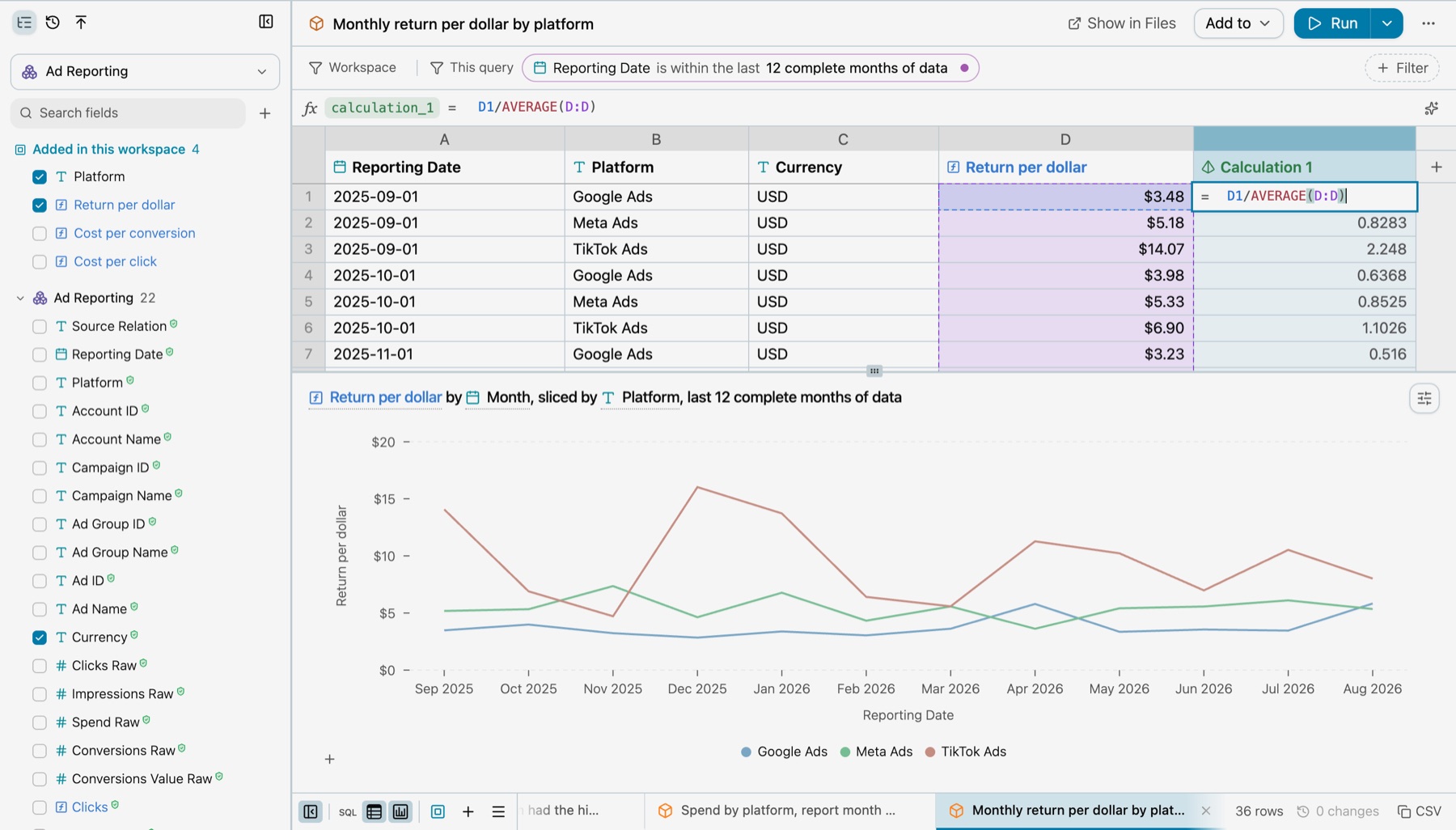
See Excel formulas.
Write SQL in the editor
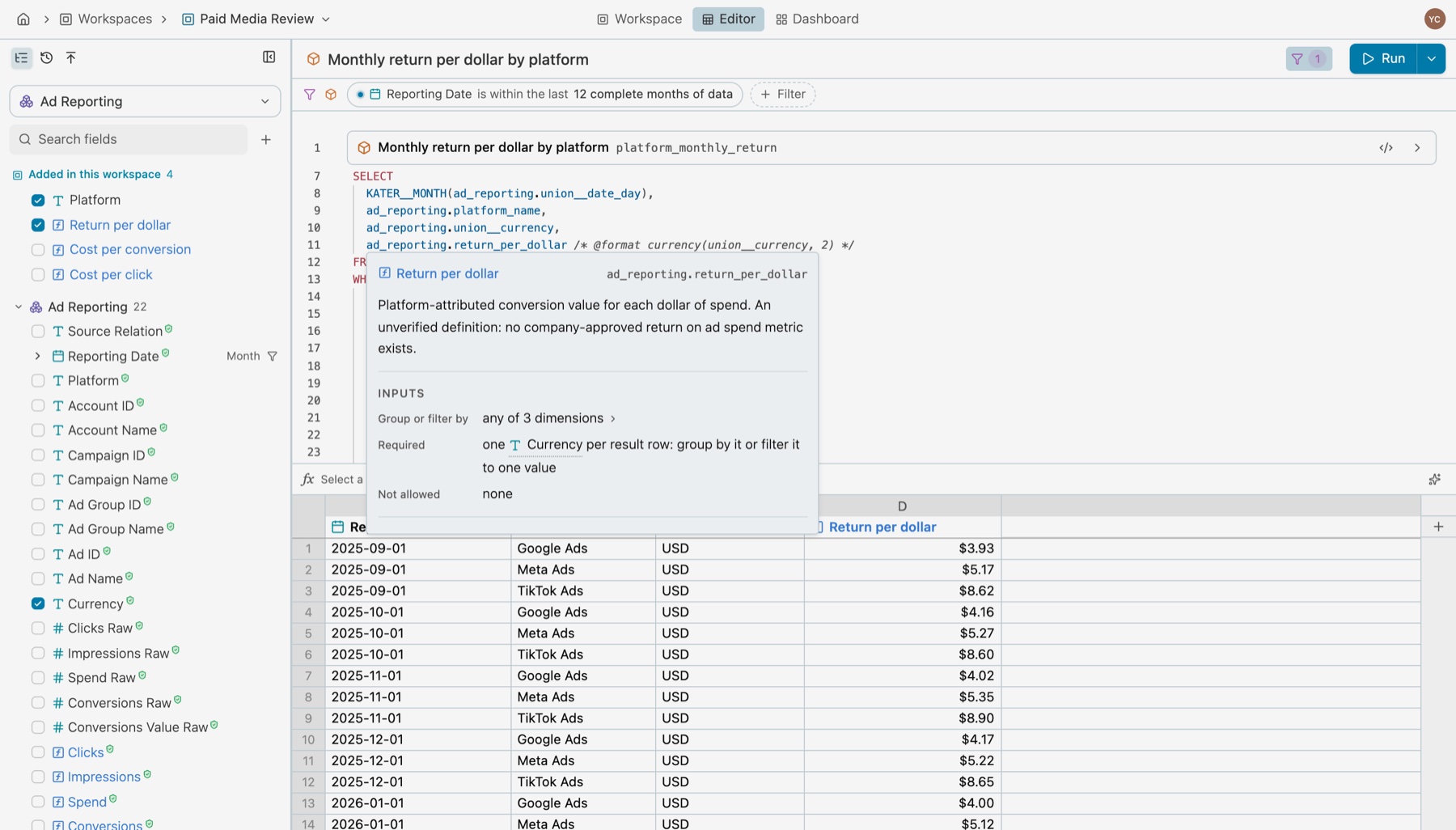
SQL in the footer opens the query’s Kater SQL over its rows. It completes field names with CtrlSpace, and hover shows a field’s definition card.
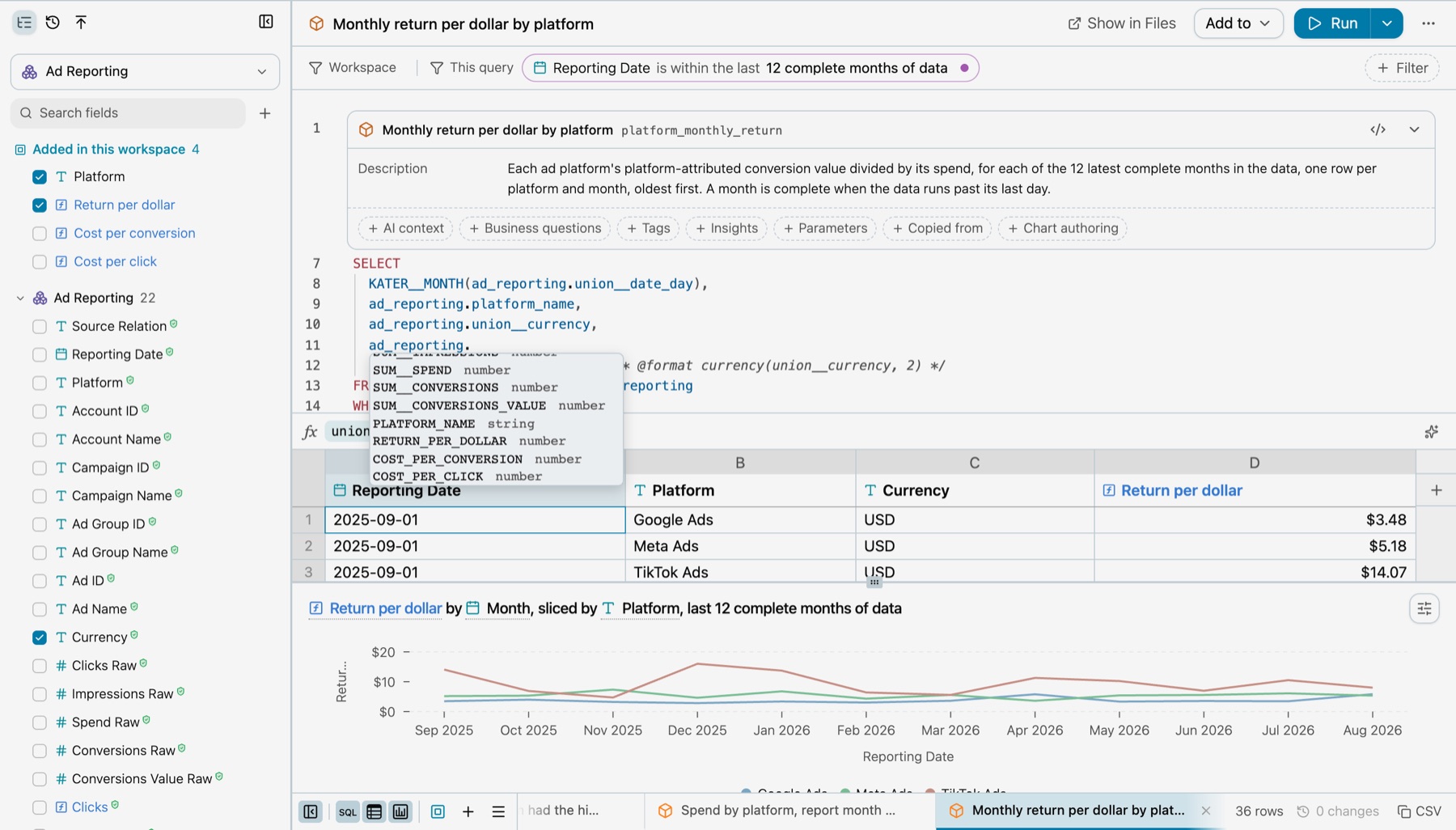
- It saves itself. The text saves a second after the last key, errors and all. ⌘S saves at once.
- It compiles on request. Run or Compile Query checks the text and shows its problems, with quick fixes. Until then, the field list, the rows and the chart stay as the last compile left them.
- The compiled SQL. View › Compiled SQL shows what runs on the warehouse.
See Queries under Analyze for the whole editor.
Write SQL in VS Code
With the Kater extension, each query file is a Kater Query Contract file. The kater-lsp language server checks it as you type, and gives completion, hover, go to definition, formatting and quick fixes. The Kater panel shows the same editor as the portal.
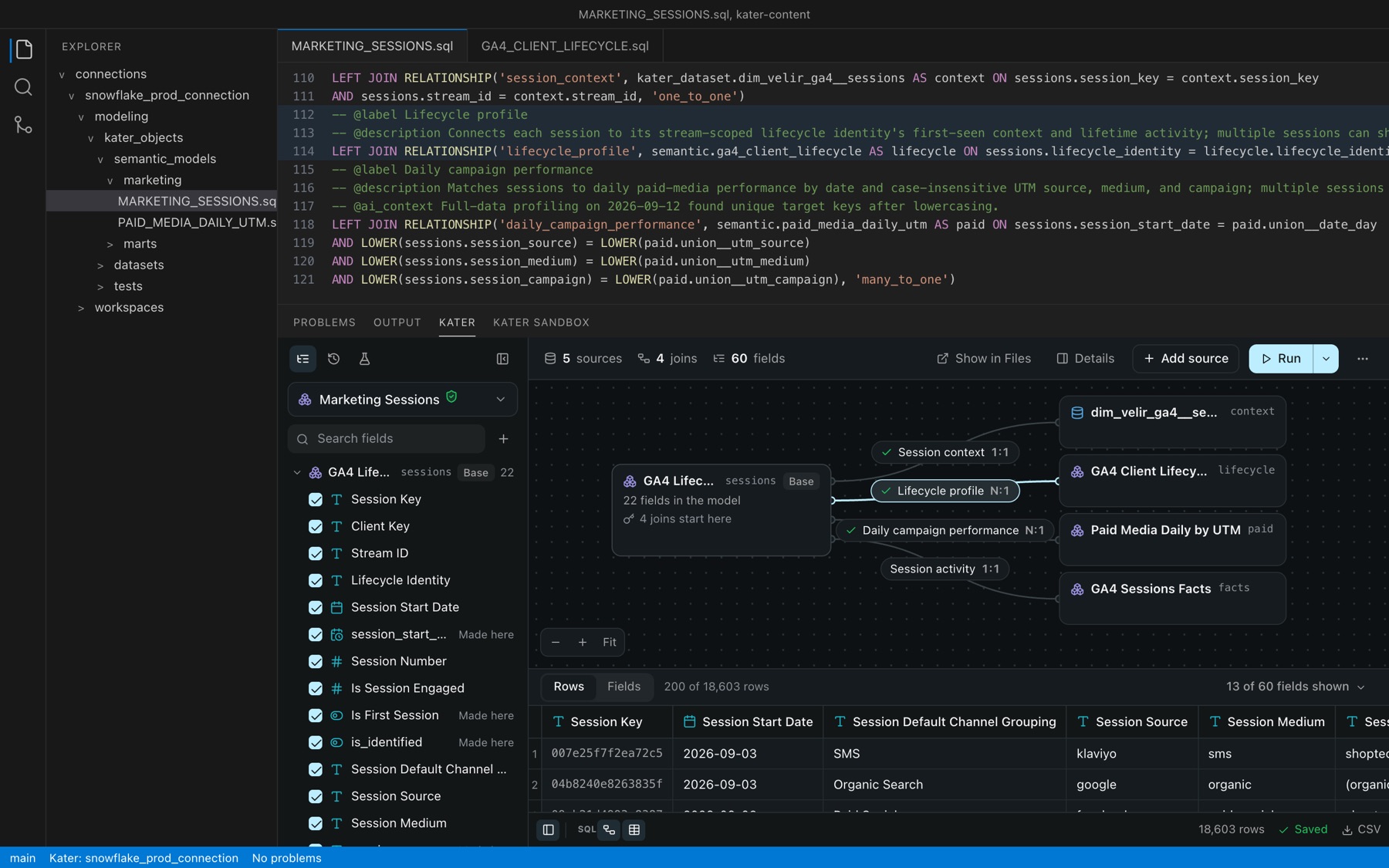
See VS Code extension.
Ask your agent
Describe the analysis. The agent lists the fields, then sends a query.new request like this one:
{ "namespace": {"kind": "workspace", "path": "connections/snowflake_prod_connection/users/yvonne@kater.ai/workspaces/paid_media_review"}, "fields": [ {"field": "union__date_day", "operation": "timeframes.set", "parameters": {"unit": "month"}}, {"field": "platform_name"}, {"field": "union__currency"}, {"field": "return_per_dollar"} ], "conditions": [ {"field": "union__date_day", "operation": "is_within_last", "parameters": {"amount": 12, "unit": "month", "complete": true}, "required": true} ], "order": [{"field": "union__date_day"}]}From a terminal, kater query new --request-file REQUEST.json sends the same request. kater new query --target-path WORKSPACE --name NAME --sql-file BODY.sql saves SQL that you wrote.
Authoring rules
These rules apply to every query, whoever writes it. The compiler checks most of them and says what to change.
1. One step, one query
A query has no CTEs and no subqueries as steps. A step that needs its own SELECT is its own query, and the next query reads it as query.<name>. Each step then has a name, a definition card and rows you can check, and other queries can read it too.
Paid Media Review answers “which platform had the highest return, most months?” in three queries:
SELECT KATER__MONTH(ad_reporting.union__date_day), ad_reporting.platform_name, ad_reporting.union__currency, ad_reporting.return_per_dollar /* @format currency(union__currency, 2) */FROM workspace.ad_reporting AS ad_reportingWHERE REQUIRED_FILTER( 'is_within_last_12_month__union__date_day', KATER__IS_WITHIN_LAST( ad_reporting.union__date_day, 12, 'month', complete => TRUE, end => DATEADD( DAY, 1, ( SELECT MAX(reported.union__date_day) FROM workspace.ad_reporting AS reported WHERE reported.union__date_day < DATE_TRUNC('MONTH', CURRENT_DATE) ) ) ), label='Reporting Date is within the last 12 complete months of data' )GROUP BY KATER__MONTH(ad_reporting.union__date_day), ad_reporting.platform_name, ad_reporting.union__currencySELECT monthly.union__date_day, monthly.platform_name, monthly.union__currency, EVAL(monthly.return_per_dollar)FROM query.platform_monthly_return AS monthlyGROUP BY monthly.union__date_day, monthly.platform_name, monthly.union__currencyQUALIFY KATER__IS_IN_TOP(EVAL(monthly.return_per_dollar), 1) OVER (PARTITION BY monthly.union__date_day, monthly.union__currency)SELECT leaders.platform_name, leaders.union__currency, MEASURE('count__union__date_day', KATER__COUNT(leaders.union__date_day)) AS "Months with the highest return, of the last 12" /* @format number(0) */FROM query.monthly_return_leaders AS leadersGROUP BY leaders.platform_name, leaders.union__currencyORDER BY 3 DESC NULLS LAST- The filter is required. No reader can turn off the 12-month window, because the answer depends on it.
endsets the window’s last month to the last complete month in the data. - Top 1 keeps ties. Two platforms that tie in a month both stay.
PARTITION BYranks within each month and currency, so spend in two currencies is never compared.
A query that already has a CTE gets the hint cte_can_be_query. Its fix moves the CTE into a query of its own, as does kater model edit QUERY --path FILE --extract-stage CTE --write. A CTE stays when it is recursive, when a subquery reads it, or when moving it would change a measure’s numbers. A semantic model can use CTEs, as GA4 Client Lifecycle does.
2. Use the KATER__ function when one exists
| Instead of | Write |
|---|---|
DATE_TRUNC('month', d) | KATER__MONTH(d) |
A self-join, LAG, or SUM(IFF(month = ...)) for the month before | KATER__PREVIOUS_PERIOD(m, by => KATER__MONTH(d)) |
(a - b) / b | KATER__PERCENT_CHANGE(a, b) |
RANK() OVER (...) | KATER__RANK(m, 'desc') OVER () |
ROW_NUMBER() with QUALIFY ... <= 10 | KATER__IS_IN_TOP(EVAL(m), 10) |
d >= DATEADD(month, -12, ...) | KATER__IS_WITHIN_LAST(d, 12, 'month', complete => TRUE) |
CASE to give values display names | KATER__MAP(platform, ('google_ads', 'Google Ads'), ...) |
A KATER__ function means the same on every warehouse, and the field menus, the filter bar and the definition card can read it. kater model inspect FILE gives the hint kater_function_available where your SQL computes what a KATER__ function does, and --fix applies it.
3. Select a field bare
ad_reporting.return_per_dollar passes the measure through: it keeps its definition, and a query that reads this one can group it again. Write EVAL(...) only inside an expression, or in HAVING, QUALIFY or ORDER BY.
SELECT ad_reporting.platform_name, ad_reporting.union__currency, -- Passed through: still the shared Spend measure. ad_reporting.sum__spend, -- Evaluated inside an expression. 1000 * EVAL(ad_reporting.sum__spend) / NULLIF(EVAL(ad_reporting.sum__impressions), 0) AS "Spend per 1,000 impressions"FROM workspace.ad_reporting AS ad_reportingGROUP BY ad_reporting.platform_name, ad_reporting.union__currencyA custom calculation that you read from another query is a finished value. Select it bare. EVAL of it is the error custom_calculation_evaluated.
4. Leave an output unnamed
Write expression AS "Label". An unnamed output is correct, and the compiler sets its type from its formula. Keep a name that an operation writes, such as previous_month__sum__spend.
5. Name a field only when a later query reads it
| A later query | Declare | Example |
|---|---|---|
| Computes it again at its own grouping, such as a ratio of measures | MEASURE | MEASURE('return_per_dollar', EVAL(a.sum__conversions_value) / NULLIF(EVAL(a.sum__spend), 0)) |
| Groups or filters by it, such as a bucket, a label or a flag | DIMENSION | DIMENSION('platform_name', KATER__MAP(a.platform, ...)) |
| Reads a window or a calendar comparison as a finished value | CUSTOM_CALCULATION | CUSTOM_CALCULATION('previous_month__sum__spend', KATER__PREVIOUS_PERIOD(...)) |
- A value computed from a measure is never a
DIMENSION.DIMENSION('revenue_value', EVAL(sum__amount))gets the warningmeasure_value_declared_as_dimension. - A source field keeps its one name.
DIMENSION('currency', a.currency)gets the warningdimension_renames_field. Selecta.currencyinstead.
6. One name, one formula
In a workspace, one name means one formula, and each formula is defined one time. A name says what, from what and how: spend_change_vs_previous_month, not change.
repeated_formula. A field computes what another field of the workspace computes. Select that field instead. When the other field is in a query, add the formula to the root one time, and read it from there. These are the expressions the Promote tab recommends.name_reused. A field uses a name that another field uses for another formula. Choose a name that says how it is different.
7. Filters are calls
A filter is a KATER__ condition inside OPTIONAL_FILTER or REQUIRED_FILTER, not a bare WHERE.
OPTIONAL_FILTER. A reader or an app can turn it off or change its value, as the Report month above shows.REQUIRED_FILTER. It always applies. Use it when the answer depends on it, as the 12-month window above does.- On a measure. A fixed condition, such as “is greater than 1,000”, goes in
HAVING. Top N and Bottom N go inQUALIFY, keep ties, and takePARTITION BY. The field menu’s filters write both, with theEVALs they need.
8. Do not format in SQL
No TO_CHAR, and no CASE for display. A format is a comment, and display names are a map:
ad_reporting.return_per_dollar /* @format currency(union__currency, 2) */,DIMENSION( 'platform_name', KATER__MAP( ad_reporting.platform, ('google_ads', 'Google Ads'), ('facebook_ads', 'Meta Ads'), ('tiktok_ads', 'TikTok Ads'), default_label => 'Other' )) AS "Platform"The value stays a number or a code, so filters, sorts and later queries still work. A map that every workspace needs goes in the shared model.
9. Compile and run
kater compile --select WORKSPACE checks the whole workspace. kater run --select FILE runs the query. Read the rows before you call it done.
More examples
A workspace root. The root of Paid Media Review reads the shared model with SELECT * and adds the definitions its queries share:
---name: ad_reportingmodel_type: workspacelabel: Paid Media Review---SELECT *, -- @description The ad platform by the name people use for it: Google Ads, Meta Ads or TikTok Ads. DIMENSION( 'platform_name', KATER__MAP( ad_reporting.platform, ('google_ads', 'Google Ads'), ('facebook_ads', 'Meta Ads'), ('tiktok_ads', 'TikTok Ads'), default_label => 'Other' ) ) AS "Platform", -- @description Platform-attributed conversion value for each dollar of spend. MEASURE( 'return_per_dollar', EVAL(ad_reporting.sum__conversions_value) / NULLIF(EVAL(ad_reporting.sum__spend), 0) ) AS "Return per dollar", /* @format currency('USD', 2) */ -- @description Spend divided by clicks. MEASURE( 'cost_per_click', EVAL(ad_reporting.sum__spend) / NULLIF(EVAL(ad_reporting.sum__clicks), 0) ) AS "Cost per click" /* @format currency('USD', 2) */FROM semantic.ad_reporting AS ad_reportingThe simplest query. Four fields, passed through. Each keeps its definition from the root:
---name: journey_summarymodel_type: querylabel: Journey summary---SELECT user_journeys.journey_sessions, user_journeys.journey_users, user_journeys.completion_rate, user_journeys.steps_per_sessionFROM workspace.user_journeys AS user_journeysQueries power apps
Every figure in an app comes from a query in a workspace. The app’s page names the query by its full path, and the field it shows:
<kater-chart  query="connections/snowflake_prod_connection/users/yvonne@kater.ai/workspaces/paid_media_review/platform_monthly_return"  kind="line" dimension="union__date_day" measures="return_per_dollar"  heading="Return per dollar spent, by platform and month"></kater-chart>
<kater-value  query="connections/snowflake_prod_connection/users/yvonne@kater.ai/workspaces/paid_media_review/platform_month_over_month"  field="previous_month_percent_change__sum__spend"></kater-value>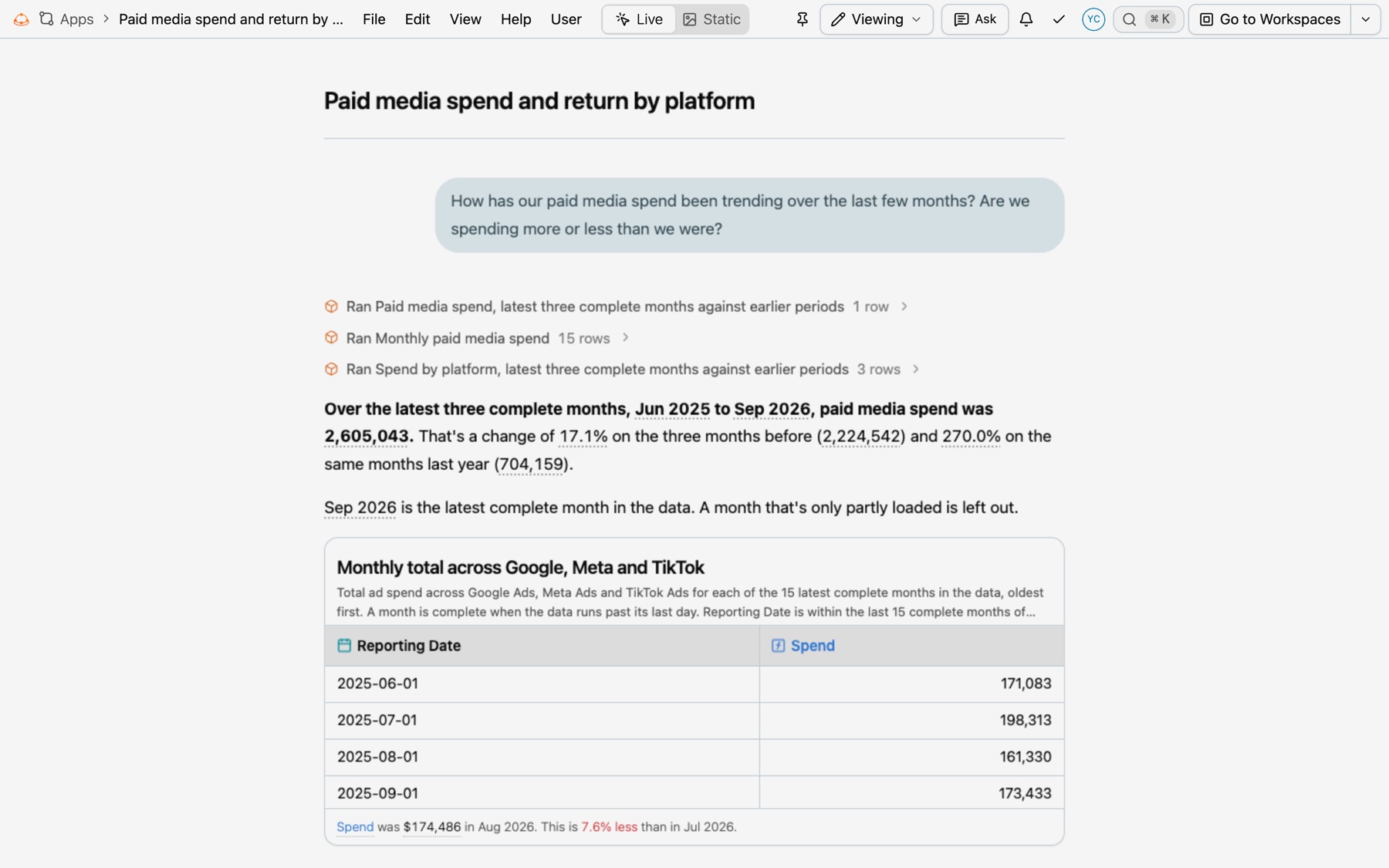
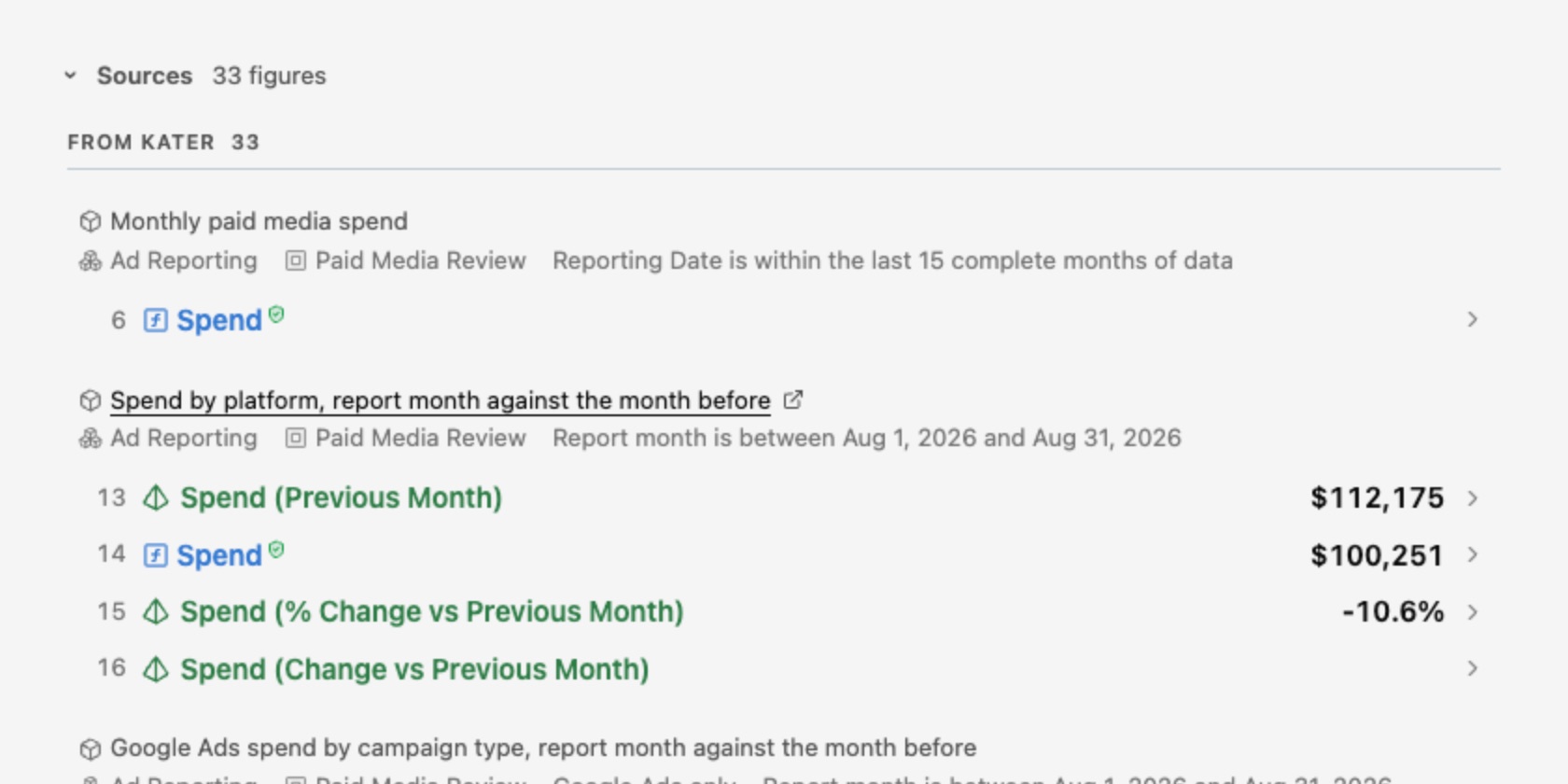
At the end of every app, Sources lists every figure, grouped under the query it comes from, with the workspace and the filters it ran with. Select a query’s name to open that query in its workspace, in a new tab.
In the app editor, Add Content › Data lists every query you can read. In This App shows the workspaces the app reads, with a dot on each query the page uses. Everything Else lists every other workspace. Expand a workspace to see its queries and their charts. Hover a query for Add to App, Go to and Preview.
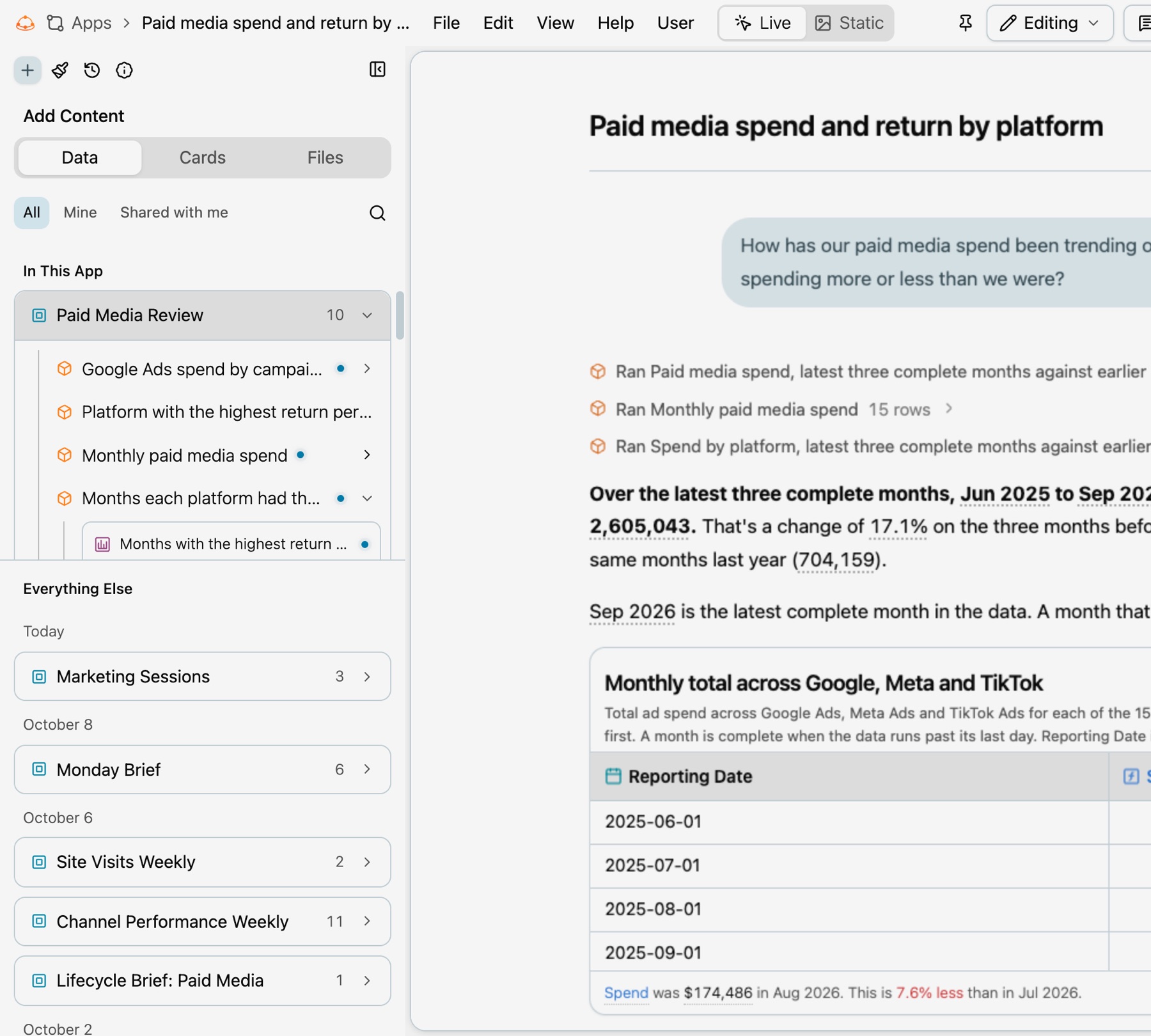
See Apps and Build an app.
Keys
| Key | What it does | Example |
|---|---|---|
name | The query’s identity in its workspace. Other queries read it as query.<name>. | platform_monthly_return |
model_type | Always query. | query |
label, description, ai_context | The tab’s name, a sentence for people, and guidance for agents. | label: Monthly return per dollar by platform |
business_questions, tags | The questions it answers, and tags by facet. | - How did spend change from last month? |
parameters | Parameters its own filters read. Root parameters need no entry here. | - name: is_between__union__date_day |
insights, chart_authoring | Optional settings for insight templates and chart authoring. |
- Files and names. Queries live in the workspace’s
query_contracts/folder. One file can hold several queries, each with its own frontmatter block. Kater still calls a saved query a query contract in a few places, such as this folder’s name. - Identity is the full path. A query is named by its workspace’s full path plus its name, never by its label.
- What a query reads. Its workspace root, or other queries in the same workspace. It is the one place, with tests and the Sandbox, where custom calculations live.
Fields made in a query
A field that the query declares itself belongs to that query.
- It leads the field list. While the query is open, the field shows under Added in this query, ticked. Measures are blue and custom calculations green, in the list and in the column header.
- Other queries do not see it. In Queries, it shows only under its own query’s row until someone promotes it.
- Its menu is its own. It leads with Promote to workspace, and has Edit calculation. On a column, it also has Convert to Excel formula, or Convert to SQL for one that is an Excel formula.
- Removing it deletes it. Its column menu ends with Delete field, which deletes its definition from the query. While another column reads it, removing is greyed, with the reason, and a second item removes both in one change.
Charts read a query
A saved chart is a small model in the workspace’s charts/ folder. Its frontmatter holds the chart spec. Its SQL reads one parent query, and can rename, filter, sort and limit that query’s columns. It never aggregates: totals, ranks and comparisons stay in the query. See Charts.
Run and check
- In the portal. The Run button’s menu has Run Query, Run Selected and Compile Query. Query › Refresh data in the workspace name’s menu runs the query again for new data.
- From a terminal.
kater run --select PATHruns a saved query. It needs no compile first. Rows come from the result store when anyone ran the same inputs in the last 15 minutes, and--freshruns it again. - Compile.
kater compile --select PATHformats the file, declares the parameters it reads, and exits non-zero on an error. - Lineage. Query › Lineage in the workspace name’s menu traces each field down to the columns it reads.
- Keep the answer. Query › Add as test saves the query as a test. See Tests.
Warnings and errors
| Code | Cause | Fix |
|---|---|---|
cte_can_be_query | Hint. A CTE can be a query of its own. | Apply the fix, or run kater model edit with --extract-stage. |
kater_function_available | Hint. The SQL computes what a KATER__ function does. | Apply the fix to write the function. |
repeated_formula | A field computes what another field of the workspace computes. | Select the other field, or promote the formula to the root. |
name_reused | A field uses a name that another field uses for another formula. | Choose a name that says how it is different. |
measure_value_declared_as_dimension | A DIMENSION over a measure’s value. | Leave it unnamed, or declare a MEASURE. |
dimension_renames_field | A DIMENSION gives a source field a second name. | Select a.currency instead, when no chart, app or query reads the second name. |
not_additive_across | A currency measure without its currency in the result. | Apply the fix that adds the currency to the SELECT and the GROUP BY. |
field_name_in_scope | A new field takes the name of a workspace field. | Rename it, or pass the existing field through. |
unsupported_measure_context | A measure passes through a SELECT that has HAVING or QUALIFY. | Evaluate it with EVAL, as a filter from the field menu does. |
unnamed_output | Hint. A computed column has no name, so no other model can read it. | Name it only when a later query reads it. |
custom_calculation_evaluated | EVAL of another query’s custom calculation. | Select it without EVAL. |