Model Workspaces
Workspaces
The boundary for saved analysis: one shared model, the filters every query shares, and the queries, charts and dashboard built on it.
A workspace is where analysis is saved. Its root reads exactly one shared model and sets the filters and parameters every query in it shares. Queries, charts, a dashboard and apps live inside it. A workspace is private to you, or shared on the connection for your team.
What a workspace holds
| Path | What it is |
|---|---|
workspace.sql | The root: one model_type: workspace declaration over one semantic model or Kater dataset. |
query_contracts/<name>.sql | Queries. A file can hold several. See Queries. |
charts/<name>.sql | Saved charts, each bound to one query. |
dashboard.yaml | The workspace’s one dashboard, made of its saved charts. See Dashboards. |
default-inputs.json | Saved parameter values and filter selections. |
tests/<root>.sql | Tests of the root’s filters and parameters, in a connection workspace. |
apps/<app>/ | Apps of a connection workspace. Your own apps live beside your workspaces, in users/<email>/apps/. |
Private and connection workspaces
| Kind | Path | Who can edit it |
|---|---|---|
| Private | connections/<c>/users/<email>/workspaces/<w>/ | You, and anyone you share it with. Organisation admins have full access. |
| Connection | connections/<c>/workspaces/<w>/ | People with edit access to that folder. |
A workspace’s identity is its full path, owner included, so two people’s workspaces with the same name never collide. A workspace is never verified: only a field is. To recommend a workspace, add curated: ["true"] to its tags. A tag grants no access. See Promotion and verification and Files and access.
The root
---name: shopmodel_type: workspacelabel: Shopdescription: Orders from the sample DuckDB shop, with each order's customer.parameters:- name: is_one_of__region label: Region kater_data_type: string subtype: multiselect- name: order_date label: Order Date kater_data_type: date subtype: range- name: min_amount label: Minimum amount kater_data_type: number default_value: 0---
SELECT *FROM semantic.shopWHERE OPTIONAL_FILTER('is_one_of__region', KATER__IS_ONE_OF(region, $is_one_of__region), label='Region') AND OPTIONAL_FILTER('order_date', KATER__IS_BETWEEN(order_date, $order_date), label='Order date') AND OPTIONAL_FILTER('min_amount', KATER__IS_AT_LEAST(amount, $min_amount), label='Minimum amount')SELECT * passes every field of the shared model through, each measure still a measure. The root can also select fields by name, declare new dimensions and measures, and hold optional and required filters.
| Key | What it does | Example |
|---|---|---|
name | The root’s name. Queries read it as workspace.<name>. It does not need to match the folder. | shop |
model_type | Always workspace. | workspace |
label, description, ai_context | Display name, a sentence for people, and guidance for agents working in this workspace. | label: Shop |
business_questions, tags | What the workspace answers, and tags by facet. | - Which ads have spend but no reported conversions? |
parameters | The workspace’s variables. Every query can read them. See Filters and parameters. | - name: min_amount |
query_order | The order of the query tabs, as a list of query names. Dragging a tab writes it. | [spend_by_platform, ...] |
insights, chart_authoring | Optional settings for insight templates and chart authoring. |
- One source. The root reads exactly one semantic model or Kater dataset, including a custom SQL dataset. It cannot join.
- No windows. Its optional filters apply first, so a window would change with each reader’s filters. Put windows in a query.
- The root is the workspace overview. In the workspace editor, Workspace in the header opens the root as the workspace overview.
Create a workspace
- From Explore. New workspace and Make something new › Workspace on the Workspaces page open Explore, and so does File › New workspace in a workspace. There, Add to workspace saves cards as queries, in a new or an existing workspace.
- From a shared model. With a model open in Shared models, select File › Start a workspace from this model. The New workspace dialog opens on Manual, with the model filled in. New › Workspace opens it on Prompt AI, where you describe the workspace.
- From a terminal.
kater new workspace NAME --connection CONNECTION --from-model semantic.shop. Add--kind connectionfor a connection workspace.kater workspace source use MODEL --scope WORKSPACEgives a workspace another source. - From your agent. It creates a private workspace for you.
A workspace made without a model opens on a start page, where you search for a model or select one in the Model Selector. See Workspaces under Analyze.
The workspace overview
The overview is the root, drawn as a page. It opens from Workspace in the header, and the Files page and the VS Code extension show it for any workspace.sql. Its three tabs are Overview, Definitions and Source.
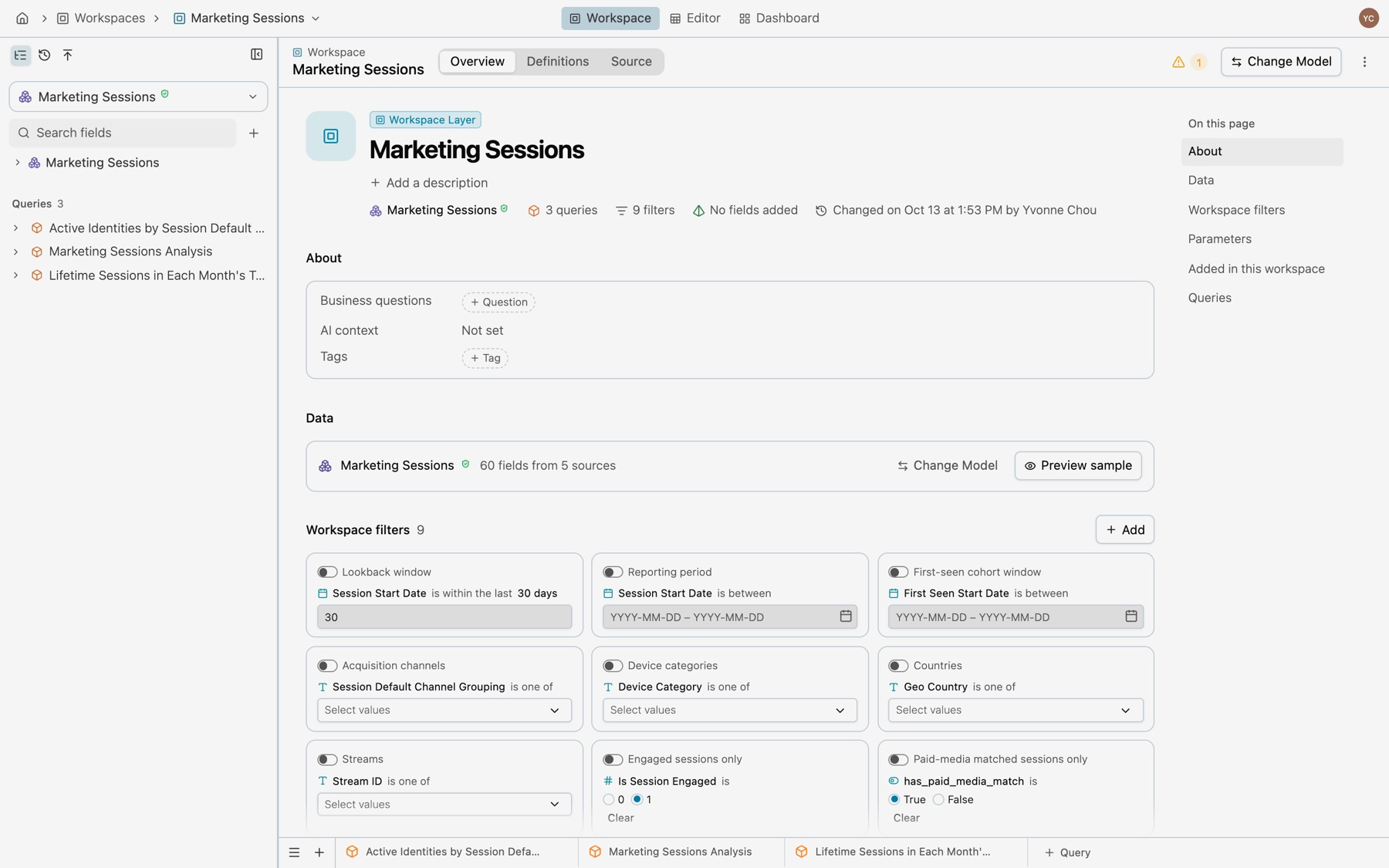
Overview
The title block shows the name, the description and the facts: the model with its verified mark, the number of queries and filters, how many fields were added, and who changed the workspace last. Add a description writes description into the frontmatter. The sections below it map to the root like this:
| Section | What it shows and edits | In the root |
|---|---|---|
| About | Business questions, AI context and tags | business_questions, ai_context, tags |
| Data | The model it reads, how many fields from how many sources, and Preview sample | FROM semantic.<model> |
| Workspace filters | A card for each filter: its switch, condition and value. Each card’s settings edit the filter and its parameter. Add makes a filter or a parameter. | The filters in WHERE, and parameters |
| Parameters | The parameters no filter reads, with type, values, default and value | parameters |
| Added in this workspace | Each field the root declares, with its expression, “Used by” and how many queries, and its menu | Fields declared in the SELECT |
| Queries | Each query, its columns and when it last changed | query_contracts/ |
More in the bar has Show SQL parameter names and Reset filters to defaults. See Filters and parameters for the filter cards and their settings.
Definitions
Every field the workspace offers, as a card with its address, description and what it computes. Fields from the model come first, by measures and dimensions. Created in this workspace follows, with the root’s fields and then each query’s. Open definition in any field menu lands here, on that field’s card.
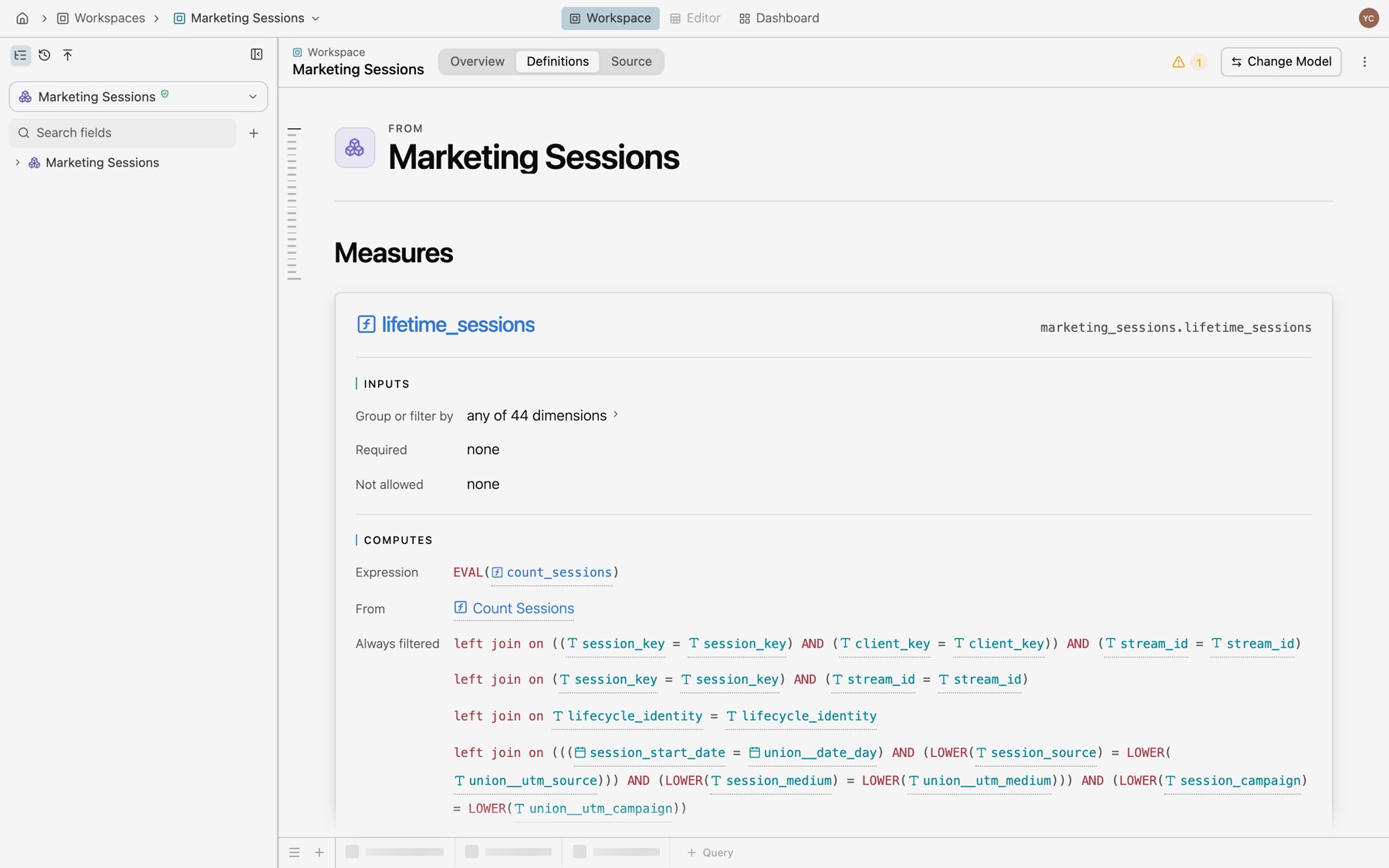
Source
The root’s Kater SQL, which you can edit in place. It saves itself, and it compiles when you ask.
Change the model
Select Change Model in the overview’s bar, or in the model button’s menu. Before anything changes, If you switch checks every query’s fields and every filter against the new model. It lists each query that loses a field, each filter that keeps working or is removed with the field it needs, and the fields added in this workspace. Switch to the model writes the new source into workspace.sql, and a message offers Undo.
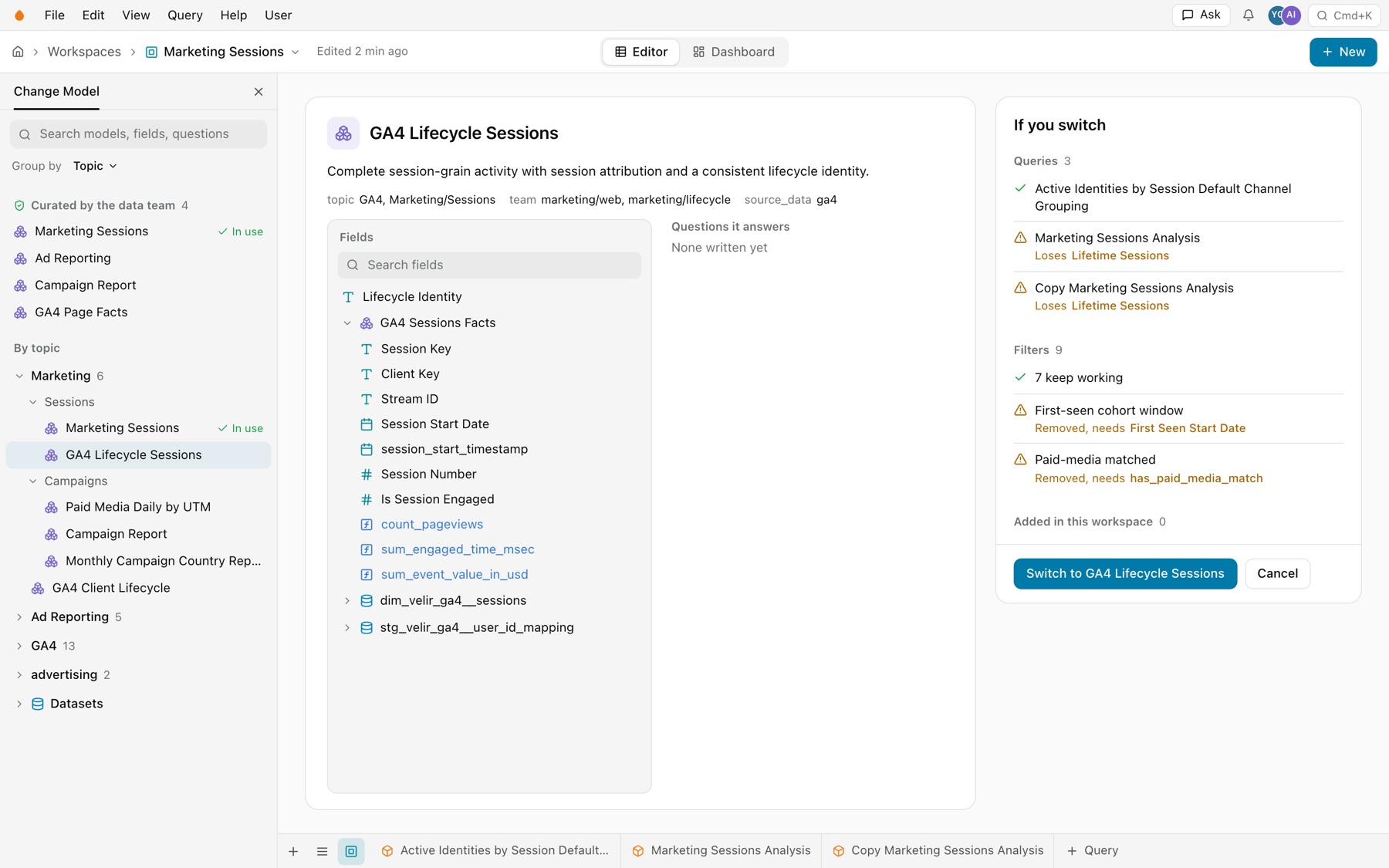
After the switch, a query that reads a missing field cannot run. Its rows name the field and offer Replace with and Remove column. From a terminal, kater workspace source use MODEL --scope WORKSPACE changes the source.
Try changes safely
To change a workspace without touching the original, copy it into your brainstorm folder: kater brainstorm copy WORKSPACE --topic TOPIC. The copy’s banner offers Compare and Apply, and kater workspace apply COPY writes it back. See Try changes safely.
Common errors
| Code | Cause | Fix |
|---|---|---|
window_not_allowed | A window in the root. | Move it to a query. |
relationship_not_allowed | A join in the root. | Join in the shared model, or in a query. |
field_name_in_scope | A root field takes the name of a field in the shared source. | Give it a new name. |
parameterized_required_filter | A required filter reads a parameter. | Make it optional. |