AI
Skills and workflows
Every skill and workflow Kater ships, the agent that runs each one, and what goes in a skill file and a workflow folder.
A skill is how your agent does one task. A workflow is a process in steps, with one agent for each step. An agent is the role that does the work. Each is a Markdown file in ai_tools/, and each can be a starter that anyone runs by name.
Agents, skills and workflows
| Agent | Skill | Workflow | |
|---|---|---|---|
| What it holds | A role: a persona, the skills it owns and its rules | The procedure for one task | A process in steps, and the agent for each step |
| Where it is | agents/<name>.md | skills/<name>.md | workflows/<name>/workflow.md, with one file for each step in steps/ |
| What it remembers | Nothing | Nothing | Each step it completes, in your brainstorm folder, so it can carry on later |
| A starter | With a starter: block | With a starter: block | With a starter: block |
| On a schedule | No | No | With a schedule: block |
Keep each kind to its job: the persona in an agent, the procedure in a skill or a workflow step, and the state in the brainstorm folder.
Every skill
Kater ships 28 skills. A skill with a starter shows on AI Tools › Starters. The others are steps that an agent or a workflow uses.
| Skill | Category | Agent | Starter | What it does |
|---|---|---|---|---|
| resolve-workspace | route | Conductor | Finds the one workspace a request needs, or makes a personal one after your yes | |
| planning | plan | Planner | Plan a project | Turns a goal that takes more than one change into a plan in phases |
| run-plan | plan | Conductor | Runs a plan’s phases one at a time. The Developer builds each one, and QA checks it. | |
| onboard | plan | Planner | Onboard me | A first chat that fills in your about.md and ends on one of your own numbers |
| about-me | plan | Planner | Update About you | Records one thing about you under the right heading of your about.md |
| digest | plan | Planner | Weekly digest | Drafts a digest of the metrics you watch, on a schedule you approve |
| watch | plan | Planner | Watch a metric | Drafts a watch on one metric, with a line profiled from its history |
| schedule-workflow | plan | Planner | Schedule a workflow | Sets up, changes, pauses or stops a scheduled workflow |
| tour | analyze | Analyst | Tour my data | What the connection holds, and three questions it answers now |
| brief-me | analyze | Analyst | Brief me | What moved in the metrics you watch since your last brief |
| compare | analyze | Analyst | Compare two periods | One metric in two periods, and the dimensions that moved it most |
| explain | analyze | Analyst | Explain a metric | How a metric, or a number on screen, is computed, in plain words |
| build-plan | analyze | Planner | The plan for one question in Why did it change? | |
| build-analysis-dag | analyze | Planner | Turns that plan into queries, decisions and follow-up checks, in order | |
| profile-parameters | analyze | Analyst | Profiles the data for a value the plan needs, such as a threshold | |
| select-analysis-parameters | analyze | Analyst | Picks that value, and records why | |
| run-analysis-dag | analyze | Analyst | Runs the plan’s queries in order | |
| diagnose-findings | analyze | Analyst | Runs the follow-up checks the plan declared | |
| query-authoring | build | Developer | The rules for every query and workspace root | |
| configure-workspace | build | Developer | Picks the model a workspace uses and adds what its queries need | |
| run-phase | build | Developer | Builds one phase of a plan | |
| build-app-ui | build | Developer | Build an app | Builds or changes an app |
| model-table | build | Developer | Model a new table | Turns synced warehouse tables into shared models and first queries |
| new-skill | build | Developer | Make your own command | Writes a skill of your own, which you start by name |
| check | review | QA | Check a number | Traces one number back to its source |
| test-model | review | QA | Test a model | Locks in answers you trust as tests of a shared model |
| review-analysis | review | QA | Review an analysis | Checks a finished analysis before its findings are written |
| synthesize-findings | report | Reporter | Writes the findings and recommendations from reviewed evidence |
Every workflow
Kater ships five workflows.
| Workflow | Starter | Steps | What it does |
|---|---|---|---|
| deep-analysis | Why did it change? | 7 | Finds a workspace, then plans, builds, profiles, runs, reviews and reports on one question |
| build-query-contract | Define a metric | 4 | Finds what exists, starts a draft, changes it until it is right, then checks and publishes one query |
| resolve-workspace | Start a workspace | 4 | Lists the workspaces you can read, rates them for the request, then picks one or makes one and checks it |
| calibrate-analysis-parameters | 2 | Profiles an approved analysis again and recommends a new value. It never changes the value itself. | |
| monday-brief | Scheduled | In one file | Every Monday at 08:00, briefs you on what moved last week. See Scheduled workflows. |
What is in a skill
A skill is one file: a header in YAML, then the procedure in Markdown. This is the header of brief-me:
---label: Brief Mename: brief-metags: kater-defaultcategory: analyzeowned_by: analystdescription: Brief the person on what moved in the metrics their about.md names, from verified definitions, since a date they give or their last brief.starter: title: Brief me summary: What moved since last time icon: newspaper group: Understand order: 1 ask: Brief me on what moved in the metrics I watch since my last brief. inputs: - name: since description: How far back to look, such as last Monday or the start of the month. Left out, since your last brief, or a week.---| Key | What it holds |
|---|---|
label | Its name in the library |
name | How you start it, such as /brief-me |
tags | kater-default on each file Kater ships |
category | route, plan, analyze, build, review or report |
owned_by | The agent that runs it |
description | One sentence. Your agent reads it to decide when to use the skill, so say when it applies. |
guide | The guide in guides/ it follows, when it has one |
invokes | Other skills it hands over to |
starter | Makes it a starter: its title, a one-line summary, an icon, its group and order, the words it starts with (ask), and the inputs a person can give it |
The body says when to use the skill, the steps it follows, and when to stop:
# Skill: brief-me
## When to useUse this when the person asks what changed, how things are going, or for their brief.To find out why something moved, hand over to deep-analysis.
## Procedure1. **Read what they watch:** `## Metrics I watch` in `{user_root}/about.md`.2. **Set the window.** From `since` or their words.3. **Find each metric's verified definition.**...
## Stop conditions- No metric has a verified definition: say which lack one, and offer build-query-contract.
Words in braces, such as {user_root}, come from config.yaml. When a starter reaches your agent through the Kater MCP, Kater fills in your own email, so {user_root} is your own folder.
What is in a workflow
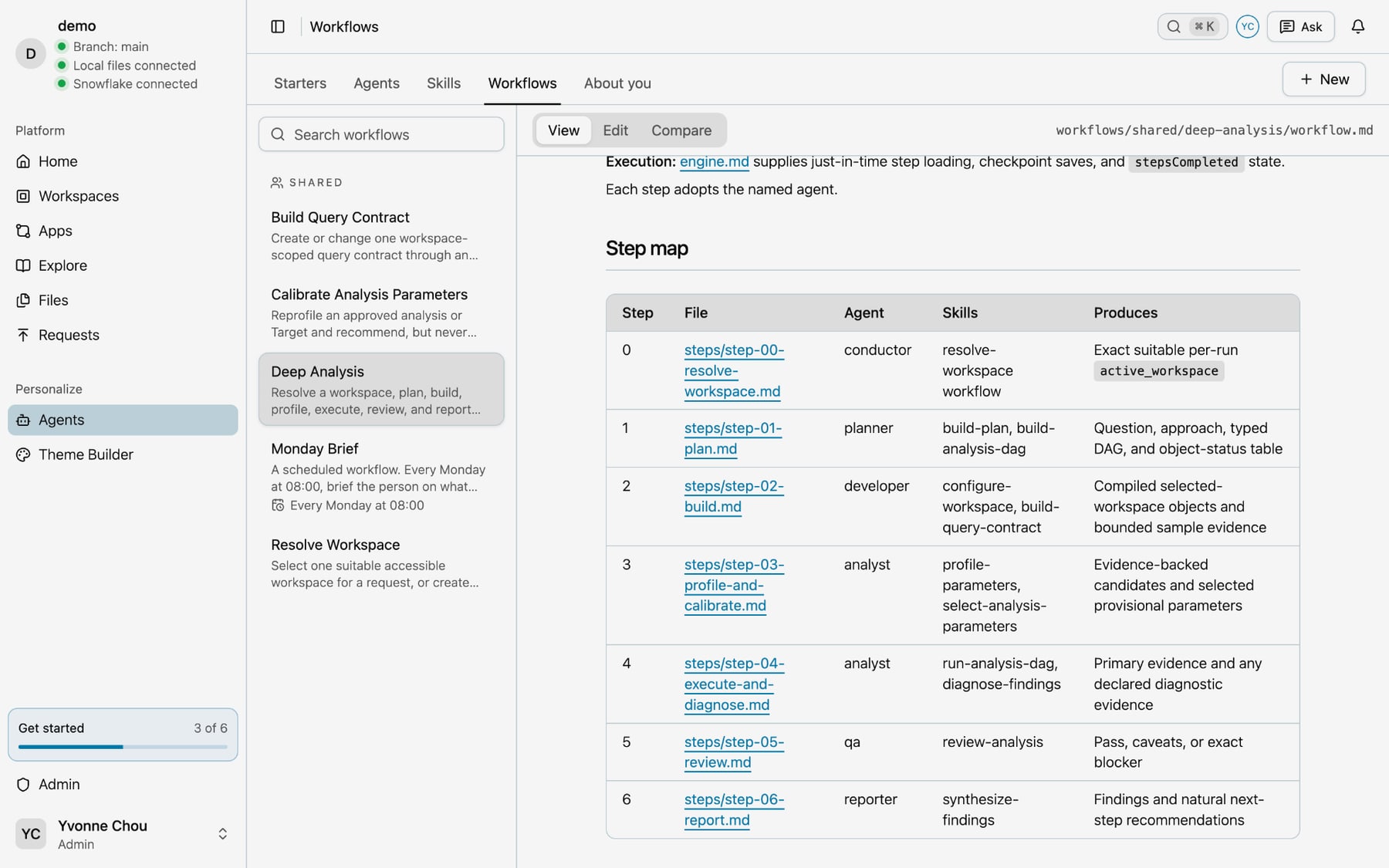
A workflow is a folder. workflow.md holds its header, its goal and a step map. Each step is a file in steps/, and your agent reads only the one it is on.
workflows/deep-analysis/ workflow.md steps/ step-00-resolve-workspace.md step-01-plan.md step-02-build.md step-03-profile-and-calibrate.md step-04-execute-and-diagnose.md step-05-review.md step-06-report.md---label: Deep Analysisname: deep-analysistags: kater-defaultdescription: Resolve a workspace, plan, build, profile, execute, review, and report one complex governed analysis.config: '../../config.yaml'engine: '../../engine.md'workspaceMode: resolveoutputFile: '{brainstorm_folder}/{{analysis_slug}}.md'starter: title: Why did it change? summary: Trace a change to its drivers icon: trending-up group: Understand order: 2 ask: Why did---| Key | What it holds |
|---|---|
config | The config it loads first |
engine | The rules it runs by: one step at a time, with a checkpoint after each |
workspaceMode | resolve finds a workspace first, required needs one already picked, and none uses no workspace |
outputFile | The note it writes in your brainstorm folder |
starter | Makes it a starter |
schedule | Makes it a scheduled workflow, such as cron: "0 8 * * 1" for every Monday at 08:00 |
The step map in workflow.md names each step’s file, its agent, the skills it uses and what it produces. To change who does a step, change its agent there.
Next steps
- Make it yours, to write your own skill or change one of these
- Starters, every starter and how to run it
- Scheduled workflows, each key of a
schedule:block