Model Fields
Formats, descriptions and AI context
Tell people and agents what each field means and how to show it, right beside its definition.
Metadata is what makes a model usable without you in the room. A description tells a person what a field is. AI context tells an agent how to use it, and what not to do. A format tells every table and chart how to show it. In Kater all three sit beside the field’s definition, so they change together, and the Shared models editor lets you fill them in like a spreadsheet.
Where context lives
An agent reads context from several places, from the whole organisation down to one field. Put each fact at the narrowest level where it is true.
| Where | What it holds | Who writes it |
|---|---|---|
rules.md at the content root | Your organisation’s own rules for every request. Keep it short. See MCP server and tools. | Admins |
about.md, at the root and in each Personal folder | Facts about the company, and about each person. | Admins, and each person |
connection_context.md | What to know about one connection and its data. | Data team |
| Model frontmatter | label, description, ai_context, business_questions, tags | Data team |
| Comments above a field | @description, @ai_context, @format, @business_questions, @tags, classification | Data team |
| Comments above a join | @label, @description, @ai_context | Data team |
| A filter call and the comments above it | label='…', @description, @ai_context | Workspace owners |
| A parameter’s entry | label, description, ai_context | Workspace owners |
Edit metadata in the editor
Open the model in Shared models. Every edit writes the directive or frontmatter key for you, saves itself, and undoes exactly.
Fields, many at once
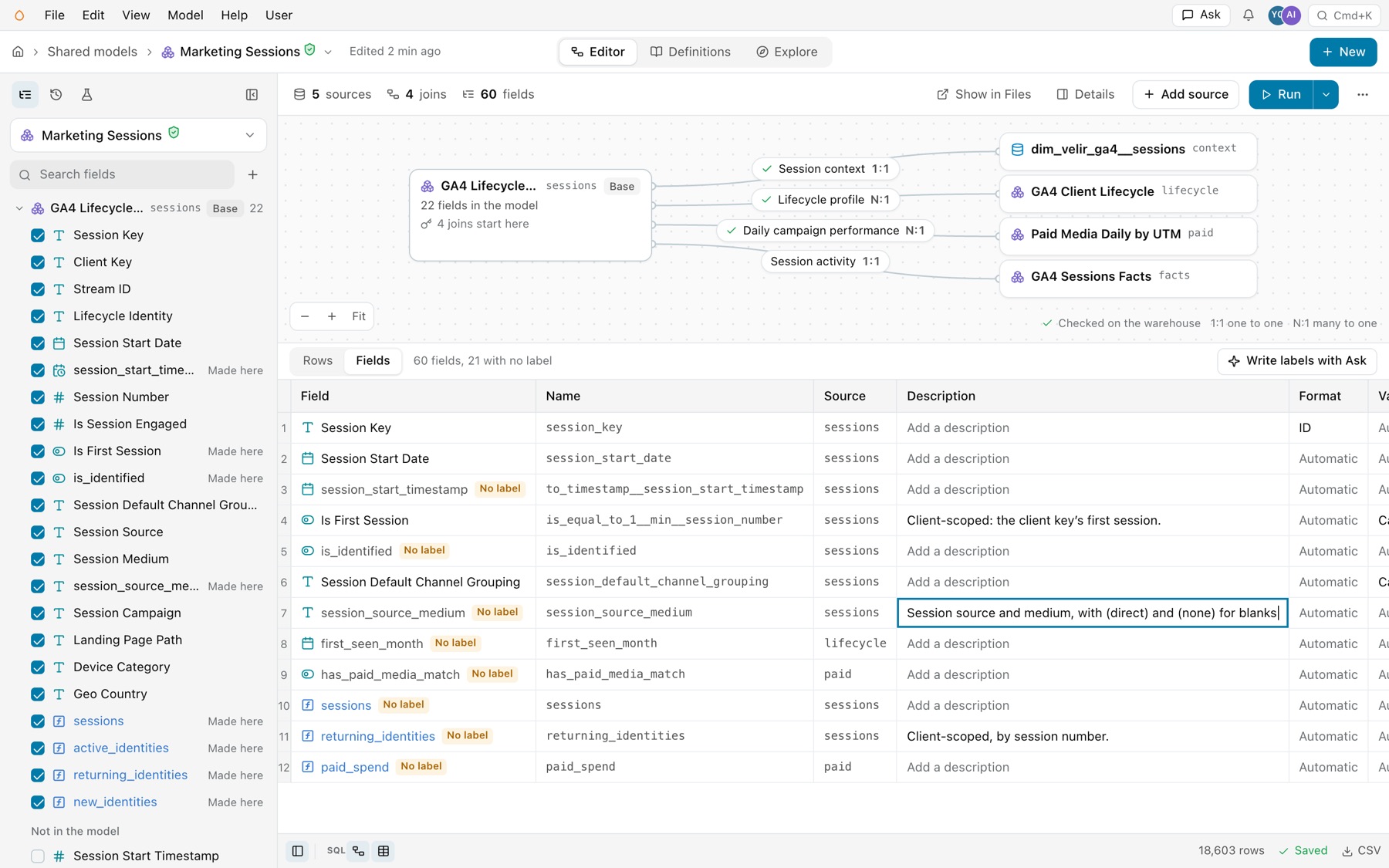
Select Fields above the grid. The Fields sheet has a row per field, with its Description, Format, Values and AI context. Click a cell to edit it, or paste a whole column at once: it saves as one change. A field whose label is still its SQL name says No label.
Write labels or descriptions with Ask
The sheet’s header counts what is missing, such as “60 fields, 21 with no label” or “42 fields, none described”. Write labels with Ask or Write descriptions with Ask opens Ask with a prompt for your agent that lists those fields. Your agent writes them through the same operations, and you review them in the sheet.
One field
Click a field to open its panel: Label, Description, AI context, Format, Values, Tags and Business questions. The field menu also has Format and Values. See Fields.
The model
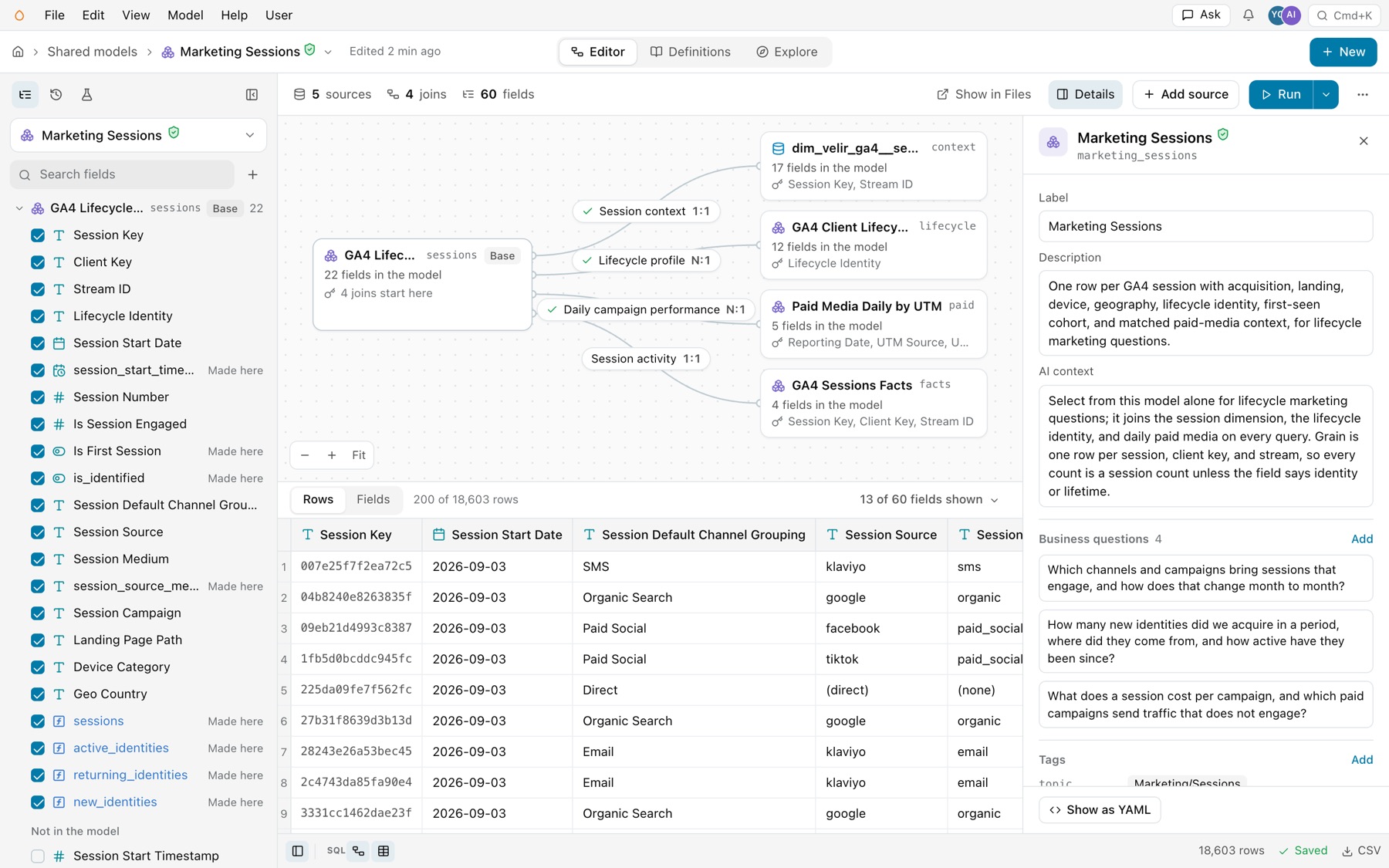
Select Details on the toolbar. The panel holds the model’s Label, Description and AI context, its Business questions and Tags, each with Add, and Always filtered: the filters with fixed values that apply to every reader. Show as YAML shows the frontmatter as the file has it.
A join
Click a join’s chip in the diagram. Its panel ends with About this join: Label, Description and AI context. See Relationships and joins.
Field directives
-- @description Sum of platform-reported attributed conversion value using upstream definitions and attribution. -- @format currency(union__currency, 2) -- @ai_context Uses each advertising platform's reported conversion value and attribution. Values are combined without cross-platform deduplication or currency conversion. MEASURE('sum__conversions_value', SUM(base.conversions_value), NOT_ADDITIVE_ACROSS(union__currency)) AS "Conversion Value" -- @description Earliest event_date_dt for the row. It is a dimension, not a measure to aggregate. -- @business_questions "When did each client first show up?" "How many new clients arrived per day?" -- @tags "acquisition" DIMENSION('first_seen_start_date', sessions.session_start_date) AS "First Seen Start Date",| Directive | What it does | Example |
|---|---|---|
AS "Label" | The display label. A field has no @label directive. | AS "Spend" |
-- @description | One or two sentences for people. | -- @description Order amount before discounts. |
-- @ai_context | Guidance for agents: caveats, what not to combine. | -- @ai_context Values are combined without currency conversion. |
-- @format | How values show. From a closed list, below. | -- @format percent(1) |
-- @categorical, -- @continuous | A category, or a quantity or point in time. Numeric IDs can be categorical. The editor calls this Values. | -- @categorical |
-- @business_questions | Questions the field answers, each in double quotes. | "When did each client first show up?" |
-- @tags | Free tags, each in double quotes. | -- @tags "acquisition" |
Write directives on the lines directly above the field. A trailing /* @format currency(currency, 2) */ after the field works too.
Formats
A format changes how a value shows, and nothing else: never the value, its grouping or its definition. Result tables, charts and definition cards use it.
| Format | Shows |
|---|---|
number(2) | Two decimal places, with thousands separators. Takes 0 to 20 places. |
percent(1) | A fraction as a percentage: 0.25 shows as 25.0%. |
big(1) | Large numbers short: 1,200,000 shows as 1.2M. |
id | An identifier: a whole number with no separators. Explore reads a field formatted id as a key. |
plain | A number as written, such as a year: 2026, not 2,026. |
currency('USD', 2) | One currency for every row. |
currency(currency, 2) | Each row’s own currency, read from a dimension the same SELECT declares or passes through. Pair it with NOT_ADDITIVE_ACROSS on that dimension. |
Operations write a format when they add a field: percent(1) for a share of total or a percent change, number(0) for a count or a rank, plain for a date part such as a year, and the source field’s format for a sum or a running total. A pass-through or an EVAL of a field keeps its format. In the editor, a field with no format of its own says Automatic.
Model metadata
---name: marketing_sessionsmodel_type: semanticlabel: Marketing Sessionsdescription: One row per GA4 session with acquisition, landing, device, geography, lifecycle identity, first-seen cohort, and matched paid-media context, for lifecycle marketing questions.ai_context: Select from this model alone for lifecycle marketing questions; it joins the session dimension, the lifecycle identity, and daily paid media on every query. Grain is one row per session, client key, and stream, so every count is a session count unless the field says identity or lifetime. ...business_questions:- Which channels and campaigns bring sessions that engage, and how does that change month to month?- What does a session cost per campaign, and which paid campaigns send traffic that does not engage?tags: topic: - Marketing/Sessions team: - marketing/lifecycle - sales source_data: - ga4---- Model tags are a map. Each key holds a list. Suggested keys are
team,source_data,topicandcurated. A slash path such asmarketing/lifecyclesits undermarketingwhen you select by tag, as inkater test --select tag:team=marketing. - Field tags are a plain list.
-- @tags "acquisition"has no keys. - Tags never grant anything. They do not set ownership or verification.
How metadata carries through
Seven keys carry through a direct reference to a field: label, description, AI context, business questions, tags, classification and format. A pass-through, a plain EVAL, an alias or a cast keeps them. A directive in the reading model overrides one key at a time. A calculation over a field, such as EVAL(a) / EVAL(b), keeps only the metadata written on it.
Where to edit each kind
| To change | In the editor | Elsewhere |
|---|---|---|
| A field’s label | Label in the field panel. | The field.relabel operation. |
| A field’s format | Format in the field panel, the field menu or the Fields sheet. | The format.display operation. |
| A field’s classification | Values in the field panel, the field menu or the Fields sheet. | The field.classify operation. |
| A field’s description or AI context | The field panel or the Fields sheet, or Write descriptions with Ask. | Write the comment in the SQL, or ask your agent. |
| A field’s tags or business questions | Tags and Business questions in the field panel. | Write the comment in the SQL, or ask your agent. |
| A model’s frontmatter | Details. | Edit the file, or run kater source patch FILE --edits '[{"at": "description", "value": "…"}]'. Every other line stays as written. |
| A filter that always applies | Always filtered in Details, Always filter in the field menu, or Edit › Add a filter that always applies. | REQUIRED_FILTER in the SQL. |
| A join’s label, description or AI context | About this join in the join panel. | The comments above the join. |
| A filter’s or parameter’s label and description | Not in a shared model. | The update_filter and update_parameter edits. See Filters and parameters. |
Write context that helps
- State the grain. “Daily ad grain within source_relation, platform, account, campaign, and ad group.” An agent then groups at the right level.
- Say what not to combine. “Other shared ad reports are overlapping rollups; do not add their totals to this model’s totals.”
- Put a caveat where it applies. A join’s matching gap goes in the AI context of that join, not in the model’s frontmatter.
- Write business questions as people ask them. Agents search them, and the Tests tab and
kater test generate --from-questionsturn them into tests. - Format every number. A format stops a currency from showing as a bare decimal, and an ID from showing with separators.
Agents search labels, descriptions, tags and business questions through the MCP’s catalog search, so plain words here make fields easier to find.
Common errors
| Code | Cause | Fix |
|---|---|---|
invalid_format | A format outside the list, or a currency(dim, n) whose dimension the SELECT does not hold. | Use a listed format, and select the currency dimension. |
unsupported_field_metadata | An unknown directive, such as @label on a field. | Use AS "Label" for the label. |
malformed_field_metadata | A list directive without double quotes, or arguments on @categorical. | Write @tags "first" "second". |
orphaned_field_metadata | A directive with no field under it. | Put it directly above a projection, with no blank line. |
field_metadata_on_star | A directive above SELECT *. | Select the field by name, then describe it. |
filter_label_directive | @label above a filter. | Write the label in the call: label='Region'. |