On this page
- Example
- Syntax
- Where joins are allowed
- The joins diagram
- The join panel
- Keys written as expressions
- What the Measures line says
- Add a source
- Check a join on the warehouse
- A check that finds a closer match
- Remove a join
- From a terminal or your agent
- Unused joins are left out
- How measures stay correct
- Joins the field picker writes
- Common errors
Model Shared layer
Relationships and joins
Join sources in a model, check each join on your warehouse, and keep measures from double counting.
A relationship is a join with a name, keys and a cardinality. Declare one and Kater knows how two models connect: it keeps measures from double counting through the join, leaves the join out when nothing uses it, and lets the field picker add fields across it. In the Shared models editor you add, change and check joins on a diagram, and the editor writes the RELATIONSHIP for you.
Example
One order has one customer, so the join from orders to customers is many_to_one:
FROM kater_dataset.orders AS o-- @label CustomerLEFT JOIN RELATIONSHIP('customer', kater_dataset.customers AS c ON o.customer_id = c.customer_id, 'many_to_one')A join can match on several keys and carry its own description and AI context. These come from the Marketing Sessions model:
FROM semantic.ga4_sessions AS sessions-- @label Session activity-- @description Adds engagement, page-view, and event-value facts for the same session, client key, and stream.LEFT JOIN RELATIONSHIP('session_activity', semantic.fct_velir_ga4__sessions AS facts ON sessions.session_key = facts.session_keyAND sessions.client_key = facts.client_keyAND sessions.stream_id = facts.stream_id, 'one_to_one')-- @label Lifecycle profileLEFT JOIN RELATIONSHIP('lifecycle_profile', semantic.ga4_client_lifecycle AS lifecycle ON sessions.lifecycle_identity = lifecycle.lifecycle_identity, 'many_to_one')-- @label Daily campaign performance-- @ai_context Full-data profiling on 2026-09-12 found unique target keys after lowercasing. ...LEFT JOIN RELATIONSHIP('daily_campaign_performance', semantic.paid_media_daily_utm AS paid ON sessions.session_start_date = paid.union__date_dayAND LOWER(sessions.session_source) = LOWER(paid.union__utm_source)AND LOWER(sessions.session_medium) = LOWER(paid.union__utm_medium)AND LOWER(sessions.session_campaign) = LOWER(paid.union__utm_campaign), 'many_to_one')Syntax
| Part | What it does | Example |
|---|---|---|
| Name, first argument | Unique within the model. Other models can reuse it. | 'customer' |
Target, alias and ON | The model to join, its alias, and keys to a source that comes before it. The ON takes no parameters. | kater_dataset.customers AS c ON o.customer_id = c.customer_id |
| Cardinality, third argument | Optional. How many rows each side matches. See the table below. | 'many_to_one' |
| Join keyword | The SQL join type. The editor writes LEFT JOIN, or INNER JOIN when you select Keep only rows that match. JOIN, INNER JOIN, RIGHT JOIN and FULL OUTER JOIN keep their SQL meaning. | LEFT JOIN |
REQUIRED_RELATIONSHIP(...) | Keeps the join, and its effect on rows, even when nothing reads the target. | LEFT JOIN REQUIRED_RELATIONSHIP('customer', ...) |
-- @label | The join’s display name, on the line above it. | -- @label Customer |
-- @description, -- @ai_context | What the join adds, and caveats for agents. | -- @description Adds landing-page ... |
| Cardinality | In the editor | Means |
|---|---|---|
many_to_one | Many to one, N:1 | Many rows on the left match one row on the right. Orders to their customer. |
one_to_one | One to one, 1:1 | Each row matches at most one row on the other side. |
one_to_many | One to many, 1:N | One row on the left matches many on the right. A customer to their orders. |
many_to_many | Many to many, N:N | Rows can repeat on both sides. The same as giving no cardinality. |
Where joins are allowed
| Model | Relationships |
|---|---|
| Semantic model, custom SQL dataset, query | Yes, on the root SELECT. |
| Scratch file in the Sandbox | Plain SQL joins only. |
| Standard Kater dataset, workspace root, chart | No. Join in a semantic model instead. |
The joins diagram
Open a semantic model in Shared models. The joins diagram sits above the rows. It comes from the model’s SQL, so it draws without the warehouse.
- The base card, at the left: the source the model starts from, with its alias, Base, its fields in the model and how many joins start there.
- A card per joined source, at the right: its label and alias, its fields in the model, and the keys it matches on.
- A chip on each line: the join’s label and its cardinality, with a check mark once the join is checked on the warehouse.
- New joins have a dashed line, and their card is marked New.
- A many to many join has a dashed amber line and a warning mark on its chip.
- Controls: zoom out, zoom in and Fit at the bottom left, and the key at the bottom right.
Click a chip or a line to open the join in the side panel. Click a card to open the source.
The join panel
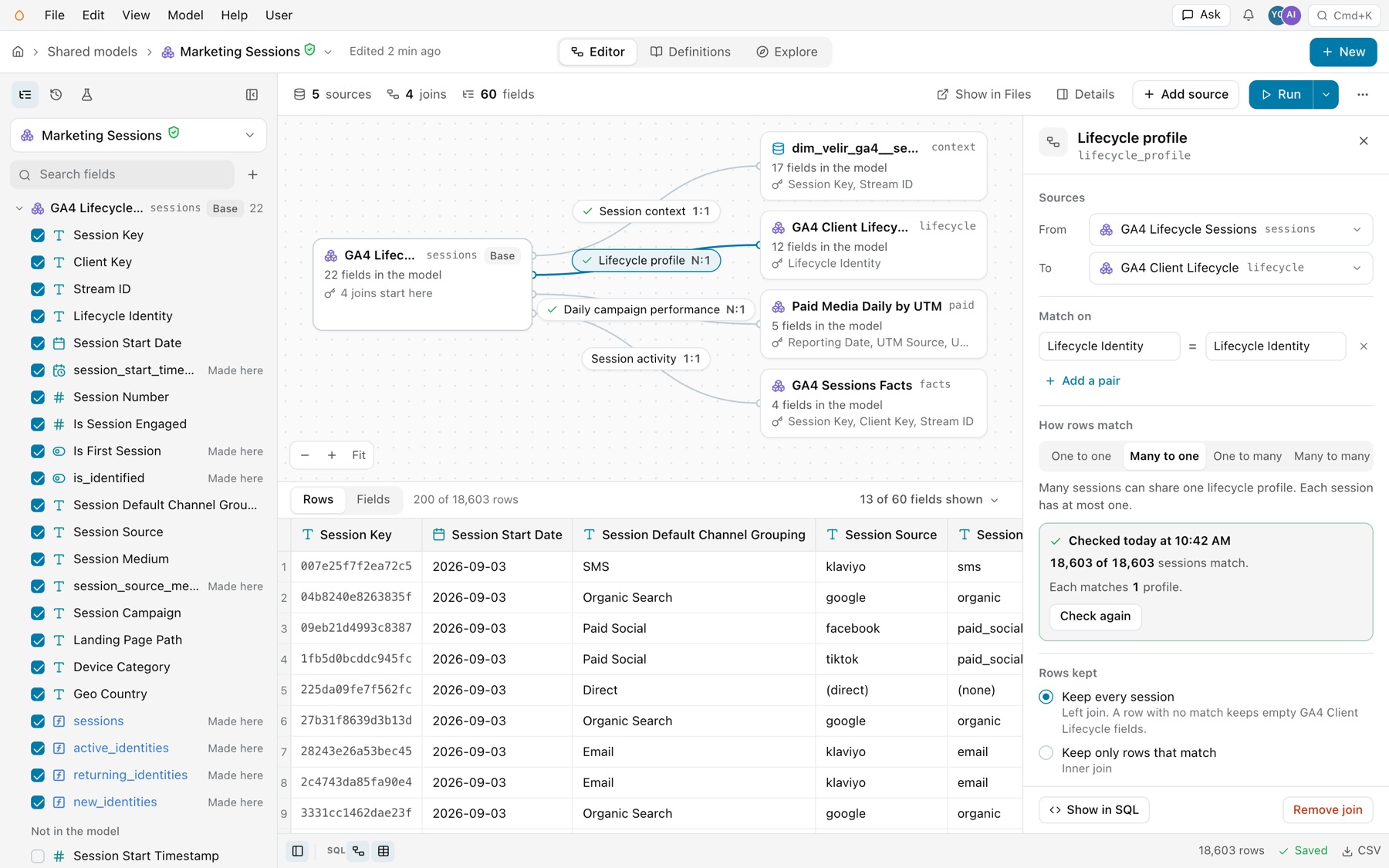
| Part | What it does |
|---|---|
| Header | The join’s label and name, such as Lifecycle profile and lifecycle_profile. |
| Sources | From and To, each a source with its alias. |
| Match on | Each key pair as two fields with = between them, and a button that removes the pair. Add a pair adds another. |
| How rows match | One to one, Many to one, One to many or Many to many, with a sentence that says what the choice means, such as “Many sessions can share one lifecycle profile. Each session has at most one.” |
| The check | What the warehouse found, with Check again. See “Check a join on the warehouse” below. |
| Rows kept | Keep every session, named for the base’s rows: a left join, where a row with no match keeps empty fields. Or Keep only rows that match: an inner join. The switch Join even when no field from the source is in use writes REQUIRED_RELATIONSHIP. |
| Measures | One line that says whether measures stay exact across this join, and why not. |
| About this join | Label, Description and AI context, as the file has them. |
| Footer | Show in SQL opens the SQL pane at the join. Remove join. |
Every change shows at once in the diagram and the panel, and saves itself. Edit › Undo takes it back exactly. Changing the keys keeps the join’s name, label, description and the fields that read its alias.
Keys written as expressions
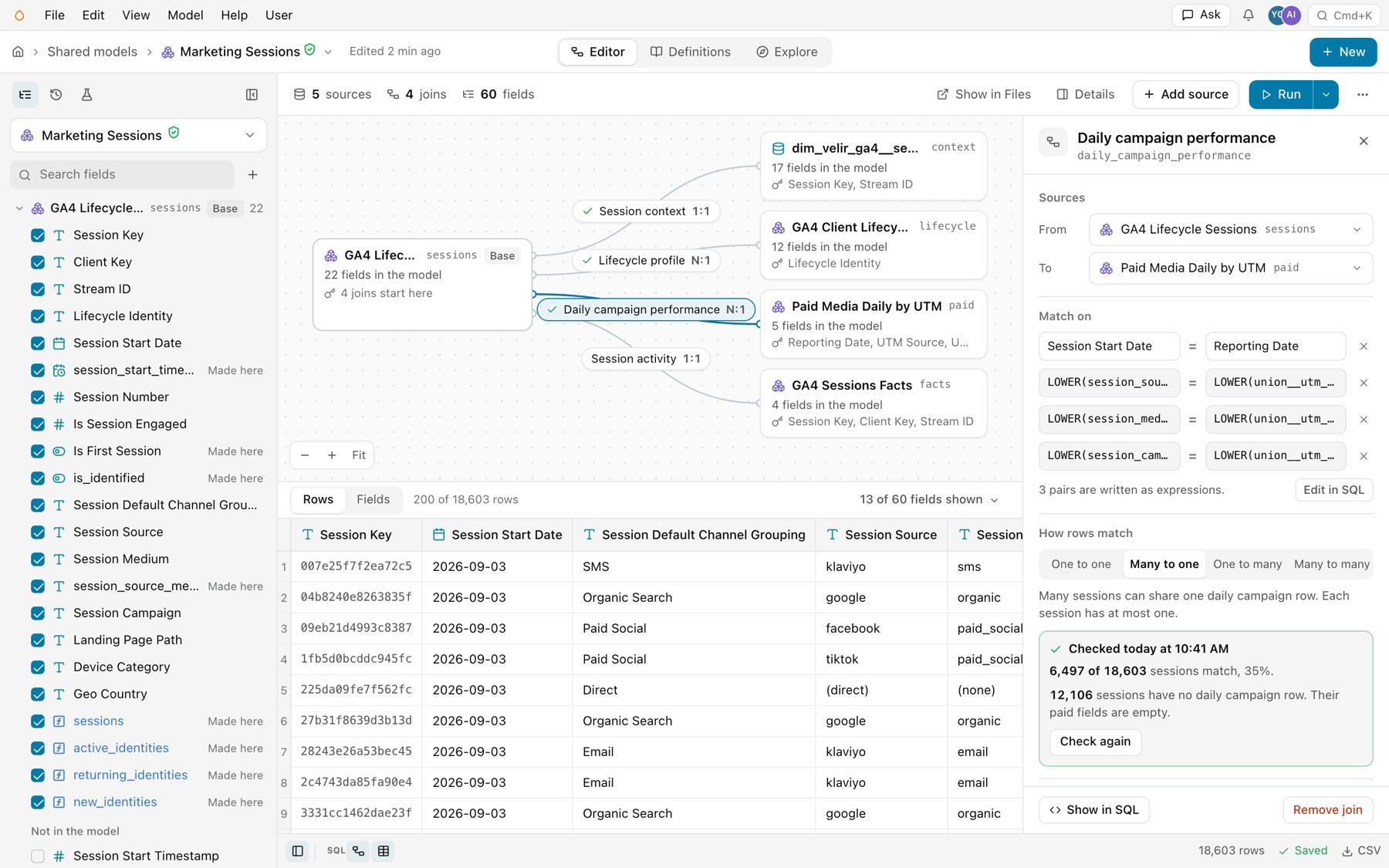
A key such as LOWER(sessions.session_source) shows as written. The panel says how many pairs are expressions, such as “3 pairs are written as expressions.”, and Edit in SQL opens the SQL pane at those lines. Edit expression keys in the SQL.
What the Measures line says
| Line | Means |
|---|---|
| Measures stay exact | The join cannot repeat rows for a measure. For Lifecycle profile, lifetime measures count each profile once, however many sessions match it. |
| Measures are worked out on their own rows first | The join can repeat rows, so each measure counts its own rows once before the join applies. |
| A warning, such as Spend is not split across groups | A joined row adds its full value to every group with a row that matches it. Grouped by Device Category, paid_spend adds up to more than its total. |
| Waiting for the check | The join is new, and its check is still running. |
Add a source
-
Select Add source.
It is on the toolbar, under the field list, and in Edit › Add source.
-
Select a source.
Joins on fields in this model lists the sources that share keys with the model, each with its keys, its field count, why it fits, such as “One row per Client Key.”, and its cardinality. Kater proves those keys from how each source is built, without the warehouse. All sources lists every source by topic, and those already in the model say In the model. Describe it instead opens Ask with the model as context.
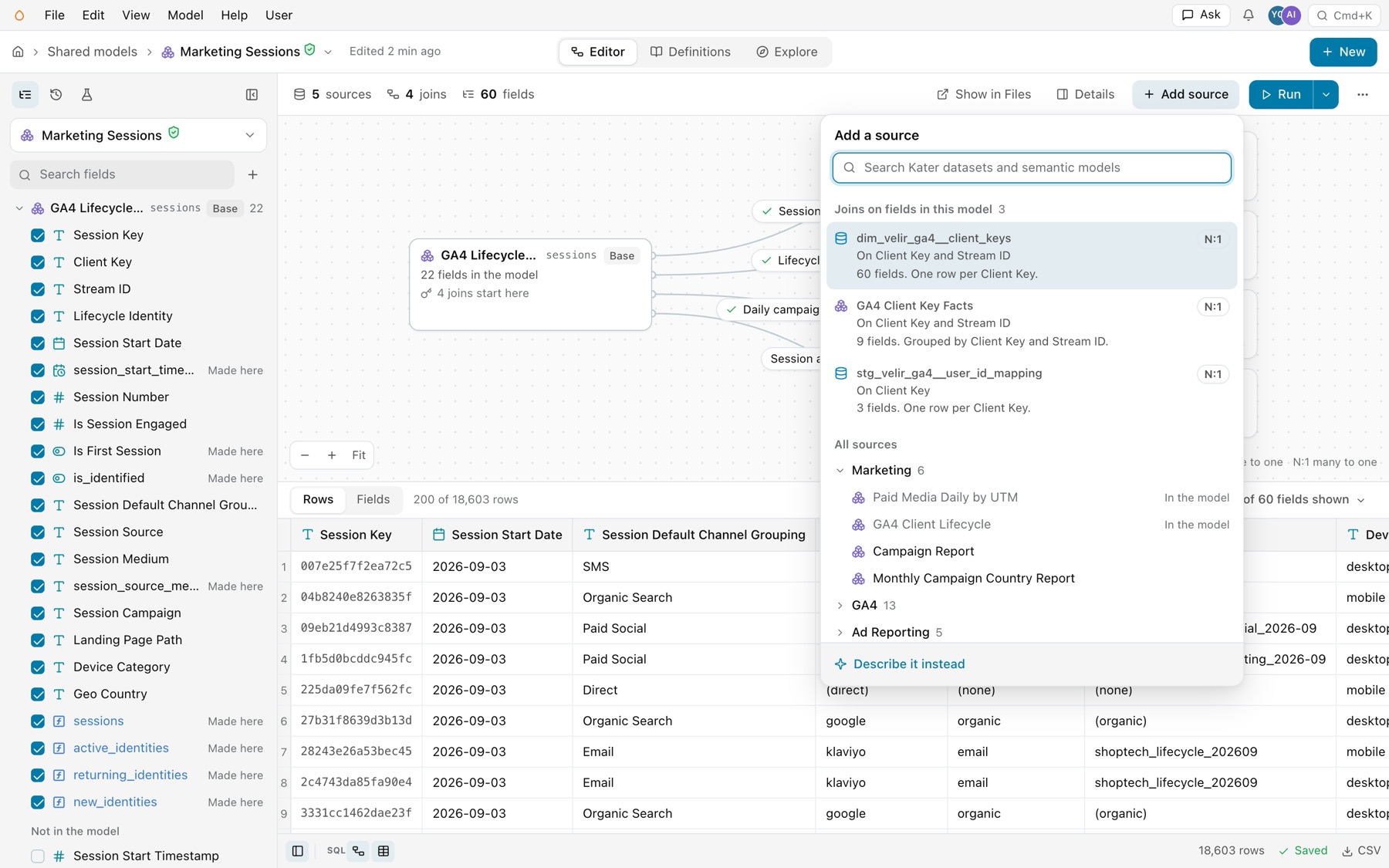
Add source. -
Watch the check.
The source joins at once on the suggested keys, as a left join. Its card, its line and its folder in the field list are marked New, and its fields wait unticked. The join’s panel opens with the keys marked Suggested while Kater checks the join on the warehouse. Stop ends the check.
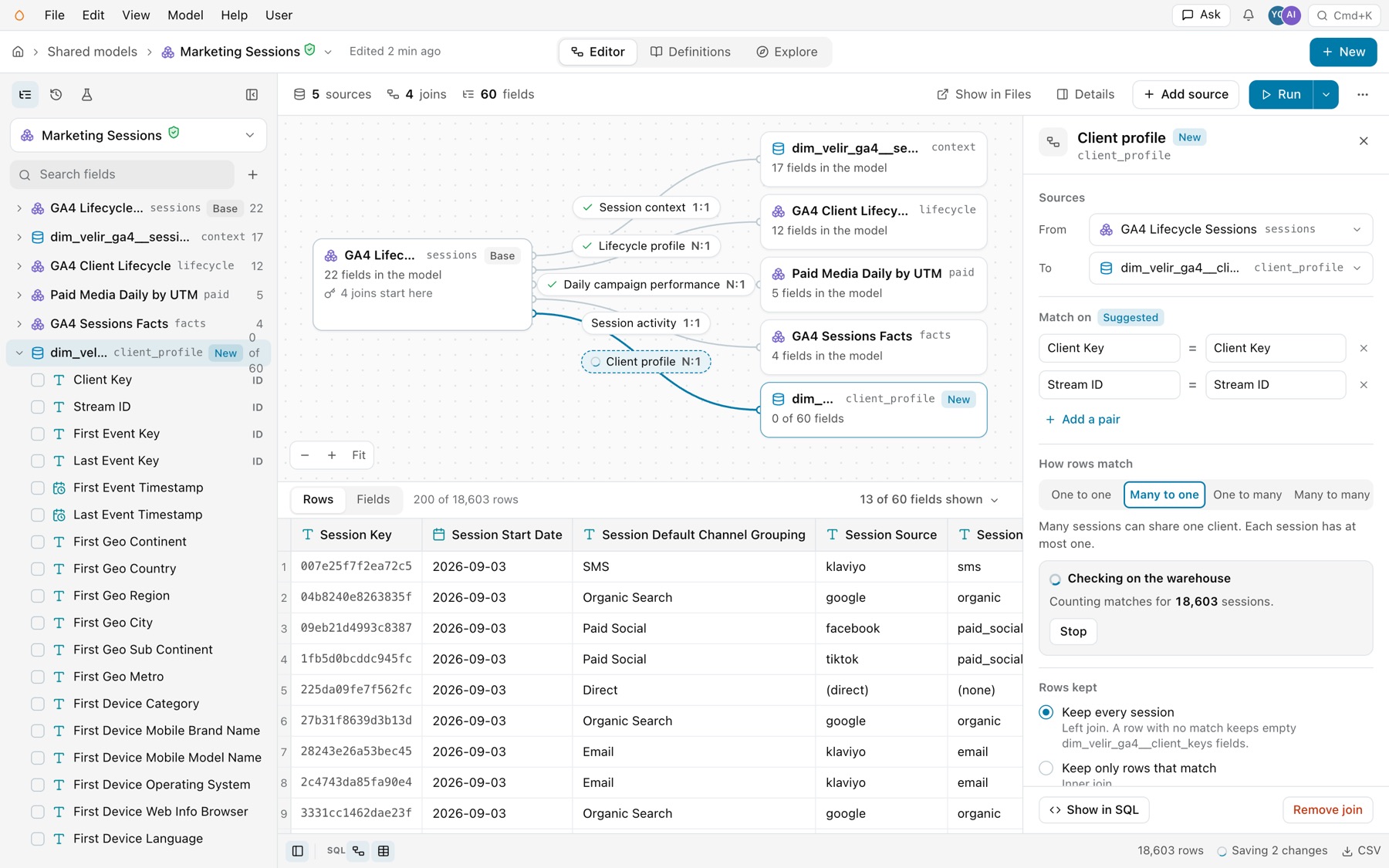
A source just added, its join being checked. -
Keep it, or undo it.
When the check is done, the panel shows what it found, and a toast names the keys, with Undo.
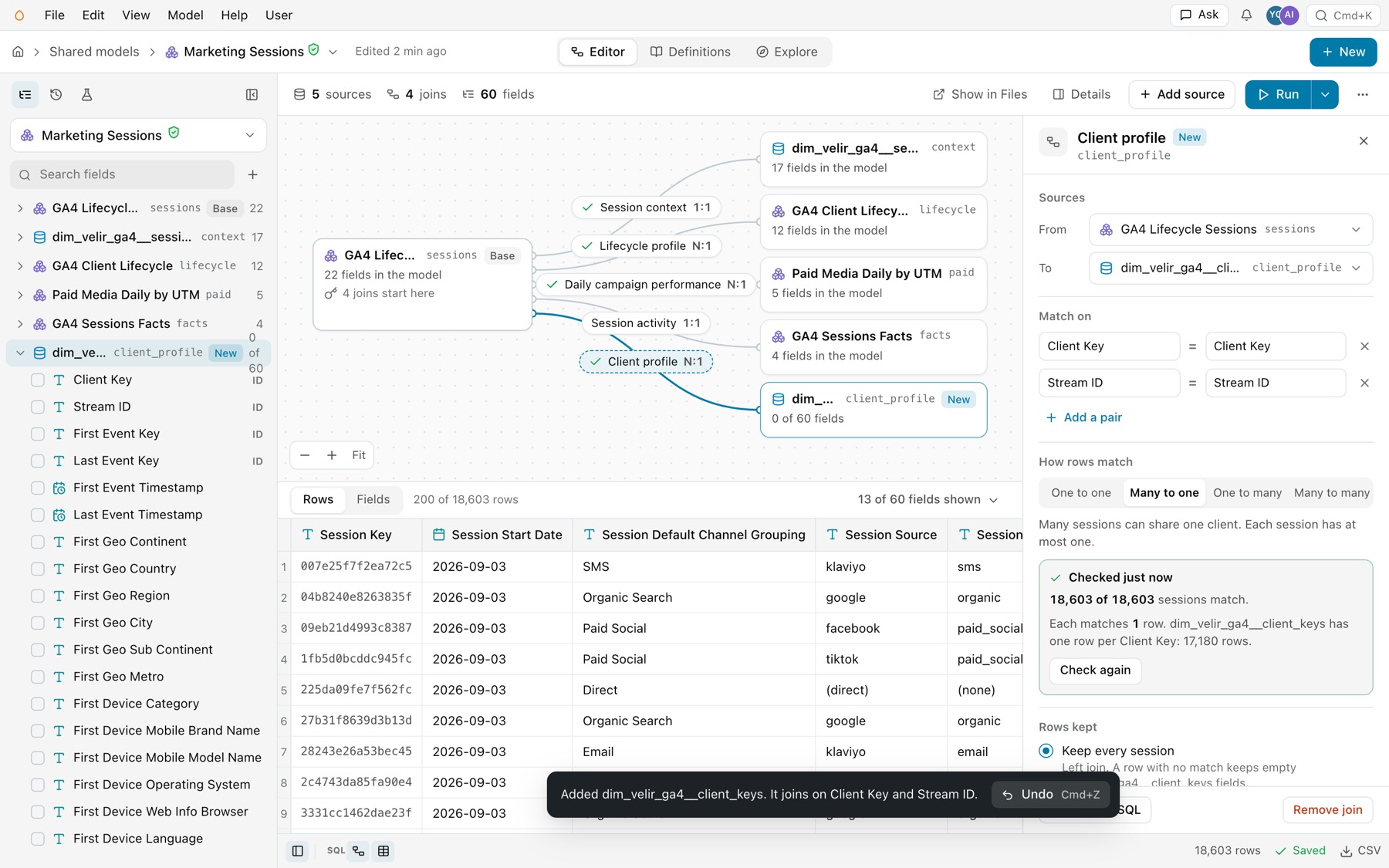
The new join, checked. -
Tick the fields you need.
Open the new source’s folder in the field list and tick its fields. See Fields.
Check a join on the warehouse
A cardinality is what you declare. The check tests it against your data. It runs counting queries on your warehouse: how many rows match, how many rows each one matches, and whether the joined side is unique on the keys.
- One join. Open the join and select Check again. A join you add is checked at once.
- Every join. Select Run › Check every join, or Model › Check every join.
- Read the answer. “Checked today at 10:42 AM. 18,603 of 18,603 sessions match. Each matches 1 profile.” A join that leaves rows without a match says so: “6,497 of 18,603 sessions match, 35%. 12,106 sessions have no daily campaign row. Their paid fields are empty.”
- Checks are kept. A check stays until the model’s SQL changes, so a second look shows at once.
- Stop. While a check runs, the panel says what it counts, with Stop.
A check that finds a closer match
When the data fits a closer cardinality than the one declared, the check says so. In Client Analysis Inputs, client_mapping is declared Many to many. The check finds that stg_velir_ga4__user_id_mapping has 8,615 rows and 8,615 Client Keys, so each session matches at most 1 row. Select Change to Many to one, or Keep Many to many.
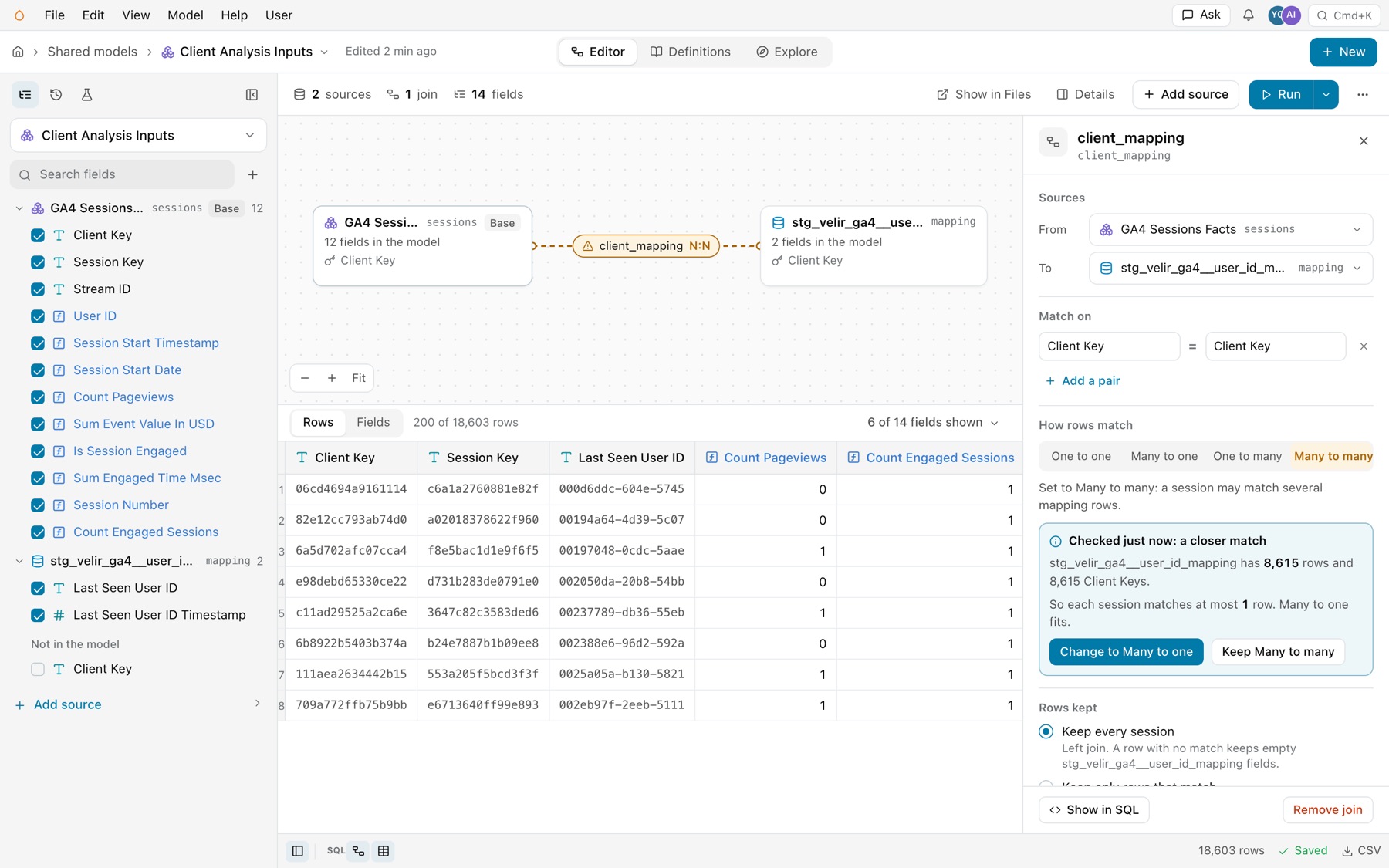
The closer match matters for measures. Across a many to one join, measures keep their formula as written. Across many to many, each measure is worked out on its own rows first.
Remove a join
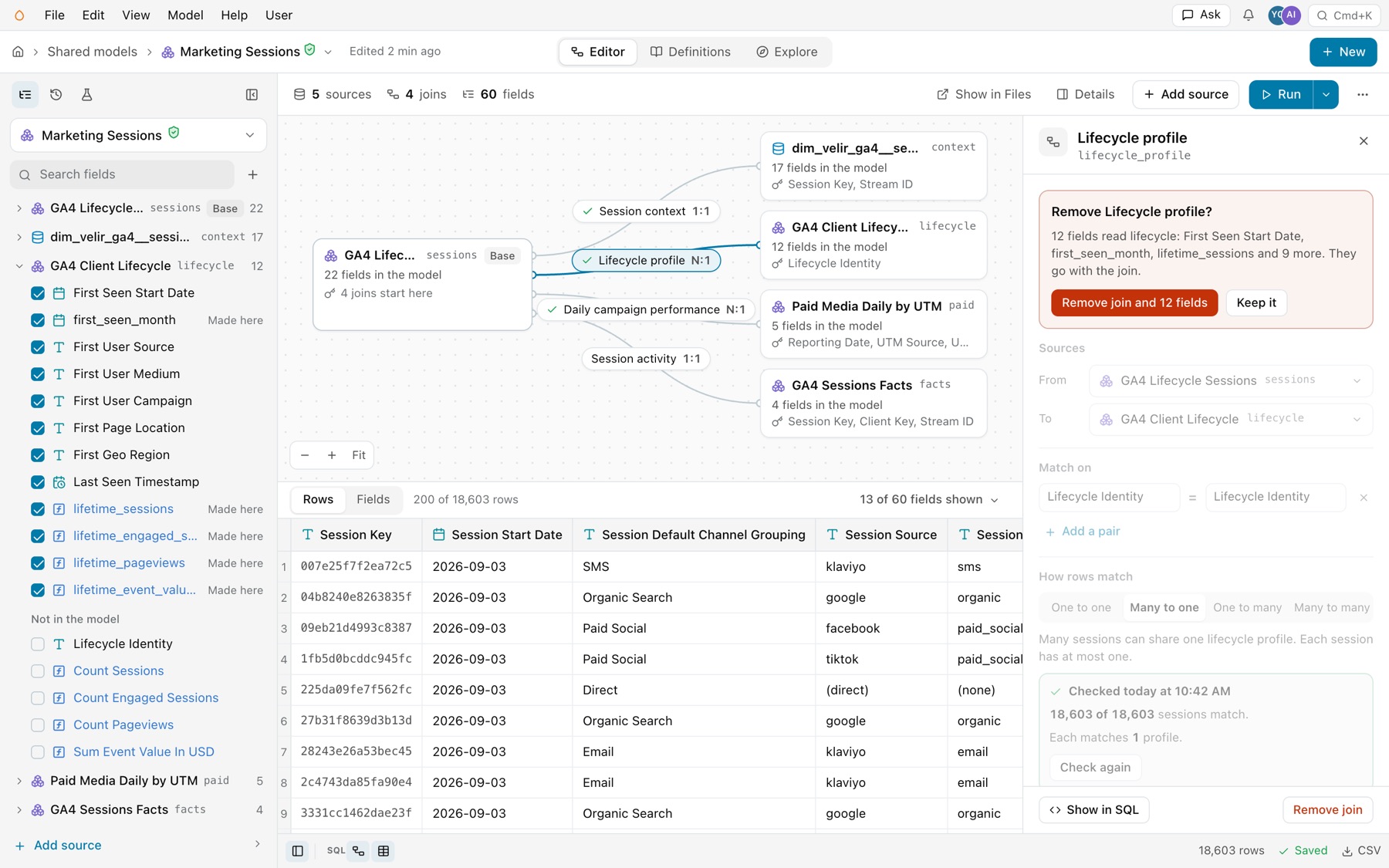
Select Remove join at the bottom of the join’s panel. When fields read the joined source, the panel asks first and names them: “Remove Lifecycle profile? 12 fields read lifecycle: First Seen Start Date, first_seen_month, lifetime_sessions and 9 more. They go with the join.” Select Remove join and 12 fields to remove the join and those fields in one change, or Keep it. Undo brings back both.
From a terminal or your agent
Your agent and the CLI write joins through the same operation as the editor. Save the edit as a JSON file:
[ { "kind": "add_relationship", "model": "kater_dataset.customers", "name": "customer", "alias": "c", "keys": [{"field": "o.customer_id", "other_field": "customer_id"}], "cardinality": "many_to_one", "label": "Customer" }]kater model edit semantic.shop \ --path connections/duckdb_sample/modeling/kater_objects/semantic_models/shop.sql \ --relationships-file customer.json --writeadd_relationshiptakes the othermodeland itskeys, and optionallyname,alias,required,cardinalityandlabel.update_relationshipchanges thelabel,requiredorcardinalityof a relationship, by itsname. To change its model or keys, remove it and add it again.remove_relationshiptakes the join out. It is refused while the SELECT still reads the other model’s alias.
Without --write, the command returns the plan and changes nothing.
Unused joins are left out
Relationships are kept only when needed. If no field, filter, grouping or other join uses the target, the compiler removes the join. That can also remove its effect on rows: rows it filtered out, or rows it repeated. The warning relationship_pruned_row_effect says so. An unused LEFT join declared many_to_one or one_to_one has no such effect and gets no warning.
When the join’s effect on rows must always apply, turn on Join even when no field from the source is in use in the join’s panel. In SQL that is REQUIRED_RELATIONSHIP, and in an edit "required": true.
How measures stay correct
A measure totals its own rows: the rows of the sources its formula reads. Other joins decide which of those rows count, and let you group or filter by the joined columns. They never multiply them. Two shipments for one order never double that order’s amount.
- A join that cannot repeat rows stays as written. That is a join declared
many_to_oneorone_to_onetoward the joined side, a source grouped or madeDISTINCTon every key, or a one-row source. - Any other join counts each row once. Kater evaluates it as a semi-join on the measure’s rows.
- Plain aggregates have no such guard. A raw
SUMover a join, outside a measure, counts each row once for each match. Aggregate the joined side in a CTE first, or declare a measure. - A raw aggregate over a join gets a note. A
SUMorCOUNTthat is not in aMEASURE, such as one in a CTE, in a SELECT that joins other sources, gets the information notepossible_fan_out. It asks you to check the join. A measure gets no note, because it counts each row once in each group. See Measures across joins and unions. - Declaring a cardinality changes no data. The compiler trusts what you declare:
many_to_onedoes not remove duplicate keys. Check the join on the warehouse, and say what you found in-- @ai_context, as the example does.
Joins the field picker writes
When you add a field from another model in a query’s field picker, Kater writes the join for you only when one relationship path leads there: a direct relationship or one through a single model in between, with proven keys. It never guesses from matching column names. Otherwise it stops with needs_relationship or ambiguous_relationship, and you write the join in SQL.
Common errors
| Code | Cause | Fix |
|---|---|---|
relationship_not_allowed | A RELATIONSHIP in a standard Kater dataset or a workspace root. | Join in a semantic model or a query. |
invalid_relationship | The relationship sits inside a CTE or subquery, or reuses a name. | Move it to the root SELECT, with a unique name. |
relationship_pruned_row_effect | Warning. An unused join was removed, with its effect on rows. | Turn on Join even when no field from the source is in use, or write REQUIRED_RELATIONSHIP, if you need that effect. |
possible_fan_out | Information. A SUM or COUNT that is not in a measure runs over a join that may repeat rows. | Check the join with kater model check-join, aggregate the joined side in a CTE first, or use a measure, which counts each row once in each group. |
needs_relationship | The field picker found no single relationship with proven keys. | Declare the join with Add source or in SQL. |
ambiguous_relationship | Several relationships or paths apply. | Select the join you mean in SQL. |
unsupported_measure_context | A measure reads two sources, and a join repeats one’s rows for the other. | Check the join’s cardinality. If the join can repeat rows, compute each measure in the model that owns its rows. |