Model Trust
Tests
Pin known answers for a model, so a change to the model, its data or Kater never moves a number by surprise.
A test is a fixed question with a fixed answer: these fields from this model, over this date range, return exactly these rows. Write a small suite when a model is done, check its numbers against something you trust, and run it whenever the model, its upstream data or Kater changes. Each model’s tests are in the Tests tab of the Shared models editor.
The Tests tab
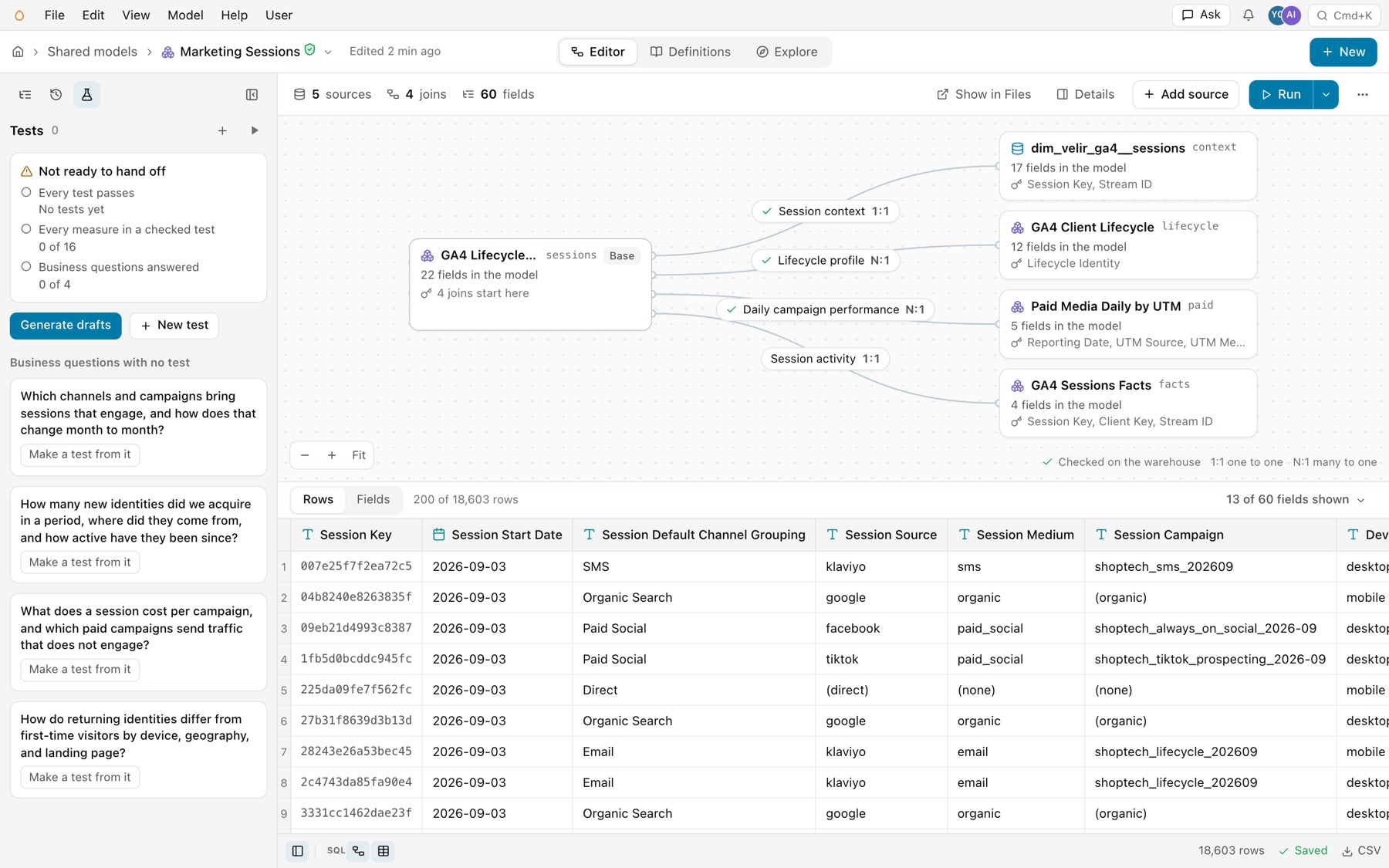
Open a model in Shared models and select the Tests tab in the sidebar. It shows:
- Tests and how many the model has, with New test (+) and Run every test (the run button).
- Readiness. Not ready to hand off or Ready to hand off, then each readiness check with its detail, such as “0 of 16” for measures in a checked test.
- The model’s tests, each with its state, its name and its kind: Rows, Refused or Same as.
A model with no tests yet offers Generate drafts and New test. Under Business questions with no test, each of the model’s business questions has Make a test from it, which writes one draft test that answers that question.
A test, opened
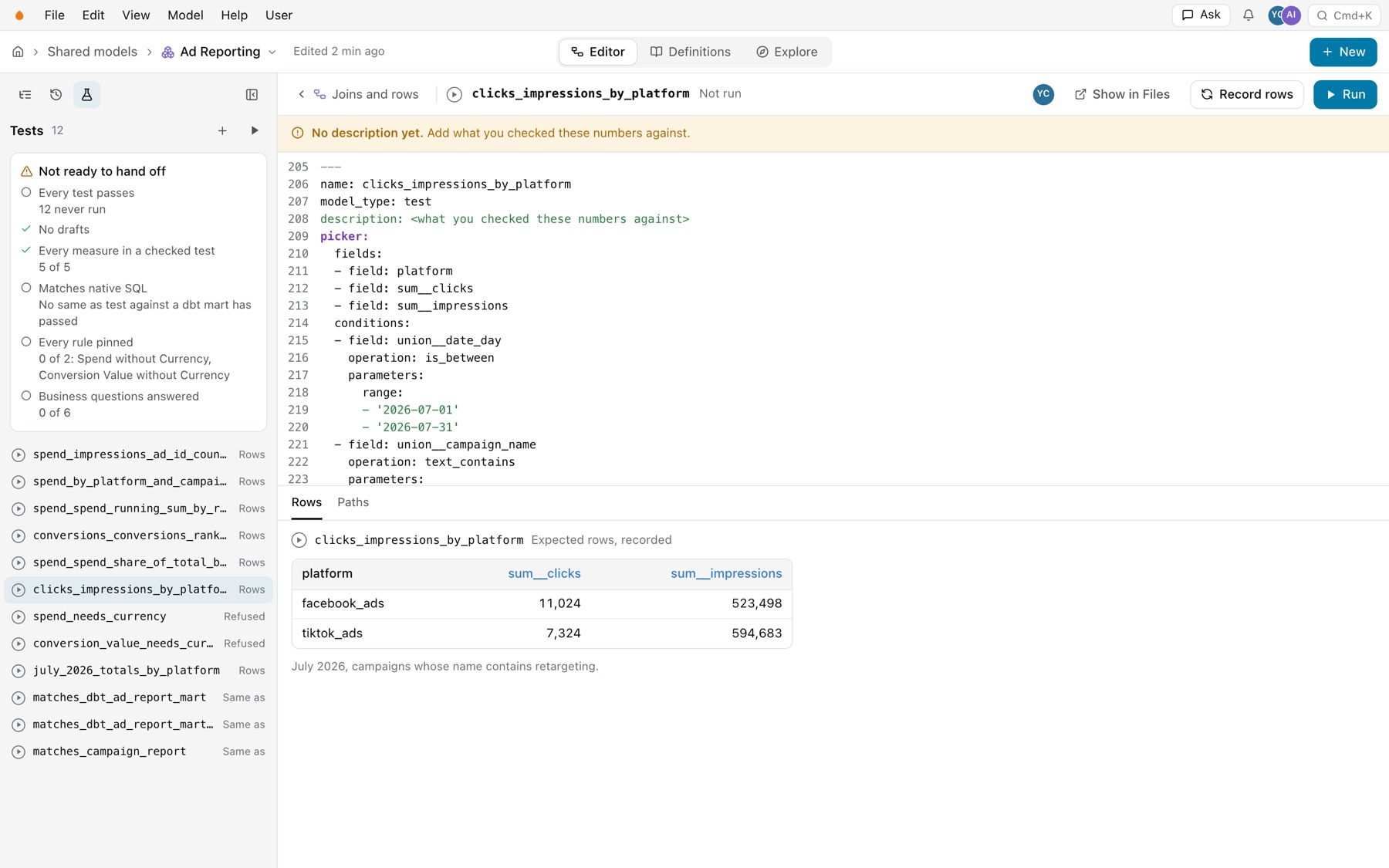
Select a test in the list, and it opens in the main area. The bar at the top has Joins and rows to go back, the test’s state and name, its author, Show in Files, Record rows and Run. A test with no description says “No description yet. Add what you checked these numbers against.” Below it is the test’s block, as the file has it, which you edit in place. Under the block:
- Rows shows the expected rows, and after a run, what the run found.
- Paths shows each path the test checks: the picker request, the SQL the writer writes, and the other side of a
same_astest.
Files keeps its own Tests view, with every test in the connection.
Where tests live
A model’s tests live in one file named after the model. tests/ad_reporting.sql holds the tests of semantic.ad_reporting.
| Where | Who reads it | Who writes it |
|---|---|---|
modeling/kater_objects/tests/<model>.sql, the shared tests | Everyone who reads the model. Only these count for readiness and the nightly run. | People who edit the shared layer |
users/<email>/tests/<model>.sql, your own | You, anyone you share it with, and admins | You. New tests go here unless you ask for the shared file. |
workspaces/<w>/tests/<root>.sql | Readers of a connection workspace. These test the root’s filters and parameters. | People who edit the workspace |
Example
---name: july_2026_totals_by_platformmodel_type: testdescription: Matches the Ads Manager exports for July 2026.expect: columns: [platform, union__currency, sum__spend, sum__clicks] rows: - [facebook_ads, USD, 63963.91, 58844] - [google_ads, USD, 110747.05, 79509] - [tiktok_ads, USD, 12535.44, 19704]---
SELECT ad_reporting.platform, ad_reporting.union__currency, ad_reporting.sum__spend, ad_reporting.sum__clicksFROM semantic.ad_reporting AS ad_reportingWHERE KATER__IS_BETWEEN(ad_reporting.union__date_day, CAST('2026-07-01' AS DATE), CAST('2026-07-31' AS DATE))GROUP BY ad_reporting.platform, ad_reporting.union__currencyEach test is one block with its own frontmatter. A test compiles as a query in a workspace rooted in the model, so grouping, KATER__ conditions and currency rules apply exactly as they do for a stakeholder’s query. Nothing reads a test: it is not in pickers, the catalog or Explore.
Keys
| Key | What it does | Example |
|---|---|---|
name | Required. Unique within the file. | spend_needs_currency |
model_type | Always test. | test |
description | What you checked the answer against. | Matches the Ads Manager exports for July 2026. |
tags | Tags for selecting tests with --select tag:KEY=VALUE. | |
model | Only when a Kater dataset and a semantic model share the file’s name. | semantic.ad_reporting |
question | The model’s business question the test answers, word for word. | |
draft | true until you have checked the answer. | true |
as_of | The day the test takes as today. It pins relative dates. | '2026-08-03' |
inputs | Workspace tests only: the parameters and the optional filters to switch on. | filters: [reporting_date] |
given | A fixture: rows to use in place of each table the model reads. | See below |
picker | The question as field picker selections: fields, conditions, group, order, limit. | group: true |
| SQL body | The question as hand-written Kater SQL. A test has a picker, SQL, or both. | SELECT ... |
expect.columns, expect.rows | The exact answer. | [google_ads, USD, 110747.05, 79509] |
expect.same_as | Another query whose answer must match, joined on key columns. native is read-only warehouse SQL, sql is Kater SQL. | key: [platform] |
expect.refused | The diagnostic code the compile must fail with. | not_additive_across |
expect.tolerance | An absolute tolerance by column, where the format’s precision is wrong. | sum__spend: 0.05 |
Two paths, three expectations
- A picker tests what a stakeholder’s clicks produce. Kater writes its SQL at each run, so the test also checks the SQL writer.
- A SQL body tests hand-written Kater SQL. With both, each path is checked on its own.
A refused test keeps a rule from being lost. This one proves that Spend cannot be totalled across currencies:
---name: spend_needs_currencymodel_type: testexpect: refused: not_additive_across---
SELECT ad_reporting.platform, EVAL(ad_reporting.sum__spend)FROM semantic.ad_reporting AS ad_reportingGROUP BY ad_reporting.platformA same_as test checks the model against a source you trust, such as a dbt mart:
expect: same_as: key: - platform - union__account_id - union__date_day native: | SELECT platform, CAST(account_id AS VARCHAR) AS union__account_id, DATE_TRUNC('MONTH', date_day) AS union__date_day, SUM(spend) AS sum__spend FROM DEMO_DB.ANALYTICS_AD_REPORTING.AD_REPORTING__AD_REPORT WHERE date_day BETWEEN '2025-05-01' AND '2026-07-31' GROUP BY 1, 2, 3Every test pins a fixed set of rows
Each side of a test filters the model’s date to the same closed range, so the answer does not move as data loads. A test without one is refused, except a refused test or a fixture test.
- A closed range. A picker condition
is_between, aBETWEENin SQL, orKATER__IS_BETWEEN. - A relative window, pinned.
is_within_lastwithcomplete: true, andas_ofto fix today. - Settled data. A range that ends within 30 days of today gets a warning, because ad platforms restate recent conversions.
A fixture test runs the model on rows you give, as a dbt unit test does. Every other table it reads is empty:
name: account_with_two_currencies_counts_spend_twicemodel_type: testgiven:- table: facebook_ads__account_report rows: - {SOURCE_RELATION: fb, DATE_DAY: '2026-07-01', ACCOUNT_ID: 1, CURRENCY: USD} - {SOURCE_RELATION: fb, DATE_DAY: '2026-07-01', ACCOUNT_ID: 1, CURRENCY: EUR}- table: facebook_ads__ad_report rows: - {SOURCE_RELATION: fb, DATE_DAY: '2026-07-01', ACCOUNT_ID: 1, AD_ID: 10, SPEND: 100, CLICKS: 7}expect: columns: [platform, union__currency, sum__spend, sum__clicks] rows: - [facebook_ads, EUR, 100.0, 7] - [facebook_ads, USD, 100.0, 7]Write tests
-
Generate a starting suite.
In the Tests tab, select Generate drafts, or Model › Generate tests. To test one business question, select Make a test from it under the question. From a terminal,
kater test generate --model semantic.ad_reportingwrites five draft tests, one of each shape, into your own file. Add--sharedfor the shared file,--count 12for more coverage, and--from-questionsto turn the model’s business questions into tests. -
Or write one yourself.
Select New test in the Tests tab, or New › Test. In the workspace editor, select Query › Add as test, then enter a Test name.
-
Check each draft.
Open it and select Run. Compare its rows with a number you trust, and write a
descriptionthat says what you compared with. Then mark it checked:kater test update NAME --model semantic.ad_reporting --checked. -
Add the reference test.
Write the
nativeside of thesame_astest against your source of truth. Kater never writes native SQL, so that test reports incomplete until you do.
From a terminal, kater new test NAME --model semantic.ad_reporting --sql-file totals.sql --record runs the SQL once and keeps its rows. --refused keeps the code the compiler refuses it with, and --same-as-native mart.sql --key platform writes a reference test.
Run tests
- In the editor. Run every test in the Tests tab, or Model › Run tests, runs the model’s tests. Run on an open test runs that one. Record rows, or Model › Record test rows, keeps what the run found as the expected rows.
- From a terminal. Use the commands below.
| Command | Runs |
|---|---|
kater test --select semantic.ad_reporting | Every test of the model you can read. |
kater test --select state:modified+ --state git:main --stale | The merge check: only tests a change could reach, and only those whose compiled SQL moved since their last pass. |
kater test --select state:modified+ --state git:main --compile-only | Compiles the tests a change could reach, without the warehouse. Good for a commit hook. |
kater test --update | Records new rows for failing tests after an intended change, and prints each number that moved. |
kater test snapshot, then kater test --local | Copies the rows tests read into a local DuckDB file, then runs on it with no credentials. A local run never replaces a warehouse run. |
Columns compare by position, and numbers at the precision their format shows, such as cents for currency(…, 2). A failure whose SQL is unchanged since its last pass means the data changed, and the test says so.
Ready to hand off
The top of the Tests tab says whether a model is ready for stakeholders, and lists each check with its detail. kater test readiness --model semantic.ad_reporting gives the same answer. Readiness only informs. Nothing is ever blocked for a model without tests.
| Check | Met when |
|---|---|
| Every test passes | Every shared test of the model passes. |
| No drafts | No test is still a draft. |
| Every measure in a checked test | Each measure of the model is in a checked test, such as “5 of 5”. |
| Matches native SQL | A same_as test against native SQL, such as a dbt mart, passes. |
| Every rule pinned | Each declared rule has a refused test. The detail names the rules still missing, such as “Spend without Currency”. |
| Business questions answered | Each of the model’s business questions has a checked test that answers it. |
Run them every night
A test job in kater.config.yaml with after: its sync job runs the shared and workspace tests after each sync, so restated data shows as failing tests in the header’s test bell. See Scheduled jobs.