Model Shared layer
Kater datasets
Name, label and describe one table's columns, add calculated fields, and define its first measures.
A Kater dataset sits on one database dataset. It gives each column a field name and a label, adds calculated dimensions, and declares measures. Schema sync creates one for every table, and you add to it in the Shared models editor.
When to use one
| If you want to… | Do this |
|---|---|
| Label, describe or format the columns of one table | Edit its Kater dataset. |
| Add a measure or a calculated field over one table | Add it to its Kater dataset. |
| Combine several tables | Join their Kater datasets in a semantic model. |
| Deduplicate rows, unnest an array, or read a table sync does not select | Write a custom SQL dataset. |
Example
---name: ordersmodel_type: kater_datasetlabel: Orders---
SELECT -- @format id DIMENSION('order_id', orders.order_id) AS "Order ID", -- @format id DIMENSION('customer_id', orders.customer_id) AS "Customer ID", DIMENSION('region', orders.region) AS "Region", DIMENSION('currency', orders.currency) AS "Currency", DIMENSION('order_date', orders.order_date) AS "Order Date", DIMENSION('amount', orders.amount) AS "Amount", ... DIMENSION('order_month', KATER__MONTH(orders.order_date)) AS "Order Month", DIMENSION('order_size', CASE WHEN orders.amount >= 100 THEN 'large' ELSE 'small' END) AS "Order Size", -- @description Order amount before discounts. MEASURE('sum__amount', KATER__SUM(orders.amount), NOT_ADDITIVE_ACROSS(currency)) AS "Revenue", /* @format currency(currency, 2) */ MEASURE('sum__quantity', KATER__SUM(orders.quantity)) AS "Units", MEASURE('count_distinct__order_id', KATER__COUNT_DISTINCT(orders.order_id)) AS "Orders", MEASURE('avg__discount', KATER__AVG(orders.discount)) AS "Average Discount"FROM shop.sales.orders AS ordersSync writes the first block of DIMENSION calls, one per column. Field menu operations write calls such as KATER__MONTH and KATER__SUM under generated names. A CASE such as order_size is written by hand, since no operation writes one.
A dataset in the editor
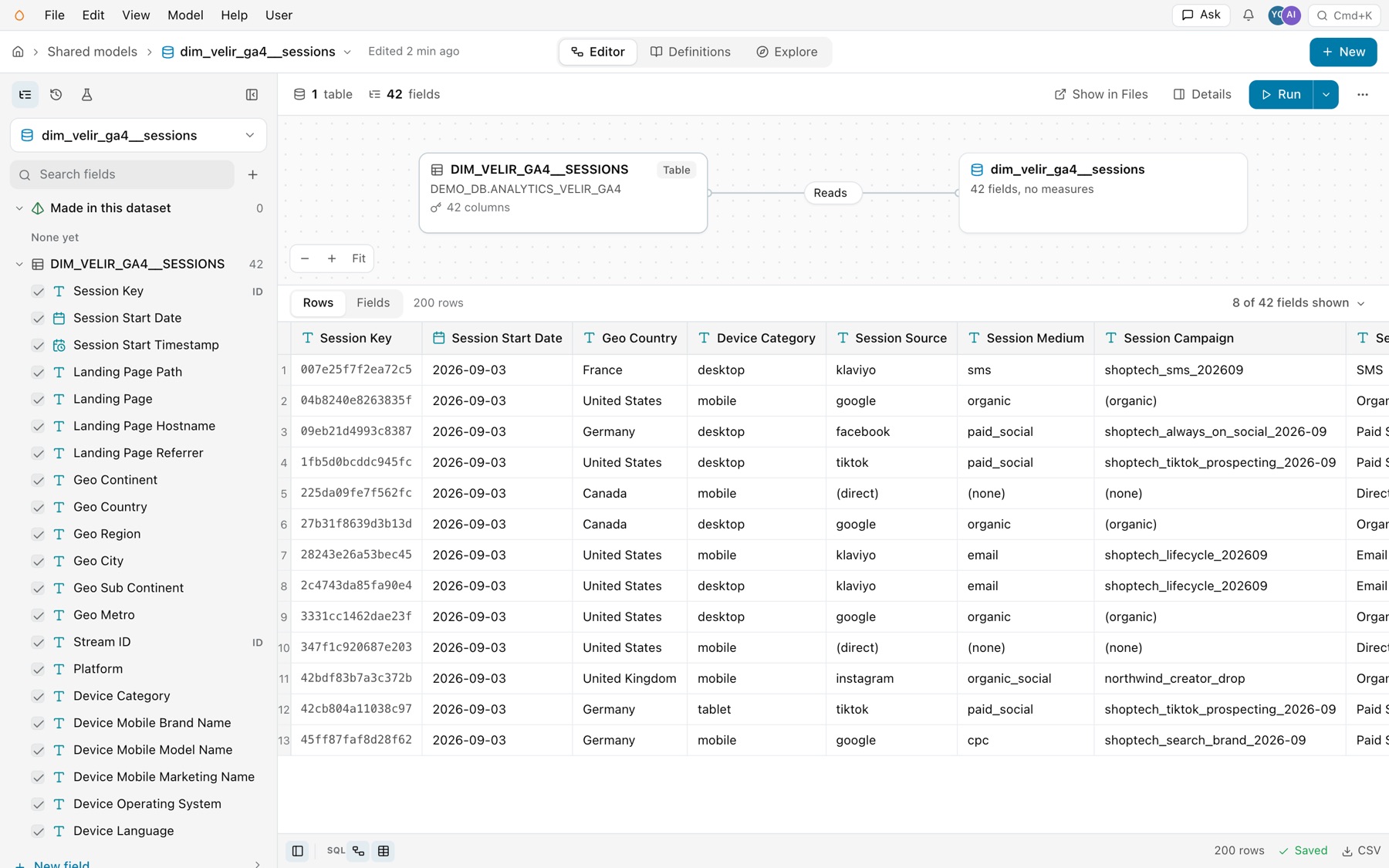
Open a Kater dataset from the Model Selector in Shared models, or open its file in Files. The editor shows the dataset beside the one table it reads.
- The table and the dataset. Where a semantic model shows its joins, a dataset shows two cards: the warehouse table, with its address and column count, and the dataset, with its fields and measures. A line marked Reads connects them.
- One table. The toolbar counts one table and the dataset’s fields. It has no Add source, because a dataset has no joins.
- Columns locked in. The field list shows the table’s columns, each ticked and locked, because every base column stays in the dataset. Keys formatted as IDs say ID. Fields you add show under Made in this dataset.
- Rows and Fields. Rows shows a sample of the dataset. Fields lists every field to edit like a spreadsheet.
A dataset’s Fields sheet
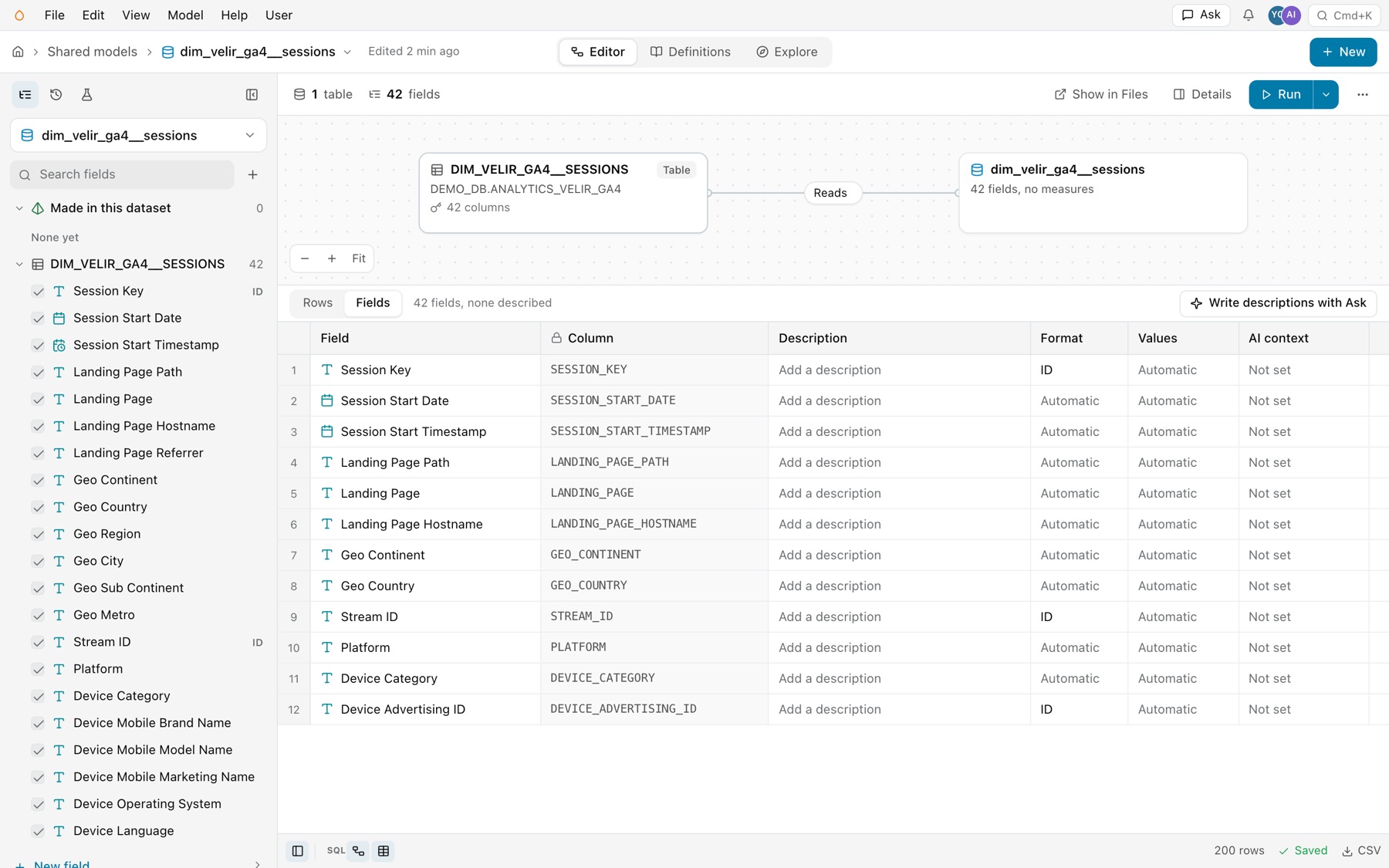
Select Fields above the grid. Each row is one field, with Field, Column, Description, Format, Values and AI context. Column is locked, since sync owns it. Click any other cell to edit it in place, or paste a column of descriptions at once. When fields have no description, Write descriptions with Ask opens Ask with a prompt for your agent that lists them.
Keys and calls
| Key | What it does | Example |
|---|---|---|
name | The dataset’s identity. Other models read it as kater_dataset.<name>. | orders |
model_type | Always kater_dataset. | kater_dataset |
label, description, ai_context | Display name, a sentence for people, and guidance for agents. | label: Orders |
business_questions, tags | Questions the dataset answers, and tags by facet. See Formats, descriptions and AI context. | tags: {topic: [orders]} |
insights, chart_authoring | Optional settings for insight templates and chart authoring. | |
custom_sql | Leave it out, or false. true makes a custom SQL dataset. | custom_sql: true |
DIMENSION('name', expr) AS "Label" | Declares a field to group and filter by. | DIMENSION('region', orders.region) AS "Region" |
MEASURE('name', expr) AS "Label" | Declares a reusable aggregate. | MEASURE('sum__quantity', KATER__SUM(orders.quantity)) |
NOT_ADDITIVE_ACROSS(dim, ...) | The last argument of MEASURE. Says the measure is right only when each result row holds one value of these dimensions. | NOT_ADDITIVE_ACROSS(currency) |
FROM DATABASE.SCHEMA.TABLE | The one table it reads, by its physical address. | FROM shop.sales.orders AS orders |
Rules
- Base columns come first, unchanged. Every physical column appears first as
DIMENSION('physical_name', source.column). Add new fields after them. To transform a column, add a new field and keep the base one as it is. - One table, no joins. A standard Kater dataset reads exactly one database dataset. Join datasets in a semantic model.
- The first argument is the identity.
AS "Revenue"is only the label. Renaming the label changes nothing that reads the field. - A new field needs a new name. No two fields in scope can share a name, in any letter case.
- A window here is a dimension.
CUSTOM_CALCULATIONis not allowed in a dataset. - No parameters or optional filters. A
REQUIRED_FILTERwith fixed values is allowed. - Sync keeps your additions.
kater sync --resource-type kater_datasetadds and renames base columns and keeps every field and label you added.
Add fields
- In the editor. Right-click a field. Under Make a new field from it, Aggregations declares a measure, Derive adds a flag, a group, a bucket or a date part, Timeframe adds a date grain, and Windows adds a window. Format sets how it shows. Each opens the new-field dialog, with Add to the model. See Fields.
- From a terminal.
kater model edit kater_dataset.orders --path FILEwith an operation, then--write. - By hand. Write the SQL only for what no operation writes, such as a
CASE. Open the SQL pane with View › SQL editor. The save compiles it and refuses a new error.
Operations name what they add: sum__amount is the sum of amount, and count_distinct__order_id the distinct count of order_id.
Create one
Sync creates one per table. To make one yourself:
-
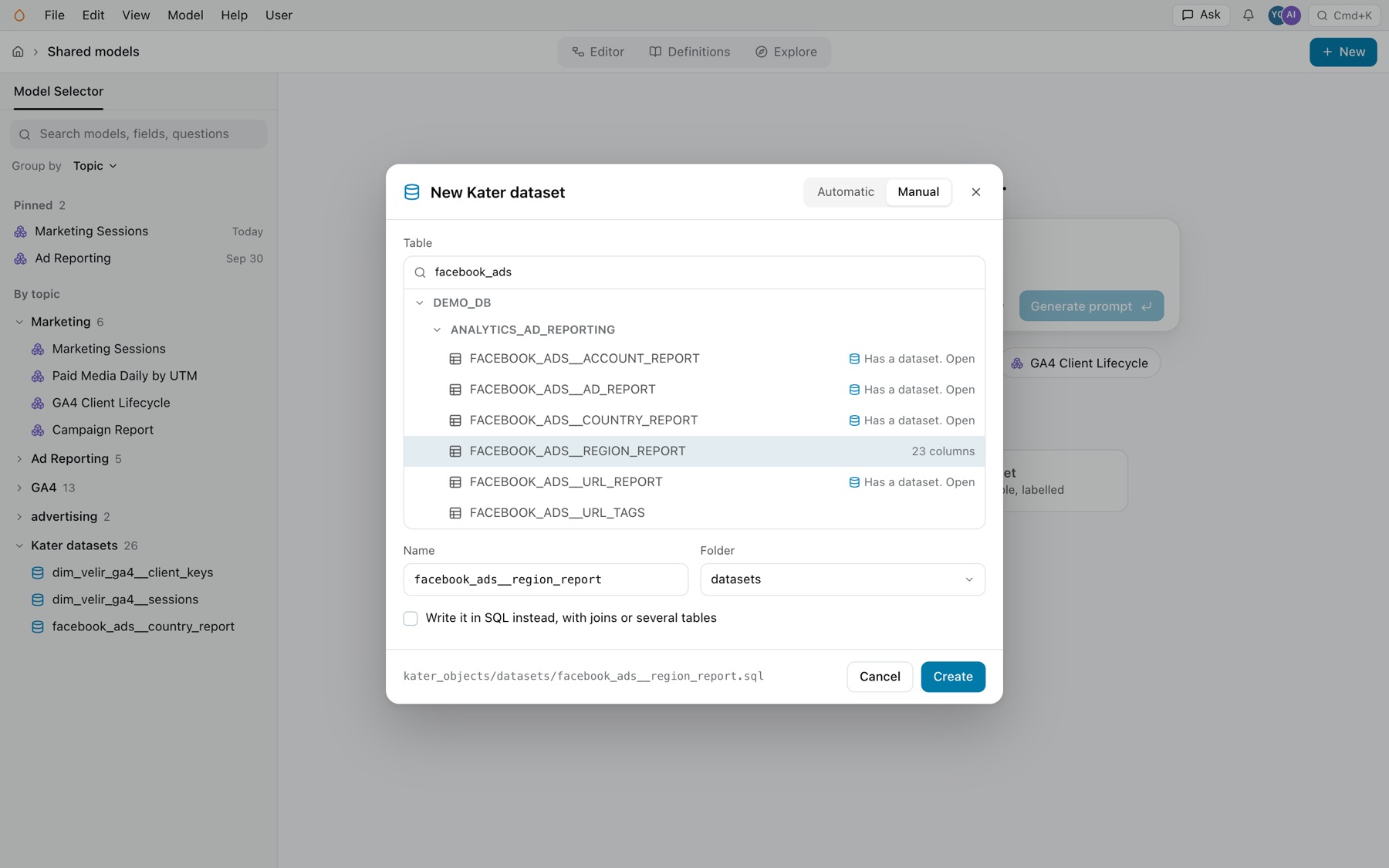
Open the New dialog.
In Shared models, select New › Kater dataset, or the New Kater dataset card when no model is open. With a model open, File › New Kater dataset does the same.
-
Select the table.
On Manual, search the source layer under Table. Tables are listed by database and schema, with their column count. A table that already has a dataset says Has a dataset. Open, and opens that dataset.
-
Name it.
Check the Name and the Folder. The dialog shows the file’s path. Select Create.
- Prompt AI. Describe the dataset in your own words, select Generate prompt and select your agent under Open in. Your agent writes it.
- Write it in SQL instead. Select this box to make a custom SQL dataset, with joins or several tables.
A new dataset
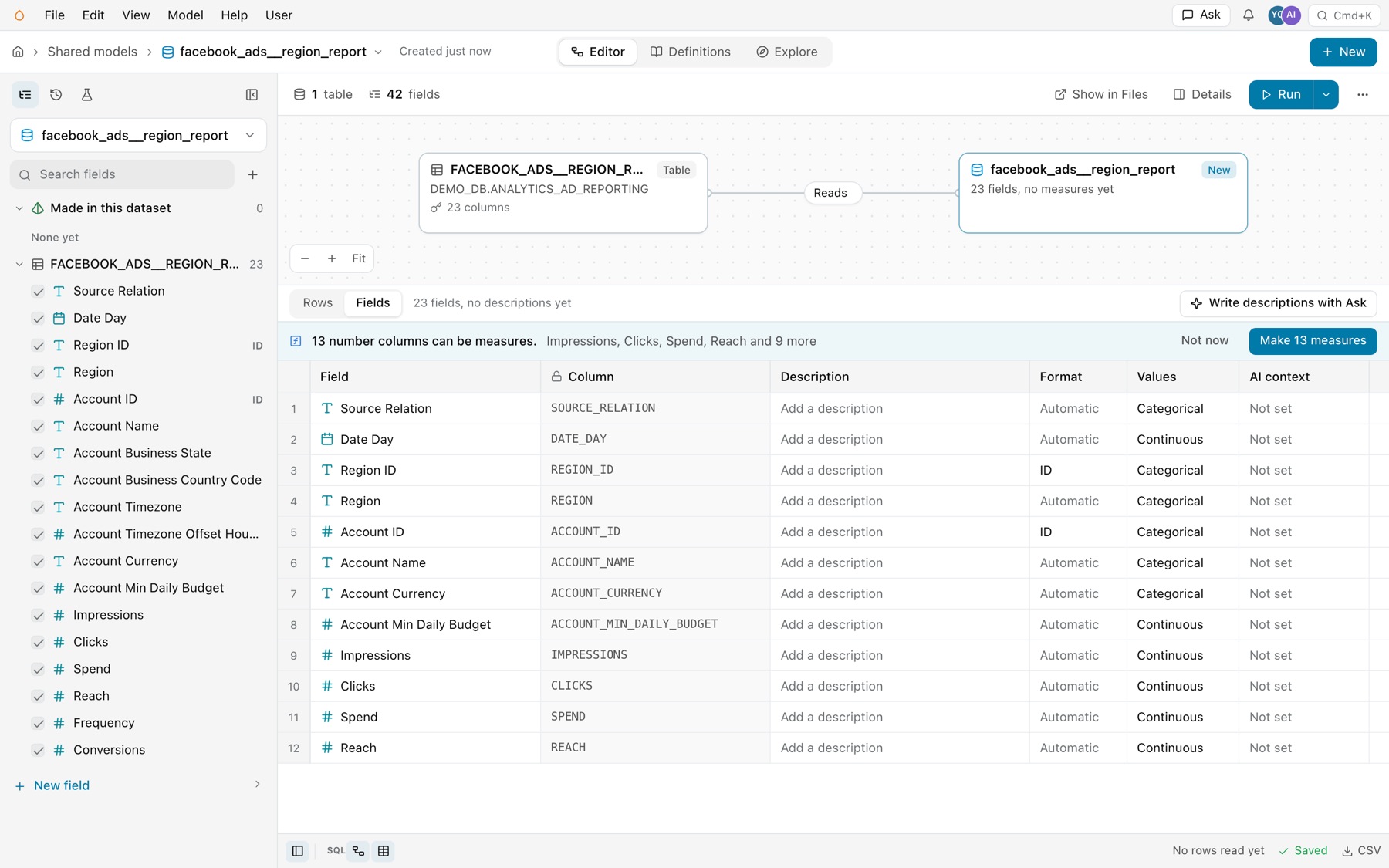
A new dataset opens with Created just now in the header, and its table and the dataset on two cards, the dataset marked New. The Fields sheet lists one field per column, and Values comes from the columns’ classifications. Number columns are not measures yet, and a banner counts them, such as “13 number columns can be measures.” Select Make 13 measures to add a SUM measure for each continuous column in one change, or Not now.
From a terminal, run kater new kater-dataset --name NAME --target-path PATH --dry-run, then again without --dry-run.
Common errors
| Code | Cause | Fix |
|---|---|---|
dataset_missing_base_dimensions | A physical column has no unchanged DIMENSION. | Add it back, or run kater sync --resource-type kater_dataset. |
dataset_base_dimension_must_be_unchanged | A base column was transformed in place. | Keep the base column, and declare the transformation as a new named field. |
dataset_base_dimensions_first | An added field sits before a base column. | Move the base columns to the top. |
dataset_join_not_allowed | The dataset joins another source. | Join in a semantic model. |
dataset_source_not_allowed | The FROM is not a synced database dataset. | Read the table by its DATABASE.SCHEMA.TABLE address, or use a custom SQL dataset. |
measure_requires_aggregation_or_evaluation | A MEASURE aggregates nothing. | Wrap it in an aggregate, or apply the fix that declares it as a DIMENSION. |
field_name_in_scope | A new field takes a name another field already has. | Give it a new name. |