Model Shared layer
Custom SQL datasets
Shape data with your warehouse's own SQL, then publish named fields the shared layer can use.
A custom SQL dataset is a Kater dataset with custom_sql: true. Its body is one read-only query in your warehouse’s own SQL, with CTEs, unions, QUALIFY or UNNEST as you need them. Its final SELECT declares the fields everyone else reads. Kater also calls it a SQL dataset.
When to use one
| If you want to… | Do this |
|---|---|
| Keep only the latest row per key, or unnest an array into rows | Custom SQL dataset. |
| Read a table that schema sync does not select | Custom SQL dataset. It needs no sync. |
| Add labels and measures to one synced table | A standard Kater dataset. |
| Join datasets with known keys | A semantic model, where each join is a named relationship. |
Example
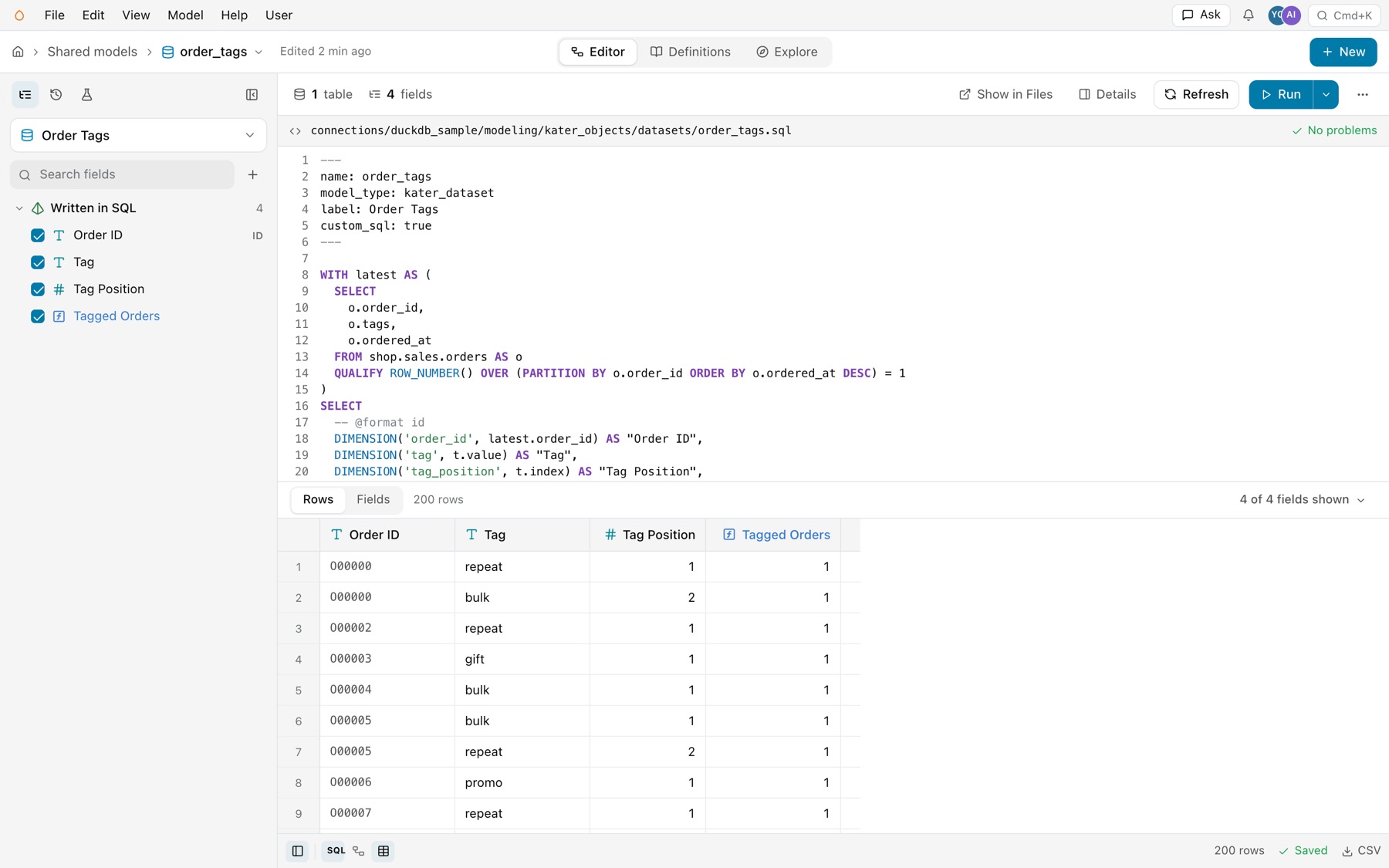
This dataset keeps the latest version of each order, then turns its tags array into one row per tag.
---name: order_tagsmodel_type: kater_datasetlabel: Order Tagscustom_sql: true---
WITH latest AS ( SELECT o.order_id, o.tags, o.ordered_at FROM shop.sales.orders AS o QUALIFY ROW_NUMBER() OVER (PARTITION BY o.order_id ORDER BY o.ordered_at DESC) = 1)SELECT -- @format id DIMENSION('order_id', latest.order_id) AS "Order ID", DIMENSION('tag', t.value) AS "Tag", DIMENSION('tag_position', t.index) AS "Tag Position", MEASURE('tagged_orders', COUNT(DISTINCT order_id)) AS "Tagged Orders"FROM latest, UNNEST(latest.tags) WITH ORDINALITY AS t(value, index)A custom SQL dataset in the editor
Open one from the Model Selector in Shared models, or open its file in Files. The SQL is the dataset, so the editor opens with it:
- The SQL pane, open. It shows the whole file, frontmatter included, with the file’s path and its problems. There is no joins area.
- Written in SQL. The field list shows the fields the final SELECT declares, under Written in SQL.
- Refresh. The toolbar has Refresh, which asks the warehouse for the query’s output columns again. Model › Refresh custom SQL dataset does the same.
- Rows. The grid shows the dataset’s rows.
Keys
| Key | What it does | Example |
|---|---|---|
custom_sql | Required, and true. Without it the file is a standard Kater dataset. | custom_sql: true |
name, model_type | The identity, read as kater_dataset.<name>. The type is kater_dataset. | order_tags |
label, description, ai_context, business_questions, tags | The same metadata as a standard Kater dataset. | label: Order Tags |
Final DIMENSION and MEASURE calls | Every output of the final SELECT is declared. CTEs inside stay plain SQL. | DIMENSION('tag', t.value) |
RELATIONSHIP | Joins are allowed on the root SELECT. | See Relationships |
Rules
- One read-only query. CTEs and unions are fine. Scripts, writes and the warehouse’s own variables are not supported.
- Every final output is declared. Each column of the final SELECT is a
DIMENSIONor aMEASURE. A finalSELECT *or an undeclared column is refused.ASis only a label. - Measures aggregate the dataset’s own dimensions. In the example,
COUNT(DISTINCT order_id)counts the publishedorder_iddimension. A measure over a private column that is not published is refused. A reader re-totals measures at its own grouping. - It reads widely. Warehouse tables, synced or not, and the Kater datasets, semantic models, workspace roots and queries you can read.
- Its text stays as you wrote it. A save compiles it like any model, but does not reformat it.
- Sync skips it. Schema sync never changes a custom SQL dataset.
- DuckDB files are read-only. Kater opens a DuckDB file read-only, so nothing in the query can change it.
How Kater knows its columns
When you save a custom SQL dataset, Kater asks the warehouse for the query’s output columns and their types. It reads metadata only, never rows. Kater keeps the answer in a hidden generated file beside the dataset, such as .order_tags.sql.metadata.yaml. Do not edit it. It travels with the dataset through kater git clone and kater git pull, so compiles work offline.
A save through Kater refreshes this file. If you change the dataset outside Kater, such as directly in a local copy, refresh it before you use it: select Refresh on the editor’s toolbar, or run the dataset.refresh operation with kater invoke dataset.refresh --request-file REQUEST.json.
Create one
In Shared models, select New › Kater dataset. On Manual, select Write it in SQL instead, with joins or several tables, enter the Name and Folder, and select Create. Then write the query in the SQL pane. On Prompt AI, describe the dataset, select Generate prompt and select your agent under Open in. Your agent writes it. It reads the custom SQL guide first.
From a terminal:
kater new kater-dataset --custom-sql --name order_tags \ --target-path connections/duckdb_sample/modeling/kater_objects/datasets \ --sql-file order_tags.sql --dry-runRun it again without --dry-run to write the file. --sql-file gives the SQL body, and Kater writes the frontmatter.
Common errors
| Code | Cause | Fix |
|---|---|---|
sql_dataset_query_required | The body is a script, writes data, or holds more than one statement. | Rewrite it as one read-only query. Move setup steps into CTEs. |
dataset_metadata_required | The generated column file is missing or does not match the saved SQL. | Select Refresh, run dataset.refresh, or save the file again through Kater. |
field_name_in_scope | A declared field takes the name of a field in a Kater model it reads. | Give the new field a new name. |
measure_requires_aggregation_or_evaluation | A MEASURE aggregates nothing. | Aggregate a published dimension, or declare it as a DIMENSION. |