Model Fields
Filters and parameters
Let readers narrow a workspace or query with named filters, and keep fixed rules always on.
Filters decide which rows count. An optional filter is one a reader can switch on, with a value they supply through a parameter. A required filter is a fixed rule that always applies. Both are named, labelled and written in the model’s SQL, so the filter bar, the CLI and agents all read the same thing.
Three kinds of filter
| Written as | Where | Parameters | Applies |
|---|---|---|---|
OPTIONAL_FILTER('name', predicate, label='…') | Workspace roots and queries | Any, or none | When a reader or a run switches it on |
REQUIRED_FILTER('name', predicate, label='…') | Kater datasets, semantic models, workspace roots and queries | None | Always |
A plain WHERE KATER__… condition | Shared models | None | Always |
Example
The Ad Reporting workspace root gives every query two optional filters: a reporting window in months and a list of campaigns. This is Snowflake, so parameters are written :name.
---name: ad_reportingmodel_type: workspacelabel: Ad Reportingparameters:- name: reporting_date label: Reporting Date kater_data_type: number default_value: 12- name: campaign_name label: Campaign Name kater_data_type: string subtype: multiselect allowed_values: from_field: ref: union__campaign_name---SELECT *FROM semantic.ad_reportingWHERE OPTIONAL_FILTER( 'reporting_date', KATER__IS_WITHIN_LAST(union__date_day, :reporting_date, 'month', complete => TRUE), label='Reporting Date' ) AND OPTIONAL_FILTER( 'campaign_name', KATER__IS_ONE_OF(union__campaign_name, :campaign_name), label='Campaign Name' )A query can add its own. This one, on DuckDB, writes parameters as $name, and holds a fixed rule too:
WHERE OPTIONAL_FILTER( 'is_equal_to__country', KATER__IS_EQUAL_TO(shop.country, $is_equal_to__country), label='Country' ) AND REQUIRED_FILTER( 'text_contains_paid__channel', KATER__TEXT_CONTAINS(shop.channel, 'paid'), label='Channel contains paid' )Filter rules
- Filters sit at the top of WHERE. Each is a direct
ANDcondition of WHERE. Not underORorNOT, and not inHAVING,QUALIFY, a join or aCASE. - The label is the third argument. Write
label='Region'. Description and AI context go in-- @descriptionand-- @ai_contextcomments directly above the filter. - Names say what the filter does. The convention is
<condition>__<field>, such asis_one_of__region. A filter’s parameter shares its name. - A required filter takes no parameters. Even a parameter with a default makes it invalid.
- A default never switches a filter on. It only supplies a value when the filter is on.
- Every query reads the root’s filters. A query inherits the filters and parameters of its workspace root and of the queries it reads.
- Filters on a measure stay in their query. A workspace filter applies before grouping, so a filter after grouping belongs to the query that groups.
Parameters
A parameter is a value a reader supplies. Only workspace roots and queries declare them, in the frontmatter’s parameters: list. A root’s parameters are shared by every query in the workspace, so a query can read :reporting_date without declaring it again.
Write a parameter as your warehouse’s own placeholder: :name on Snowflake and $name on DuckDB. Each save and each compile adds an entry for every parameter the SQL reads that has none. Edit the entry to add a label, a default or a list of choices.
| Key | What it does | Example |
|---|---|---|
name | Required. Lower snake case. Matches the placeholder. | reporting_date |
kater_data_type | string, number, boolean, date, time or timestamp. Inferred when left out. | number |
subtype | single_value, range or multiselect. Inferred when left out. A range is for numbers, dates and times. | multiselect |
default_value | Used when a reader gives no value. A list of two for a range, a list for a multiselect. | 12 |
min, max | Inclusive bounds, from a fixed value (from_value) or a field’s minimum or maximum (from_field: {ref: …}). | min: {from_value: 0} |
allowed_values | The choices: a fixed list (from_list), or a field’s distinct values (from_field, with an optional limit that defaults to 100). Not for ranges. | from_field: {ref: union__campaign_name} |
relative | Lets a reader supply a period, such as the last 3 months, as well as fixed dates. | true |
label, description, ai_context | The name readers see, a sentence for people, and guidance for agents. | label: Campaign Name |
| Subtype | Written in SQL as | Value |
|---|---|---|
single_value | KATER__IS_EQUAL_TO(region, :region) | One value |
range | KATER__IS_BETWEEN(order_date, :period) | Two ordered ends |
multiselect | KATER__IS_ONE_OF(region, :regions) | A list with at least one value |
Parameters cannot go in CASE, IF or IFF conditions, HAVING, QUALIFY, a join’s ON, or an EVAL SET. A parameter used outside a filter, such as a target in arithmetic, is always needed unless it has a default.
How a run uses them
| Situation | Result |
|---|---|
| An optional filter is off | It does not apply, and its parameter is not needed. |
| It is on, with a value or a default | It applies. |
| It is on, with no value and no default | An input error, before anything runs on the warehouse. |
| A value is not valid, even for a filter that is off | An input error. Every value given is checked. |
| A required filter | Always applies. It needs no switch. |
A run switches filters on by name. From a terminal, pass them in a file keyed by each model’s id from kater model list:
kater run --select connections/duckdb_sample/workspaces/shop/query_contracts/region_mix.sql --inputs-file inputs.jsonA workspace keeps its saved values and selected filters in default-inputs.json, in the same shape:
{ "rel1_6FpTma5qXPUnVtX3wWYGQ60uwp9UFBA9xboZqQw3IRM": { "parameters": { "last_n_days": 30 }, "filters": [ "event_date_dt_last_n_days" ] }}The filter bar in the editor
In the workspace editor, the filter bar is one row of pills under the query’s toolbar. Filters in the toolbar hides it or shows it. The pills come in two groups, each led by its mark:
- Workspace. The root’s filters as pills, such as “Session Start Date is within the last 30 days”. A filter that is off is dashed and faded, with a ring. A filter that is on is solid, with a dot, and the rows follow it. Click the dot or the ring to turn the filter off or on. Those that do not fit wait under N more.
- A parameter no filter reads shows as a parameter pill, with its name and value.
- This query. The query’s own filters, a date range among them, its top rows, and its row limit.
- + Filter. Filter by a field, Top rows by a measure, Row limit and Custom filter, each a form in the same popover.
Click a workspace pill to change it in place. Its popover names the filter and where it comes from, such as “Marketing Sessions filter bar”, then the switch, the condition and a control for the value. Edit in SQL editor at its end opens the SQL that writes the filter.
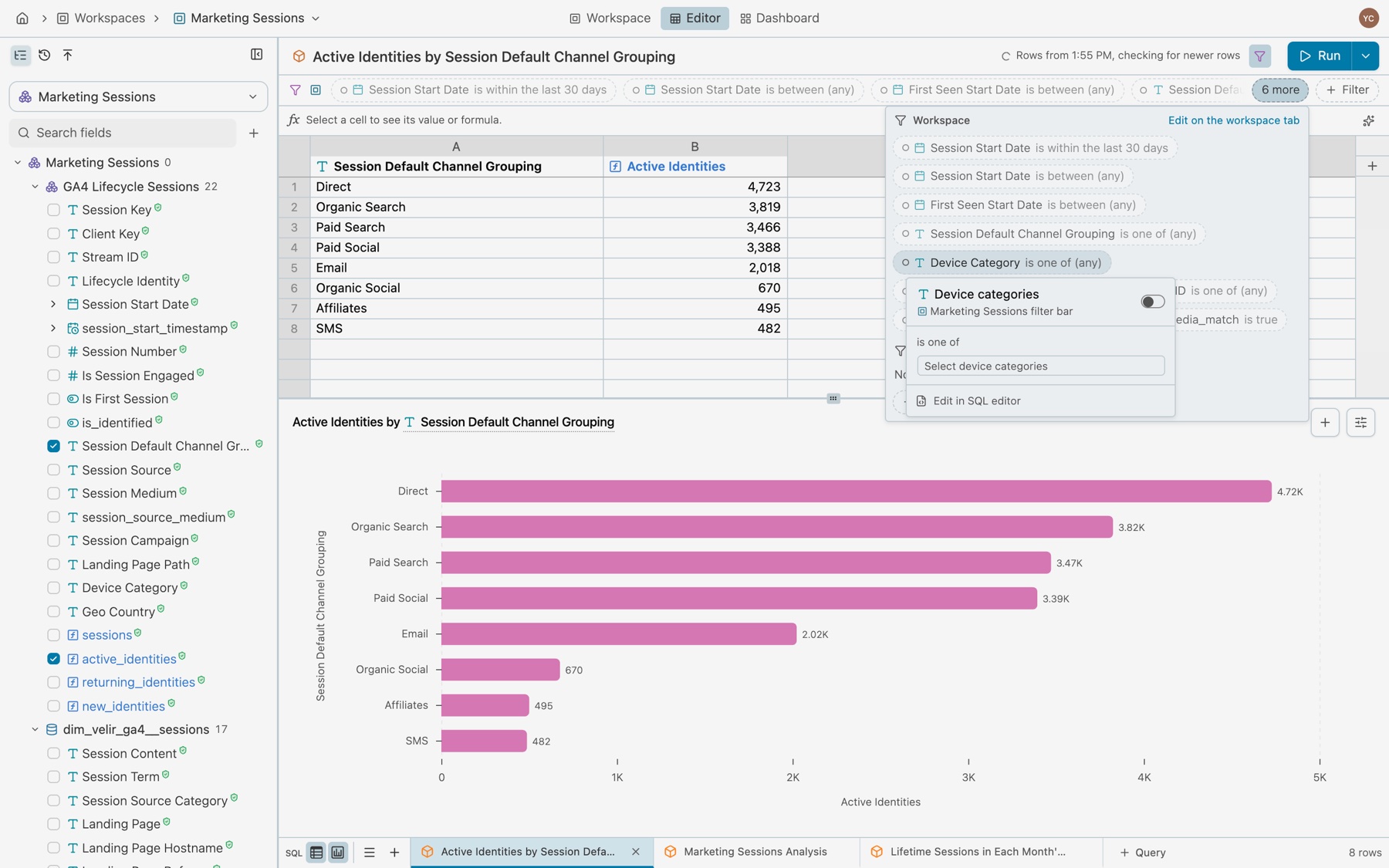
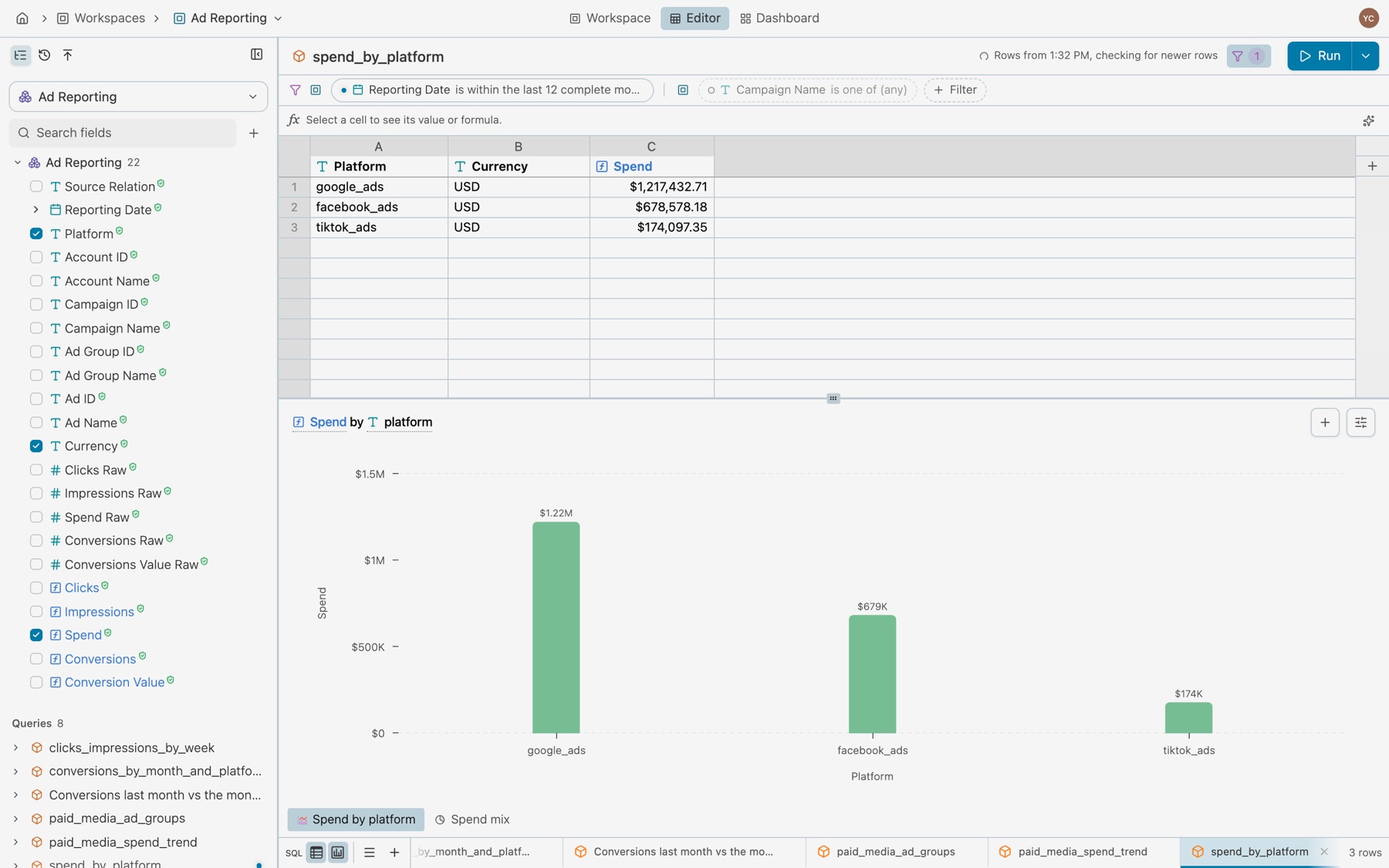
A query pill’s popover has Applied, the condition’s form, Move to workspace, and Remove filter. Move to workspace moves the pill to the Workspace section of the filter bar, where it applies to every query in the workspace. A query whose SQL you wrote by hand shows a lock after its filters, which says why on hover.
Filters on the workspace overview
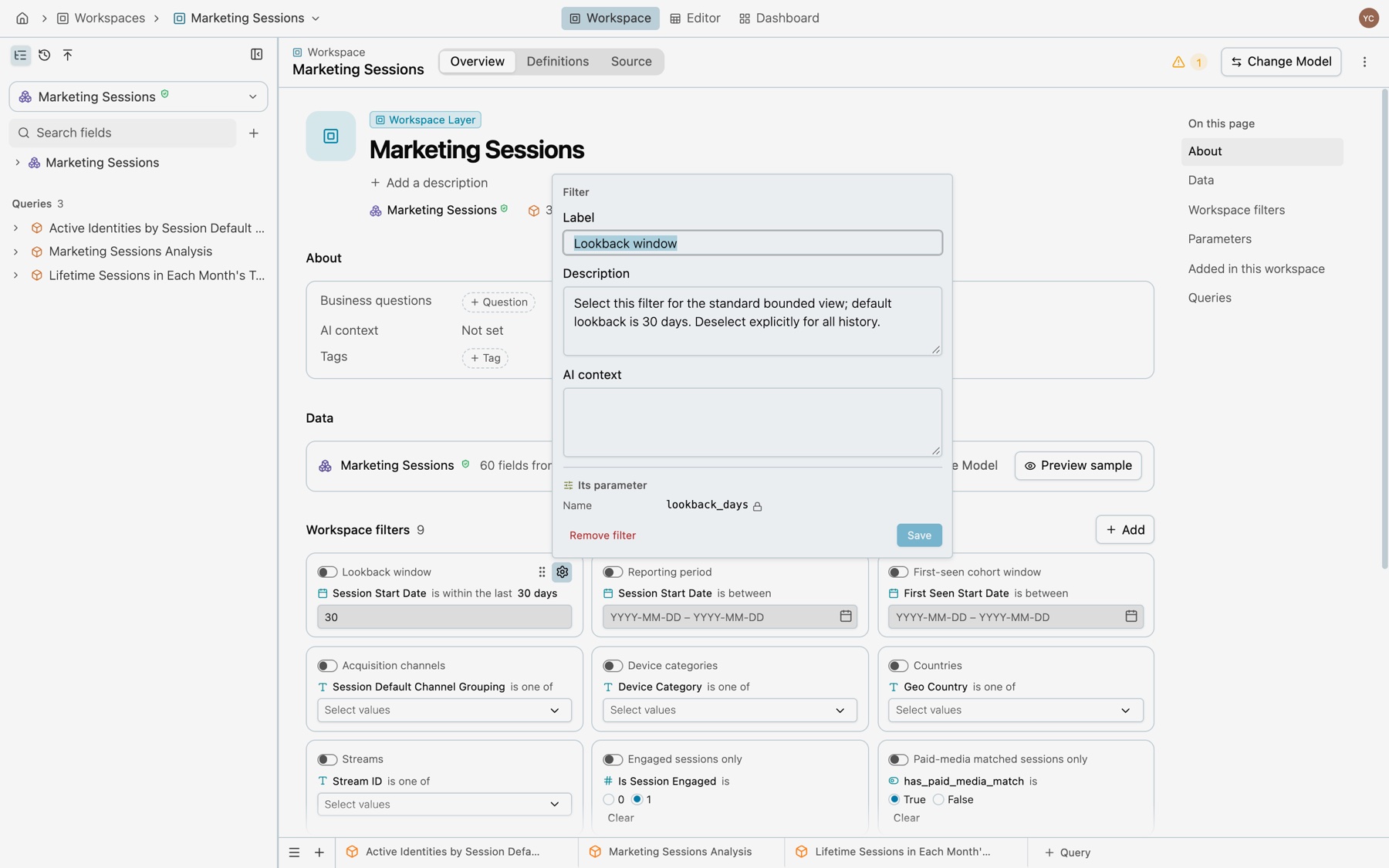
The overview’s Workspace filters section shows each root filter as a card, with its switch, condition and value. Drag a card by its grip to change the order.
Edit a filter and its parameter
Select a card’s … to open its settings. One form edits the filter and the parameter it reads together:
- Filter. Label, Description and AI context.
- Its parameter. Name, Label, Type, Default and Values from. The name is read only, because the SQL reads the parameter by that name.
- Remove filter takes the filter out of the root.
Add a filter or a parameter
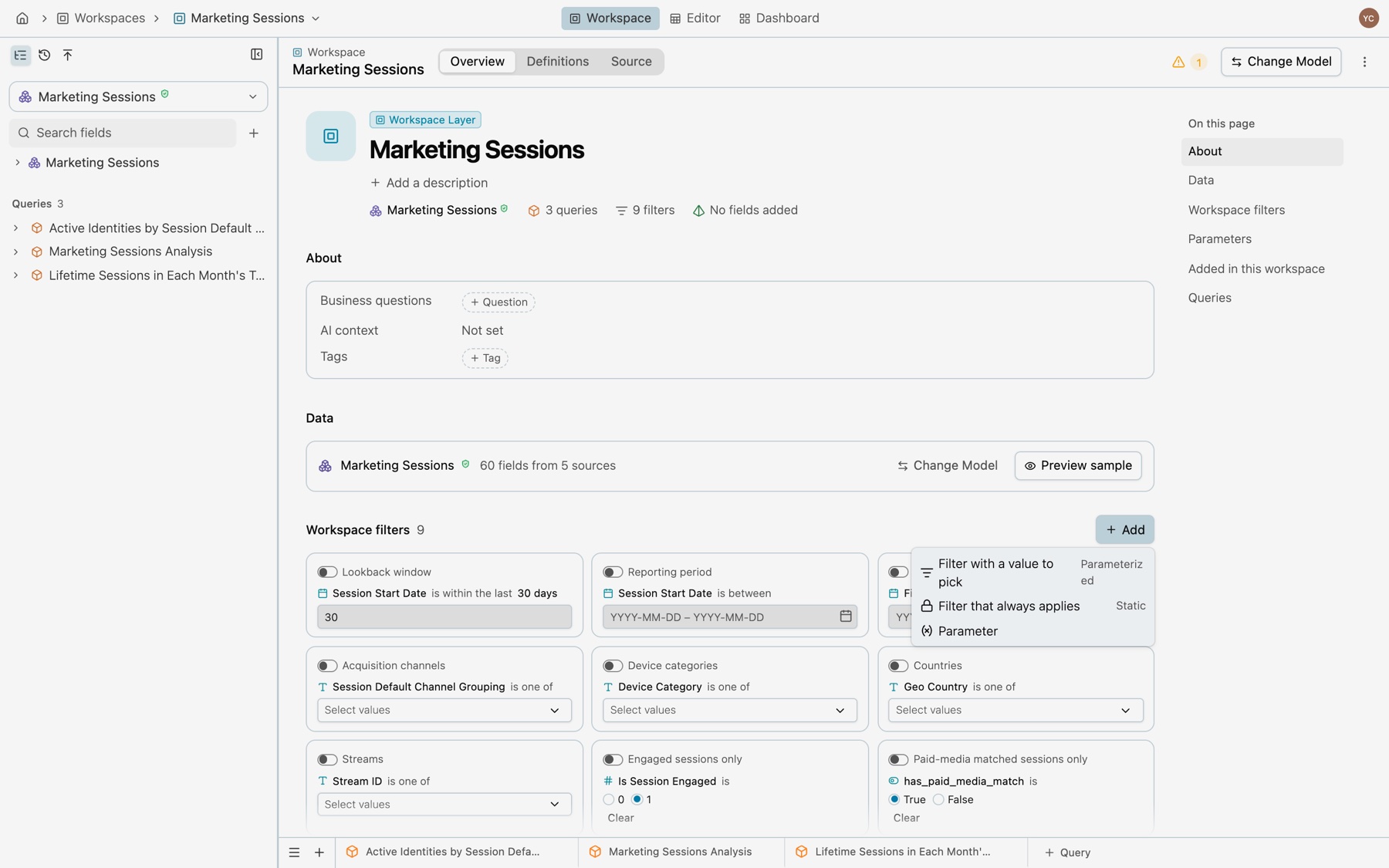
Select Add beside Workspace filters:
- Filter with a value to pick (Parameterized): a filter whose value the reader sets, through a parameter.
- Filter that always applies (Static): a condition with no value to pick.
- Parameter: a value with no filter, such as a target that a query reads in a calculation.
Parameters
The Parameters section lists only the parameters no filter reads, with their type, where their values come from, their default and their value. A filter’s own parameter is edited from that filter’s card. A parameter the frontmatter declares that no SQL reads yet is listed too, with Remove. A missing default reads null.
More › Show SQL parameter names shows each parameter’s SQL name. More › Reset filters to defaults puts every filter and value back to the saved defaults.
Add filters without writing SQL
- The filter bar. Select + Filter, then Filter by a field, a field and a condition. Edit › Add filter opens the same form.
- The field menu. A field’s Filters opens with Workspace, selected first, for a filter every query can switch on, and This query, for the open query alone. A measure offers only This query.
- The workspace overview. Add beside Workspace filters.
- The terminal.
kater model edit MODEL --path FILE --workspace-inputs-file edits.jsontakesadd_custom_filter,update_filter,remove_filter,reorder_filtersandupdate_parameter.add_custom_filtertakes a condition no menu offers, such asclicks > conversions, and the writer wraps it in the filter call.
Common errors
| Code | Cause | Fix |
|---|---|---|
parameterized_required_filter | A REQUIRED_FILTER reads a parameter. | Make it an OPTIONAL_FILTER, or write the value in. |
parameter_not_allowed | A parameter in a shared model, or a parameter a chart declares. | Move the filter to the workspace root or a query. A chart’s filter reads a parameter of its query. |
chart_parameter_unknown | A chart’s filter reads a parameter that its query does not have. | Read a parameter of the chart’s query, or write the value in. |
chart_parameter_not_single | A chart’s filter reads a parameter that holds a list or a range. | Read a parameter that holds one value, or write the values in. |
filter_not_allowed | An OPTIONAL_FILTER in a shared model. | Move it to the workspace root. |
filter_label_directive | -- @label above a filter. | Write label='…' in the call. |
invalid_filter_arguments | A third argument that is not label='…'. | Use the form label='Region'. |
conflicting_filter_metadata | Two filters with one name give different labels or descriptions. | Make them agree, or rename one. |
undeclared_parameter | Information. The SQL reads a parameter with no entry yet. | Save or compile, or apply the fix that declares it. |
unused_parameter_entry | Warning. A query declares a parameter nothing reads. | Apply the fix that removes the entry. |